

お問い合わせ
ダウンロード
マニュアル、データシート、ソフトウェアなどのダウンロード:
フィードバック
2-PC Protective Case Instructions
This document provides information for the 2-PC protective case, soft case, and kickstand. It includes instructions for installing the kickstand and protective case on your 2 Series MSO.
該当製品:
MSO22, MSO24, 2-PC, MSO22-EDU, MSO24-EDU
ダウンロードすることにより、マニュアル・ダウンロードに関する利用条件の諸条件に同意したことになります。
マニュアルのダウンロードに関する利用条件
注意:このWebサイトからドキュメントをダウンロードする前に、次の契約条項をよくお読みください。 テクトロニクスのWebサイトからマニュアルをダウンロードすることによって、次の契約条項に同意したことになります。
現在サポートされている製品のマニュアル:
当社機器の所有者は、社内使用または個人使用の目的で、このWebサイトのマニュアルをダウンロードし複製することができます。 現在サポートされている製品のマニュアルは、Tektronix, Incの書面による明示的な承認がない限り、他者への配布のために複製することはできません。
テクトロニクスのマニュアルは、製品のライフサイクル中に製品に適用された変更を反映するために改訂されていることがあります。 そのため、特定の製品に複数の版のマニュアルが存在していることがあります。 特定の製品のシリアル番号に該当するマニュアルの版を取得してください。
サポート終了製品のマニュアル:
テクトロニクスでは、長期サポートの適用外の計測製品のマニュアルは提供できません。 テクトロニクスは、(a)当社部品番号を標記し、(b)当社がサポートしない測定製品に限り、ユーザ・マニュアル、オペレータ・マニュアル、サービス・マニュアルなどを含む当社測定製品マニュアルのコピーを複製し配布する許可とライセンスを他者に付与します。
テクトロニクスのマニュアルは、製品のライフサイクル中に製品に適用された変更を反映するために改訂されていることがあります。 そのため、特定の製品に複数の版のマニュアルが存在していることがあります。 特定の製品のシリアル番号に該当するマニュアルの版を取得してください。
この権利とライセンスは、現在当社から入手可能なマニュアルや出版物、または映像制作製品やカラー・プリンタ製品のマニュアルや出版物には適用されません。
免責事項:
テクトロニクスは、当社が提供したものでないか、または上記の権利およびライセンスに従って製作または配布された、いかなる計測製品マニュアルや出版物に含まれる情報、テキスト、グラフィック、概略図、部品リスト、またはその他の素材の正確性や完全性について保証しません。
テクトロニクスは、このWebサイトのコンテンツまたはその製品をいつでも通知なく変更することがあります。
責任の制限:
テクトロニクスは、上記の権利とライセンスに従って製作または配布されたいかなる計測製品マニュアルや出版物の使用から生じた、いかなる損害(結果損害または偶発的損害、利益の損失、事業の中断、または知的所有権の侵害による損害を含むがこれらに限らない)に対して責任を負わないものとします。
Read Online
Description
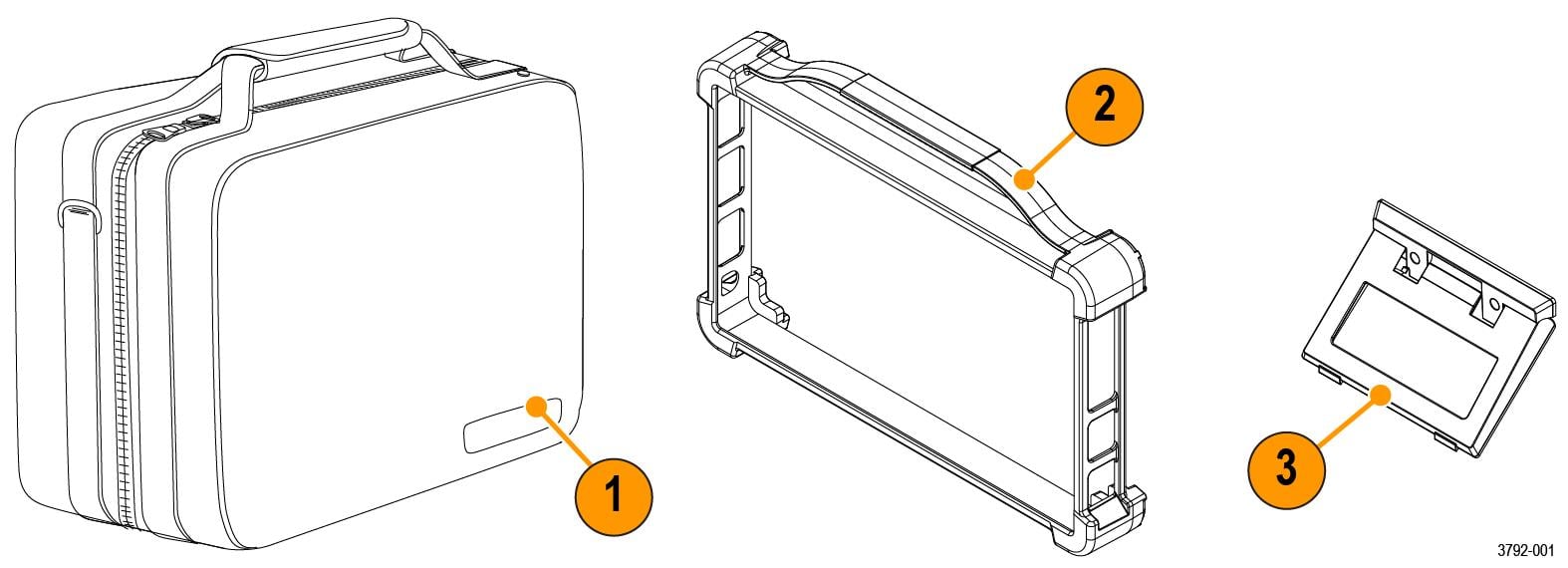
The 2-PC includes a soft carrying case, a protective case that fits around the outside edges of the instrument, and a kickstand.
| Item | Description |
|---|---|
| 1 | Soft carrying case includes two interior zipper pockets, rear slip pocket, and shoulder strap. |
| 2 | Synthetic rubber protective case. Provides extra protection against drops, increased grip, and carrying handle. |
| 3 | Kickstand provides a hands-free option to position your instrument at an angle on a work surface. |
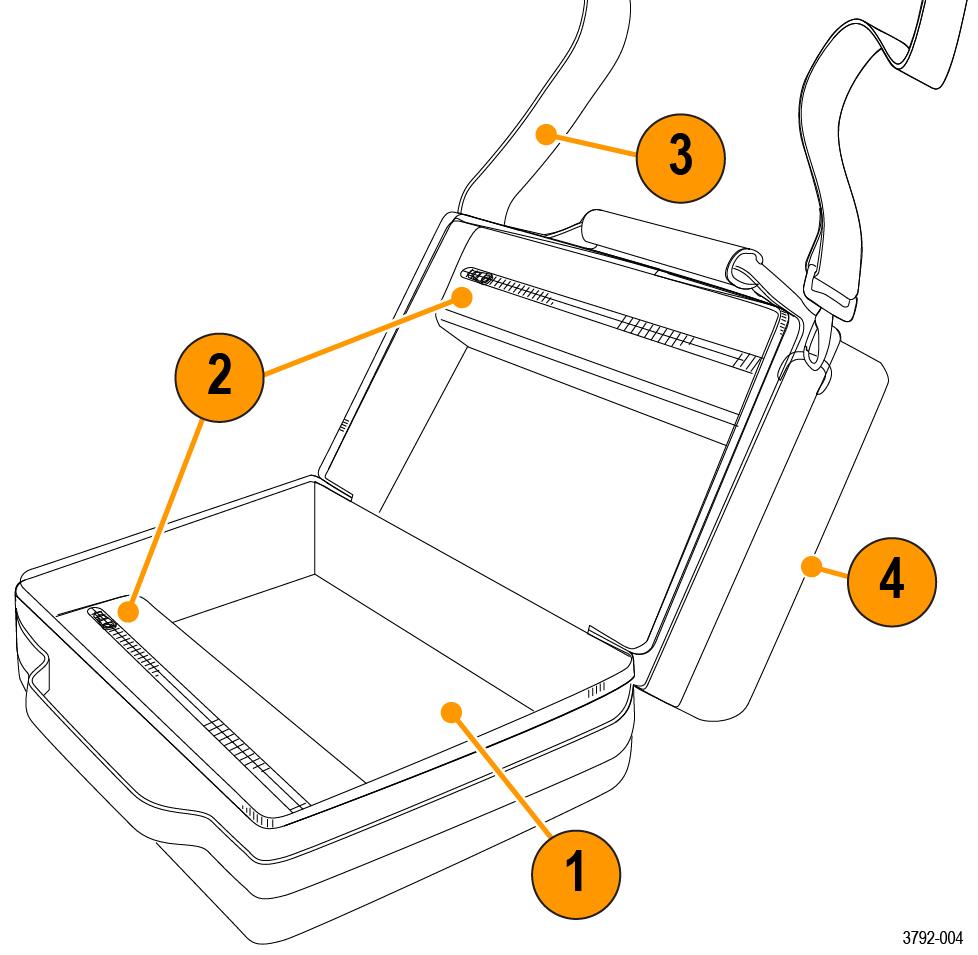
Soft carrying case description
| Item | Description |
|---|---|
| 1 | Area designated for one 2 Series MSO instrument. Fits an instrument with protective case and kickstand installed. |
| 2 | Two storage pockets. Fits accessories like the power supply, probes, and cables. |
| 3 | Shoulder strap for case transit. |
| 4 | Rear slip pocket for cables, probes, or documentation. |
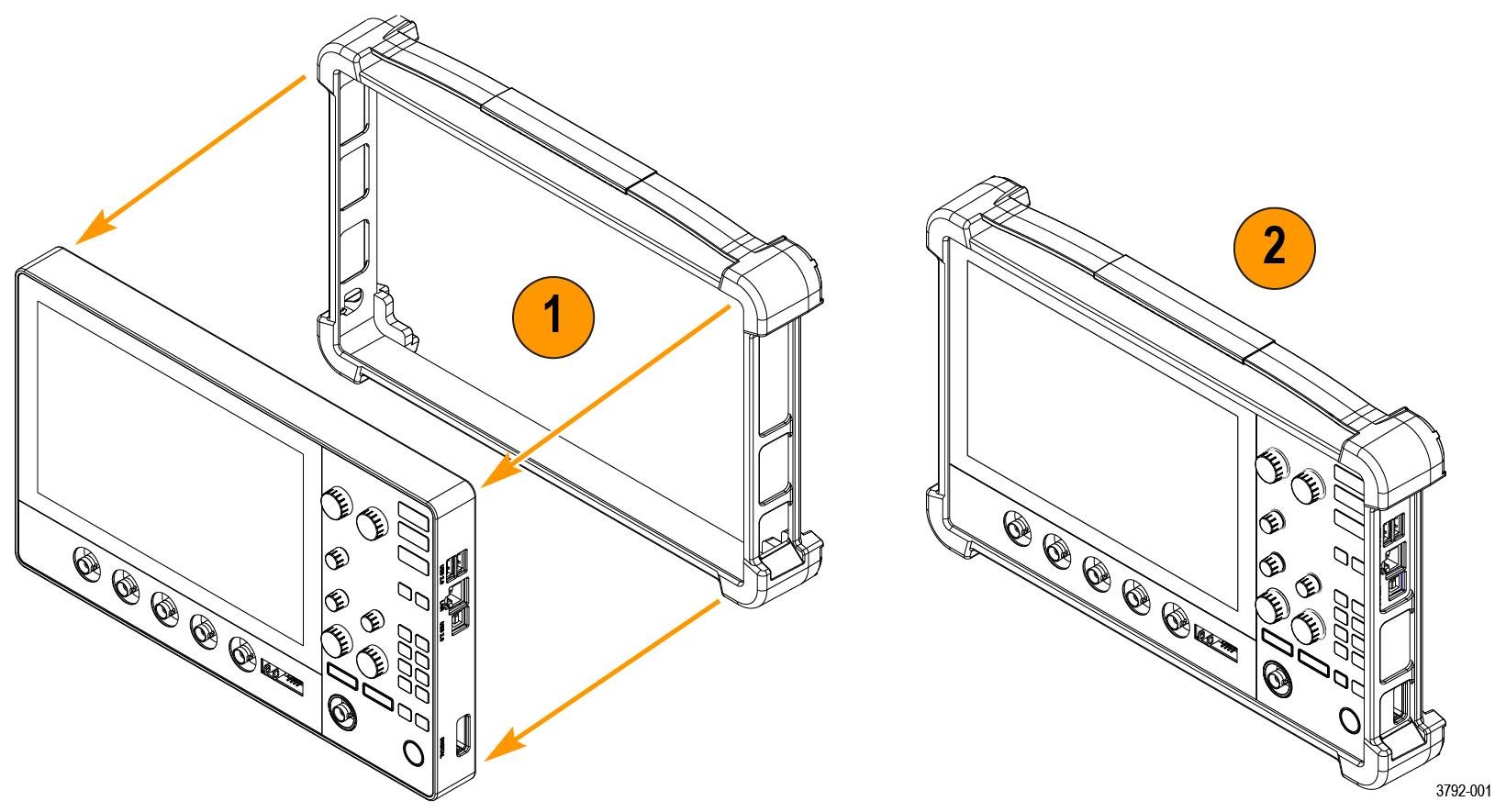
Install the protective case
Procedure
Install the kickstand
Before you begin
Use a screwdriver handle with No. 2 Phillips screw tip or a No. 2 Phillips screwdriver to install the kickstand onto your instrument.
Procedure
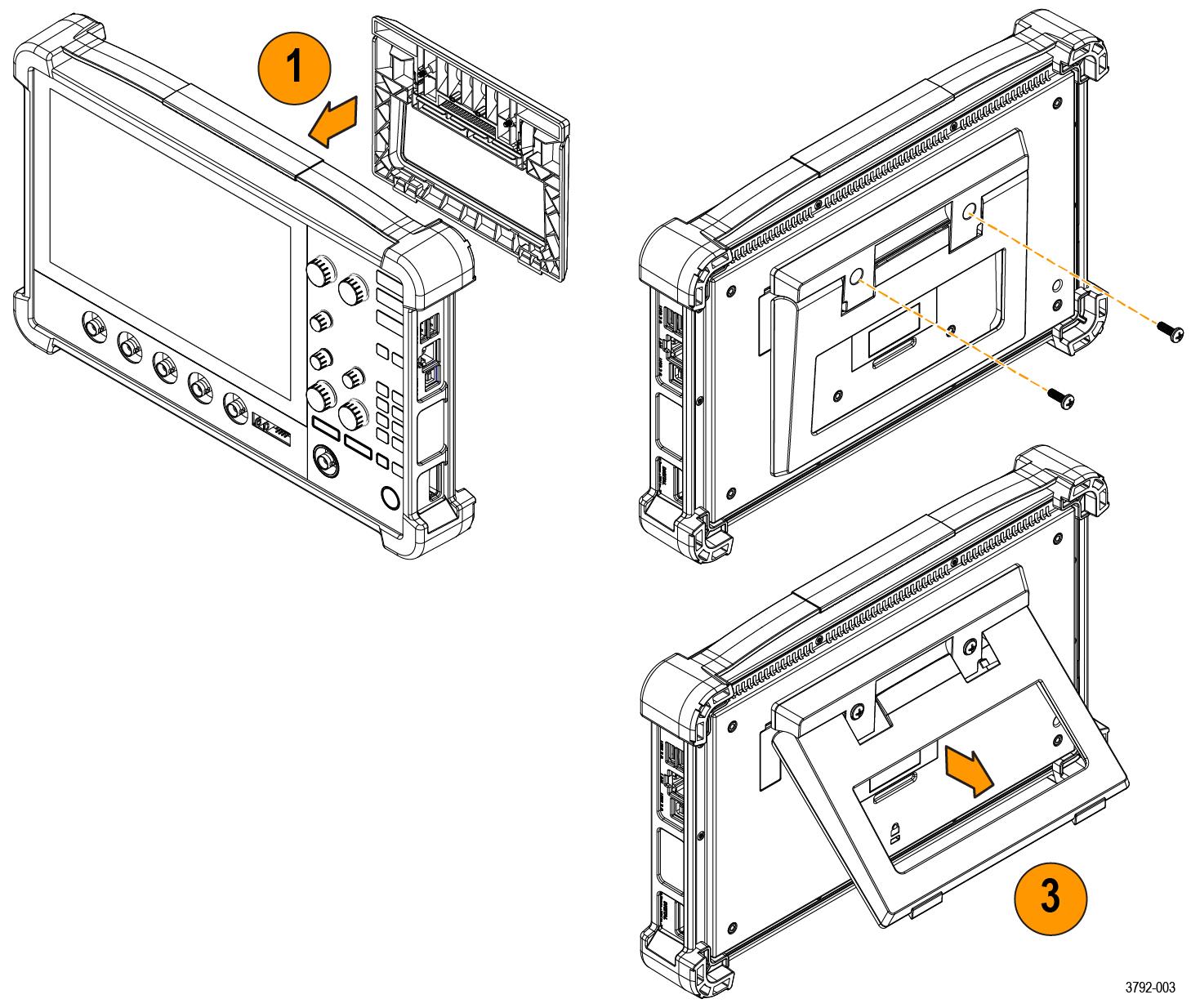
- Align the kickstand with the two top VESA mount holes (closest to the top of the label) on the back of the instrument.
- Install the two screws included with your kickstand.
- Pull the bottom of the kickstand out to position your instrument at an angle.