

與我們聯絡
與 Tek 業務代表即時對談。 上班時間:上午 6:00 - 下午 4:30 (太平洋時間)
請致電
與 Tek 業務代表即時對談。 上班時間:上午 8:30 - 下午 5:30 (太平洋時間)
下載
下載手冊、產品規格表、軟體等等:
意見回饋
2-PC Protective Case Instructions
This document provides information for the 2-PC protective case, soft case, and kickstand. It includes instructions for installing the kickstand and protective case on your 2 Series MSO.
此手冊適用於:
MSO22, MSO24, 2-PC, MSO22-EDU, MSO24-EDU
相關產品資訊
下載即代表您同意 手冊下載協議的條款與條件。
手冊下載協議
注意:從此網站下載任何文件前,請先詳閱下列條款與條件。 若從 Tektronix 網站下載手冊,即表示您同意下列條款與條件:
目前支援之產品的手冊:
Tektronix 在此授予 Tektronix 儀器擁有人權限與授權,可在此網站下載和重製手冊,供內部或個人使用。 未經 Tektronix, Inc 特別書面授權,不得重製目前支援的產品手冊,並散佈給他人。
Tektronix 手冊可能經適當修訂,以反映製造過程中對產品所做的變更。 因此,任何現有產品可能具備不同版本的手冊。 請務必確保使用者取得特定產品序號的正確手冊版本。
不再支援之產品的手冊:
Tektronix 不提供已不再長期支援的量測產品手冊。 Tektronix 於此授權其他人重製和散佈任何 Tektronix 量測產品手冊副本的權限與授權,包括使用者手冊、操作員手冊、維修手冊等,該等手冊應 (a) 具備 Tektronix 零件編號,且 (b) 為 Tektronix 不再支援的量測產品手冊。
Tektronix 手冊可能經適當修訂,以反映製造過程中對產品所做的變更。 因此,任何現有產品可能具備不同版本的手冊。 請務必確保使用者取得特定產品序號的正確手冊版本。
此等權限與授權不適用於 Tektronix 目前仍支援的任何手冊或其他出版品,或視訊生產產品/彩色印表機產品的任何手冊或其他出版品。
免責聲明:
若量測產品手冊或其他出版品並非 Tektronix 提供,或並非依前述權限和授權製作或散佈,Tektronix 將不保證其資訊、文字、圖片、示意圖、零件清單或其他內含資料的準確度或完整性。
Tektronix 得逕行變更此網站內容或其產品,恕不另行通知。
責任限制:
若因使用依前述權限和授權製作或散佈的任何量測產品手冊或其他出版品,而導致任何損害 (包括但不限於:任何二次損壞或意外損壞、利益損失損害、營業中斷損害或違反智慧財產權損害),Tektronix 概不負責。
Read Online
Description
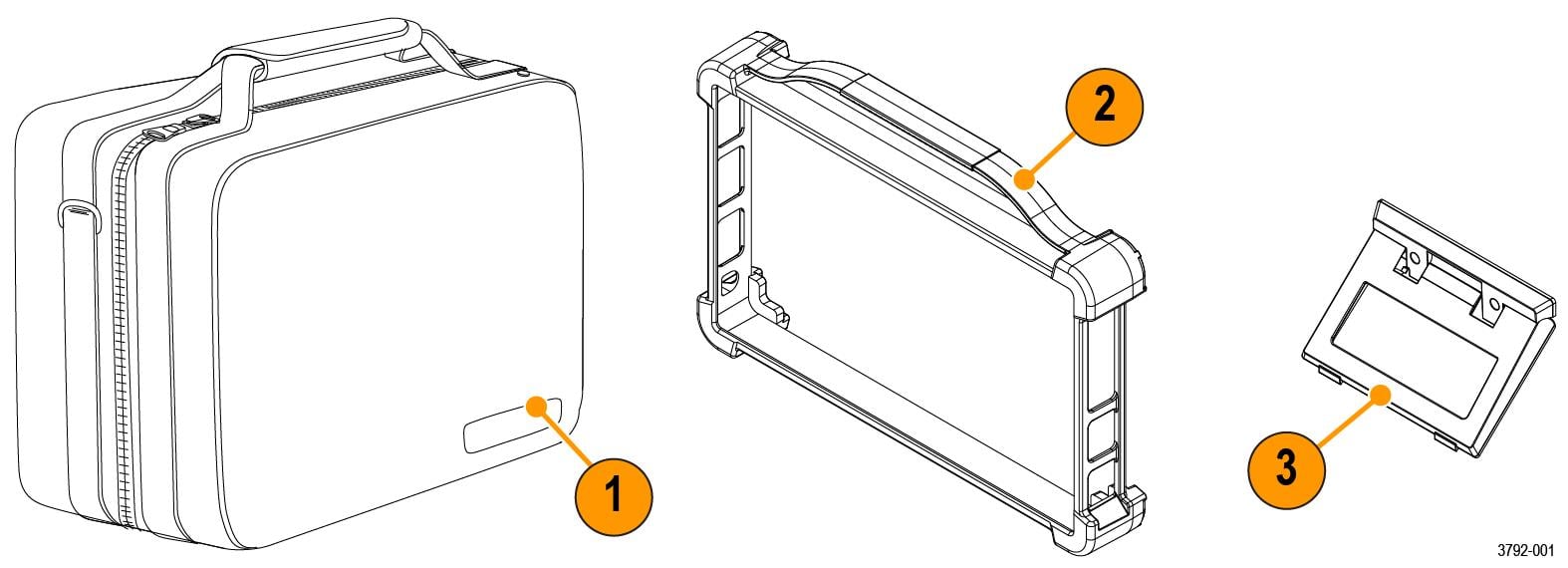
The 2-PC includes a soft carrying case, a protective case that fits around the outside edges of the instrument, and a kickstand.
| Item | Description |
|---|---|
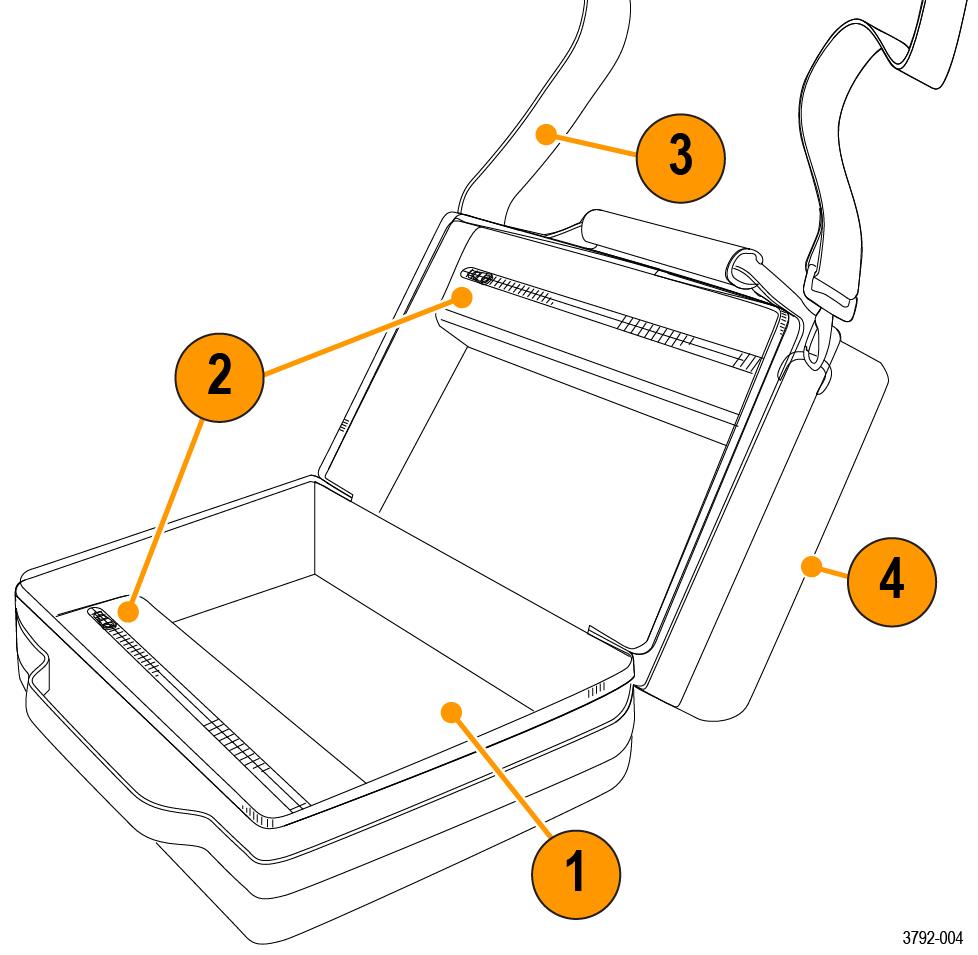
| 1 | Soft carrying case includes two interior zipper pockets, rear slip pocket, and shoulder strap. |
| 2 | Synthetic rubber protective case. Provides extra protection against drops, increased grip, and carrying handle. |
| 3 | Kickstand provides a hands-free option to position your instrument at an angle on a work surface. |
Soft carrying case description
| Item | Description |
|---|---|
| 1 | Area designated for one 2 Series MSO instrument. Fits an instrument with protective case and kickstand installed. |
| 2 | Two storage pockets. Fits accessories like the power supply, probes, and cables. |
| 3 | Shoulder strap for case transit. |
| 4 | Rear slip pocket for cables, probes, or documentation. |
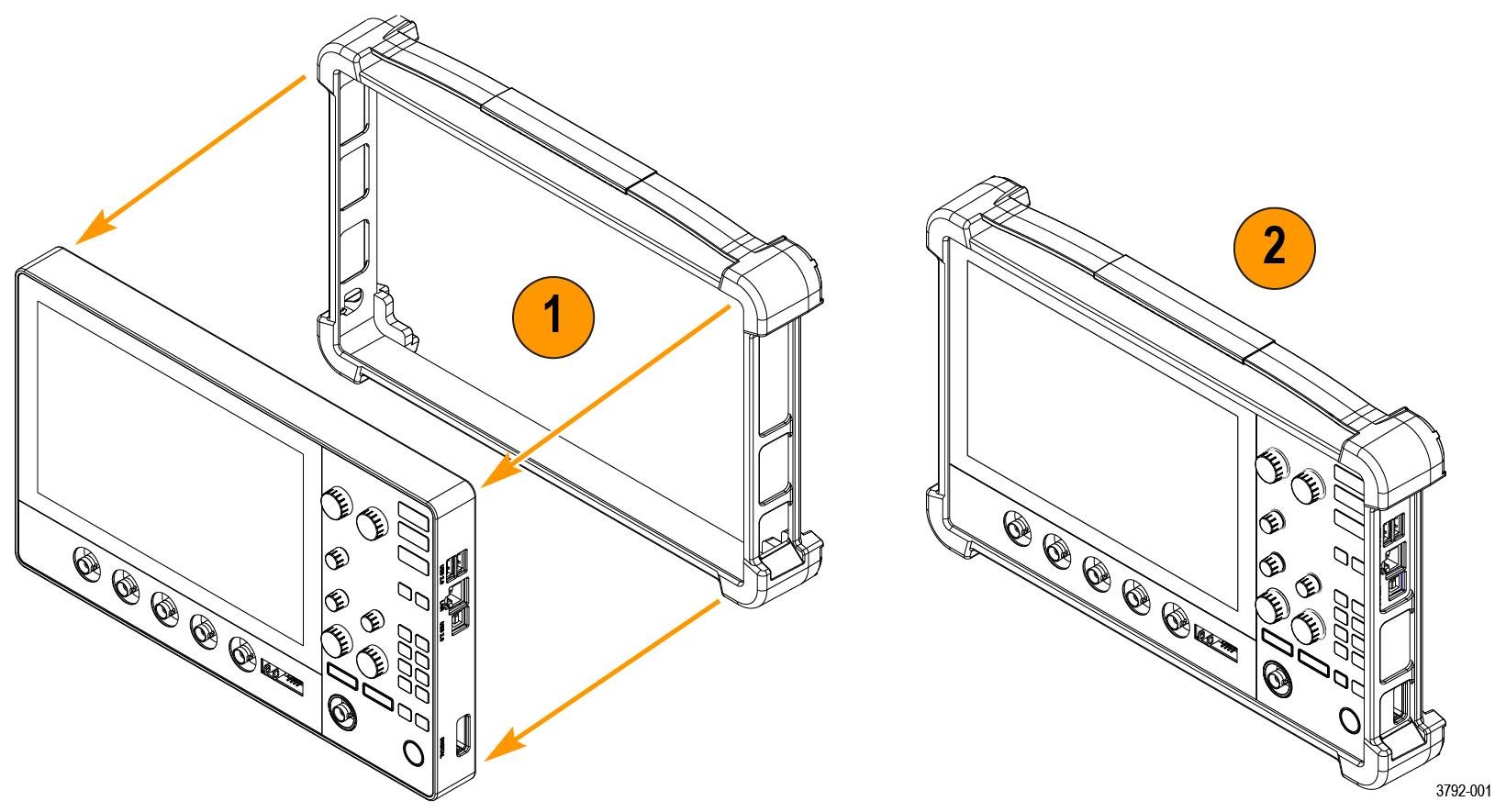
Install the protective case
Procedure
Install the kickstand
Before you begin
Use a screwdriver handle with No. 2 Phillips screw tip or a No. 2 Phillips screwdriver to install the kickstand onto your instrument.
Procedure
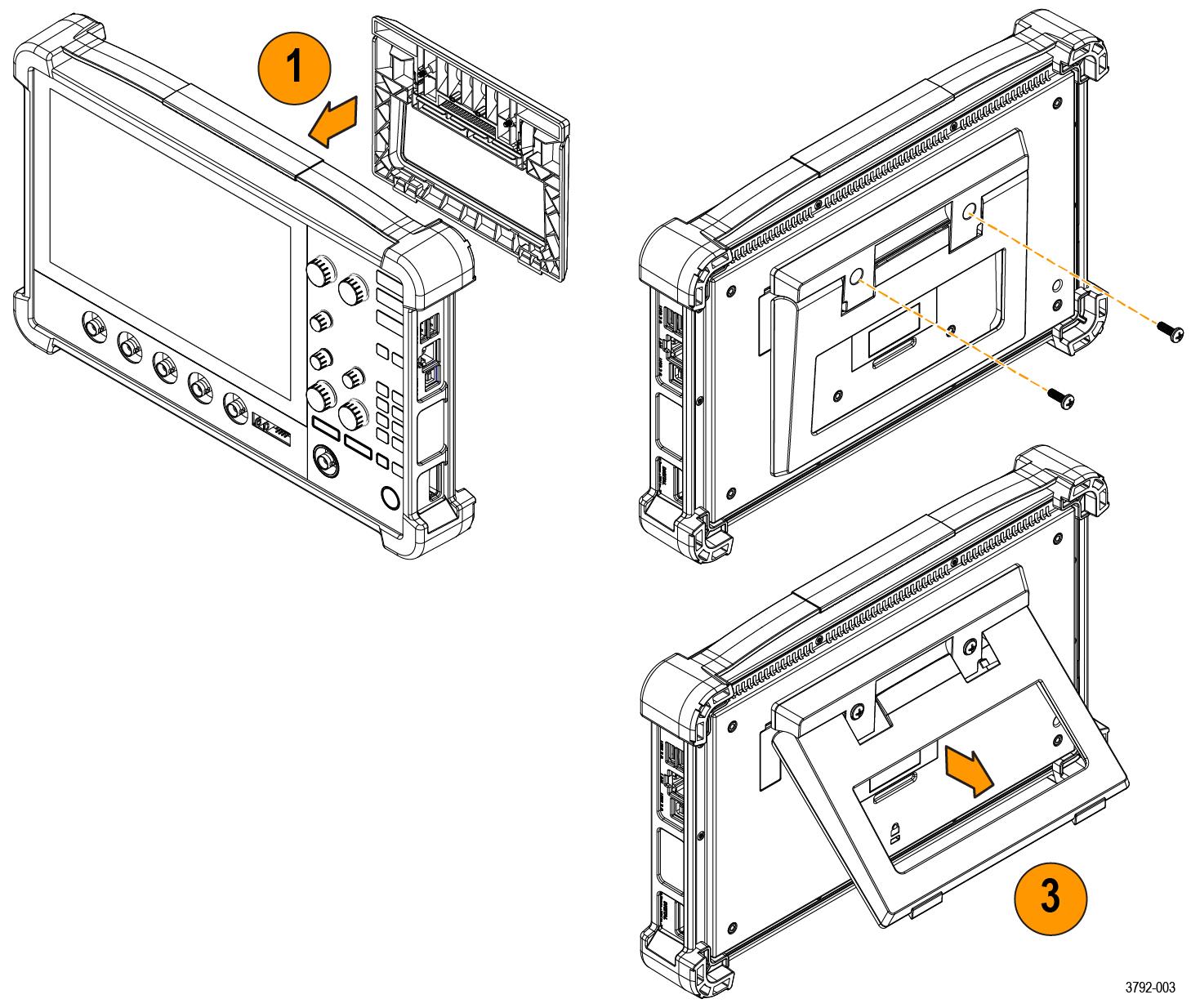
- Align the kickstand with the two top VESA mount holes (closest to the top of the label) on the back of the instrument.
- Install the two screws included with your kickstand.
- Pull the bottom of the kickstand out to position your instrument at an angle.