

Contact us
Live Chat with Tek representatives. Available 6:00 AM - 4:30 PM
Call us at
Available 6:00 AM – 5:00 PM (PST) Business Days
Download
Download Manuals, Datasheets, Software and more:
Feedback
2 Series MSO Declassification and Security Instructions
This document contains procedures to sanitize or remove memory devices from your 2 Series MSO.
This manual applies to:
MSO22, MSO24, MSO22-EDU, MSO24-EDU
Related Product Information
- Manual Type: Declassification Manuals
- Part Number: 077171200
- Release Date:
- Revision: Rev B
Bằng cách tải xuống, bạn đồng ý với các điều khoản và điều kiện của Thỏa thuận Tải xuống Hướng dẫn sử dụng.
Thỏa thuận Tải xuống Tài liệu Hướng dẫn
CHÚ Ý: vui lòng đọc kỹ các điều khoản và điều kiện sau trước khi tải xuống bất kỳ tài liệu nào từ trang web này. Bằng cách tải xuống hướng dẫn sử dụng từ trang web của Tektronix, bạn đồng ý với các điều khoản và điều kiện sau:
Hướng dẫn sử dụng cho các sản phẩm hiện đang được hỗ trợ:
Tektronix theo đây cấp phép và quyền cho chủ sở hữu các thiết bị Tektronix được tải xuống và sao chép các tài liệu hướng dẫn trên trang web này cho mục đích sử dụng nội bộ hoặc cá nhân của riêng họ. Tài liệu hướng dẫn cho các sản phẩm hiện đang được hỗ trợ không được sao chép để phân phối cho người khác trừ khi được Tektronix, Inc. cấp phép bằng văn bản cụ thể.
Hướng dẫn sử dụng của Tektronix có thể đã được sửa đổi để phản ánh các thay đổi được thực hiện đối với sản phẩm trong vòng đời sản xuất của sản phẩm đó. Do đó, các phiên bản hướng dẫn sử dụng khác nhau có thể tồn tại đối với bất kỳ sản phẩm cụ thể nào. Cần cẩn thận để đảm bảo rằng người dùng có được phiên bản hướng dẫn sử dụng phù hợp cho số sê-ri sản phẩm cụ thể.
Tài liệu hướng dẫn cho các sản phẩm không còn được hỗ trợ:
Tektronix không thể cung cấp tài liệu hướng dẫn cho các sản phẩm đo lường không còn đủ điều kiện hỗ trợ lâu dài. Tektronix theo đây cấp phép và quyền cho người khác sao chép và phân phối các bản sao của bất kỳ tài liệu hướng dẫn sản phẩm đo lường nào của Tektronix, bao gồm tài liệu hướng dẫn sử dụng, tài liệu hướng dẫn vận hành, tài liệu hướng dẫn dịch vụ và tương tự, mà (a) có Số bộ phận của Tektronix và (b) dành cho sản phẩm đo lường không còn được Tektronix hỗ trợ.
Tài liệu hướng dẫn của Tektronix có thể được sửa đổi để phản ánh các thay đổi được thực hiện đối với sản phẩm trong vòng đời sản xuất. Do đó, các phiên bản tài liệu hướng dẫn khác nhau có thể tồn tại cho bất kỳ sản phẩm cụ thể nào. Cần thận trọng để đảm bảo rằng người dùng có được phiên bản tài liệu hướng dẫn phù hợp cho số sê-ri sản phẩm cụ thể.
Giấy phép và quyền này không áp dụng cho bất kỳ tài liệu hướng dẫn hoặc ấn phẩm nào khác vẫn có sẵn từ Tektronix, hoặc cho bất kỳ tài liệu hướng dẫn hoặc ấn phẩm nào khác dành cho sản phẩm sản xuất video hoặc sản phẩm máy in màu.
Tuyên bố miễn trừ trách nhiệm:
Tektronix không đảm bảo tính chính xác hoặc đầy đủ của thông tin, văn bản, đồ họa, sơ đồ mạch, danh sách bộ phận hoặc tài liệu khác có trong bất kỳ hướng dẫn sử dụng sản phẩm đo lường nào hoặc ấn phẩm khác không do Tektronix cung cấp hoặc được sản xuất hoặc phân phối theo sự cho phép và giấy phép nêu trên.
Tektronix có thể thay đổi nội dung của trang web này hoặc các sản phẩm của mình bất cứ lúc nào mà không cần thông báo.
Giới hạn Trách nhiệm pháp lý:
TEKTRONIX SẼ KHÔNG CHỊU TRÁCH NHÁCH VỀ BẤT KỲ TỆN HẠI NÀO (BAO GỒM, KHÔNG GIỚI HẠN, BẤT KỲ TỆN HẠI DO HẬU QUẢ HOẶC NGẪU NHIÊN, TỆN HẠI DO MẤT LỢI NHUẬN, GIÁN ĐOẠN KINH DOANH, HOẶC DO VI PHẠM QUYỀN SỞ HỮU TRÍ TUỆ) PHÁT SINH TỪ VIỆC SỬ DỤNG BẤT KỲ TÀI LIỆU HƯỚNG DẪN SẢN PHẨM ĐO LƯỜNG HOẶC ANH PHẨM NÀO KHÁC DO TEKTRONIX SẢN XUẤT HOẶC PHÂN PHỐI THEO GIẤY PHÉP VÀ QUYỀN NÊU TRÊN.
Read Online
Preface
This document helps customers with data security concerns to clear or sanitize 2 Series MSO instruments. Instruments in this series contain a processor system with a non-removable mass storage.
These products have data storage (memory) devices and data export interfaces (USB and Ethernet). The following instructions explain how to sanitize the instrument.
Reference
- National Industrial Security Program Operating Manual (NISPOM), DoD 5220.22–M, Chapter 8
- Defense Security Service Manual for the Certification and Accreditation of Classified Systems under the NISPOM
Supported products
Tektronix 2 Series Mixed Signal Oscilloscope products are covered by this document.
Terms
- Clear: This removes data from media/memory before reusing it in a secured area. All reusable memory is cleared to deny access to previously stored information by a standard means of access.
- Erase: This is equivalent to clear.
- Media: Storage/data export device. A device that stores or exports data from the instrument, such as a USB flash drive or USB port.
- Sanitize: This removes the data from media/memory so that the data cannot be recovered using any known technology. This is typically used when the device is moved (temporarily or permanently) from a secured area to a non-secured area.
- Remove: This is a physical means to clear the data by removing the memory device from the instrument. Instructions are available in the product service manual.
- User-Accessible: The user can directly retrieve the memory device contents.
- User-Modifiable: The memory device can be written to by the user during normal instrument operation, using the instrument user interface or remote control.
- Volatile memory: Memory that loses data when the instrument is powered off.
- Nonvolatile memory: Memory that retains data when the instrument is powered off.
- Power off: Some instruments have a “Standby” mode, in which power is still supplied to the instrument. For clearing data, putting the instrument in Standby mode does not qualify as powering off. For these products, you must either push a rear-panel OFF switch or remove the power source from the instrument.
- Instrument Declassification: A term that refers to procedures that must be undertaken before an instrument can be removed from a secure environment. Declassification procedures include memory sanitization, memory removal, and sometimes both.
Clear and sanitize procedures
The following tables list the volatile and nonvolatile memory devices in the standard instrument and listed options.
Procedures to clear or sanitize these devices, if any, are given in each table.
Terms
- User data – Describes the type of information stored in the device. Refers to waveforms or other measurement data representing signals connected to the instrument by users.
- User settings – Describes the type of information stored in the device. Refers to instrument settings that can be changed by the user.
- Both – Describes the type of information stored in the device. It means that both user data and user settings are stored in the device.
- None – Describes the type of information stored in the device. It means that neither user data nor user settings are stored in the device.
- Directly – Describes how data is modified. It means that the user can modify the data.
- Indirectly – Describes how data is modified. It means that the instrument system resources modify the data and that the user cannot modify the data.
Volatile memory devices
These are the memory capacities at the time of publishing this document, but are subject to change.
| Type and size | Function | Type of user info stored | Backed up by battery | Method of modification | Data input method | Location | User accessible | To clear | To sanitize |
|---|---|---|---|---|---|---|---|---|---|
| SDRAM 2 GB (All models) | System memory | Both | No | Indirectly | Written by processor system and application software operations | Main board | No | Unplug the instrument and remove all battery packs for at least 30 seconds | Unplug the instrument and remove all battery packs for at least 30 seconds |
| CMOS RAM 13 bytes | Holds clock and boot configuration data | None | Yes | Indirectly | Boot operations | Main board | No | Cannot be cleared | Remove the Main board |
| FPGA <20 MB | Acquisition system | None | No | None | Written by processor | Main board | No | Unplug the instrument and remove all battery packs for at least 30 seconds | Unplug the instrument and remove all battery packs for at least 30 seconds |
Non-volatile memory devices
These are the memory capacities at the time of publishing this document but are subject to change.
| Type and Size | Function | Type of user info stored | Method of modification | Data input method | Location | User accessible | To clear | To sanitize |
|---|---|---|---|---|---|---|---|---|
| eMMC 4 GB or 8 GB | Stores application software and user data | Both | Directly | Application software operations and file operations | Main board | Yes | Run TekSecure | Remove the Main board |
How to sanitize an instrument
- Remove all external USB memory devices and store or destroy the USB memory devices in accordance with your organization’s guidelines.
- Follow the instructions in the Main board removal instructions to get access to and remove the Main board, which contains user data and settings. Store or destroy the Main board in accordance with your organization’s guidelines.
- Reassemble the instrument without the Main board and return it to Tektronix. The instrument will then be repaired and calibrated as necessary.
In North America, contact the Tektronix Customer Care Center (1-800-833-9200) for assistance with returning the instrument to a repair center. Worldwide, visit tek.com to find contacts in your area.
Main board removal instructions
- Disconnect the AC power adapter from the instrument.
- If installed, remove all batteries from the instrument.
- If installed, remove the battery pack from the instrument.
- Place the instrument on a work surface with the display facing up.
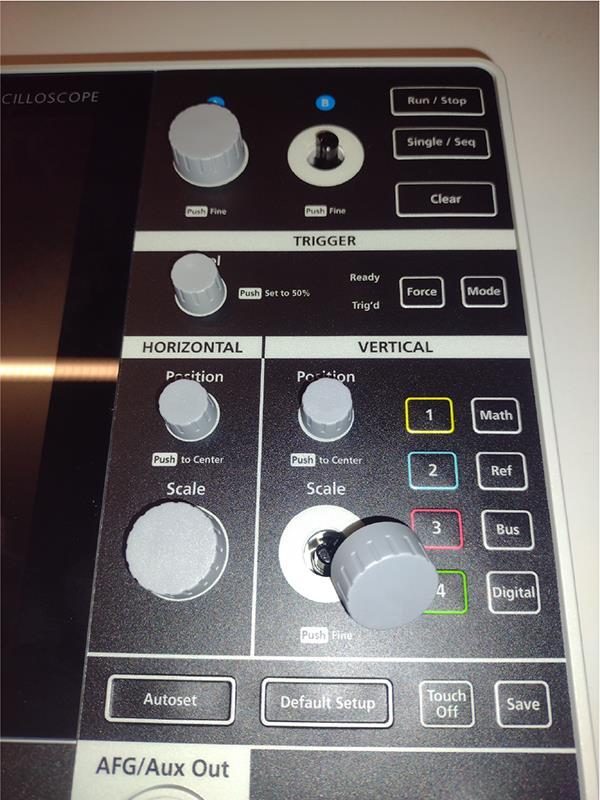
- Remove the seven knobs from the front of the instrument.

- Flip the instrument cover so the display is facing down.
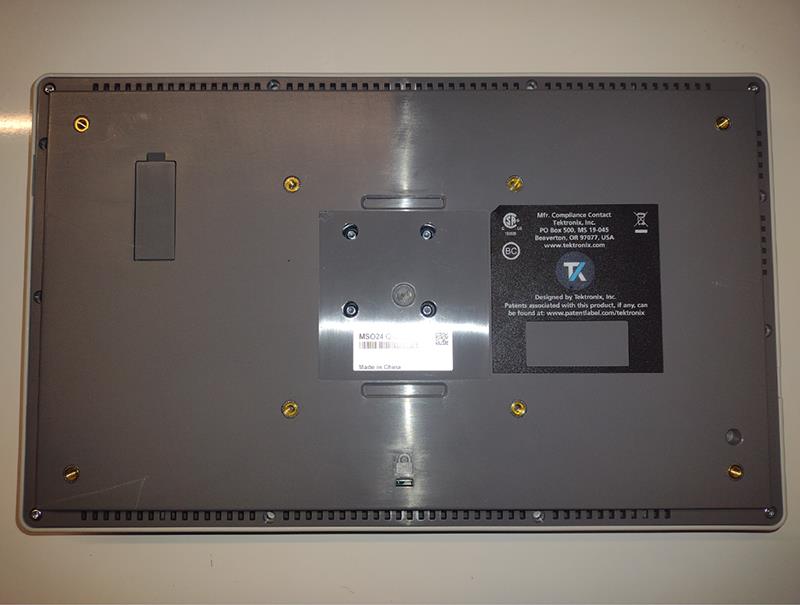
- Remove the rectangular label from the back of the instrument. Stick the label on the back of the instrument so that it is out of the way and not covering any screws.
- Using a T-10 screwdriver, remove the 16 PT thread forming screws from the back of the instrument.
- Remove the back cover of the instrument and set it aside.
The large circuit board visible inside the instrument is the Main board.
- Disconnect the power cable from the Main board by pressing on the tab near the wire-end of the connector and sliding the connector away from the board.
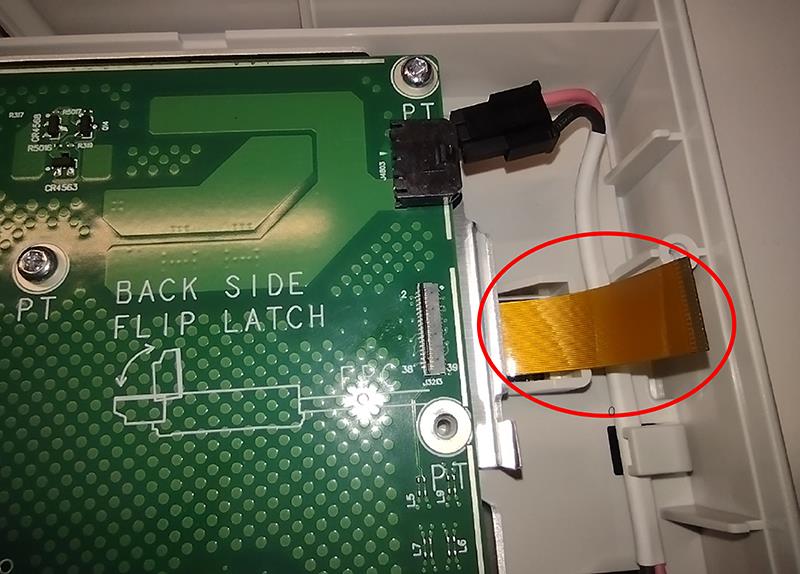
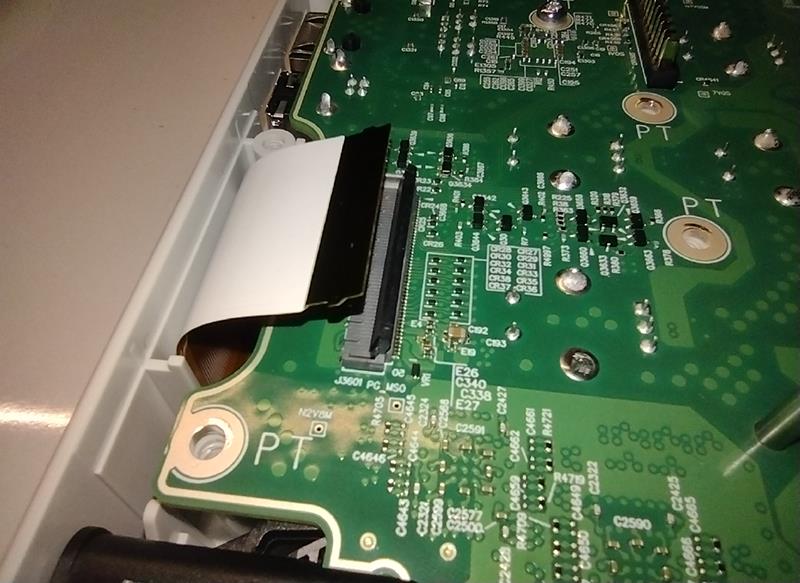
- Disconnect the display cable from the Main board by flipping up the latch on the backside of the connector and sliding the cable out. Use the illustration printed on the Main board near the connector for reference.
- Disconnect the touch screen cable from the Main board by flipping up the latch on the cable-side of the connector and sliding the cable out of the connector.
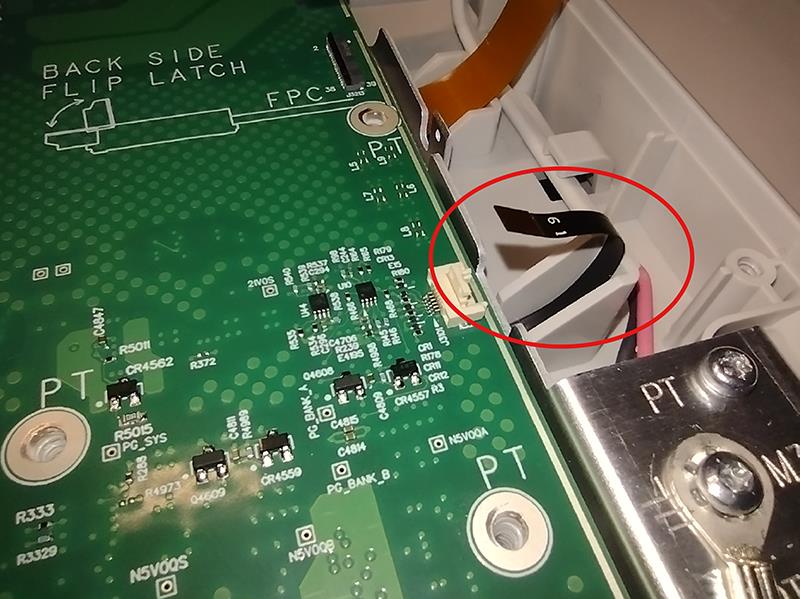
- Disconnect the front panel cable from the Main board by flipping up the latch on the cable-side of the connector and sliding the cable out of the connector. This cable includes hook features, so the cable must be lifted out of the connector while sliding it out.
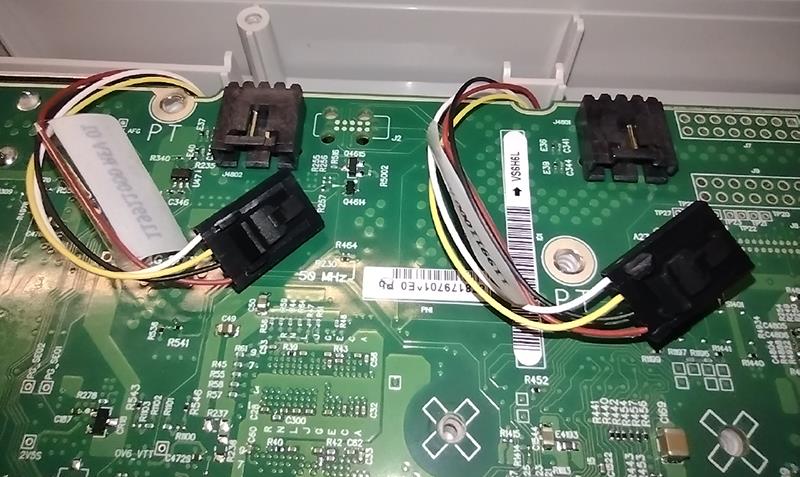
- Disconnect the two fan cables from the Main board by pressing on the tab on the connector and sliding the connector away from the board.
- Remove the 24 screws from the Main board.
- Slowly work around the edges of the Main board and lift the board straight out of the enclosure.
- Reattach the back cover using the PT thread forming screws from the instrument.
Repair charges
Replacement of damaged and missing hardware is charged according to the rate at the time of replacement.