

Question: How can Zero Check be enabled/disabled using IVI drivers with LabVIEW (LV) for 6485
Answer: By default, the Model 6485 powers up with Zero Check enabled. In order to make a measurement, the Zero Check needs to be disabled. If using the Front Panel, pressing an appropriate button disables Zero Check, and you are all set to make a measurement. Unlike other VI's based on the IVI driver (version B01) which offer control of the various functionality of the meter, there is no direct VI to control the state of Zero Check (Enable/Disable).
Two ways are listed below for remote control of Zero Check:
1. Use the "KE6485 Write Instrument data VI", under the Instrument I/O with Utility Function. Wire a string value of "SYST:ZCH OFF" to disable the Zero Check. If you want to enable Zero Check wire a string with command "SYST:ZCH ON".
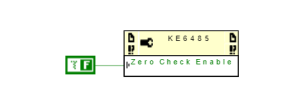
2. Another way to do this is to use a property node under the Functions. By default all properties of this node will have Read functionality. Change this to Write by clicking on "Change All to Write". Wire the "instrument handle out" terminal from the "KE6485 Initialize VI" in your program to the reference terminal of the property node to select the KE6485 class. Once that is done, right click and look under properties for system settings to select "Zero Check Enable" property. Now you can wire in a Boolean to turn this of OFF or ON. Below is a picture of a property Node set for Zero Check function.
Product Series: Keithley Series 6400 Picoammeters