與我們聯絡
與 Tek 業務代表即時對談。 上班時間:上午 6:00 - 下午 4:30 (太平洋時間)
請致電
與 Tek 業務代表即時對談。 上班時間:上午 8:30 - 下午 5:30 (太平洋時間)
下載
下載手冊、產品規格表、軟體等等:
意見回饋
SignalVu Essentials Technical Reference
This document provides an overview of the SignalVu Vector Signal Analysis Software.
此手冊適用於:
DPO7054C, DPO7104C, DPO7254C, DPO7354C, DPO70404C, DPO70604C, DPO70804C, DPO71254C, DPO71604C, DPO72004C, MSO72004C, MSO71604C, MSO71254C, MSO70804C, MSO70604C, MSO70404C, MSO5204, MSO5104, MSO5054, MSO5034, DPO5054, MSO72304DX, MSO72504DX, MSO73304DX, DPO72304DX, DPO72504DX, DPO73304DX, DPO72304SX, DPO73304SX, DPO71604SX, DPO71304SX
下載即代表您同意 手冊下載協議的條款與條件。
手冊下載協議
注意:從此網站下載任何文件前,請先詳閱下列條款與條件。 若從 Tektronix 網站下載手冊,即表示您同意下列條款與條件:
目前支援之產品的手冊:
Tektronix 在此授予 Tektronix 儀器擁有人權限與授權,可在此網站下載和重製手冊,供內部或個人使用。 未經 Tektronix, Inc 特別書面授權,不得重製目前支援的產品手冊,並散佈給他人。
Tektronix 手冊可能經適當修訂,以反映製造過程中對產品所做的變更。 因此,任何現有產品可能具備不同版本的手冊。 請務必確保使用者取得特定產品序號的正確手冊版本。
不再支援之產品的手冊:
Tektronix 不提供已不再長期支援的量測產品手冊。 Tektronix 於此授權其他人重製和散佈任何 Tektronix 量測產品手冊副本的權限與授權,包括使用者手冊、操作員手冊、維修手冊等,該等手冊應 (a) 具備 Tektronix 零件編號,且 (b) 為 Tektronix 不再支援的量測產品手冊。
Tektronix 手冊可能經適當修訂,以反映製造過程中對產品所做的變更。 因此,任何現有產品可能具備不同版本的手冊。 請務必確保使用者取得特定產品序號的正確手冊版本。
此等權限與授權不適用於 Tektronix 目前仍支援的任何手冊或其他出版品,或視訊生產產品/彩色印表機產品的任何手冊或其他出版品。
免責聲明:
若量測產品手冊或其他出版品並非 Tektronix 提供,或並非依前述權限和授權製作或散佈,Tektronix 將不保證其資訊、文字、圖片、示意圖、零件清單或其他內含資料的準確度或完整性。
Tektronix 得逕行變更此網站內容或其產品,恕不另行通知。
責任限制:
若因使用依前述權限和授權製作或散佈的任何量測產品手冊或其他出版品,而導致任何損害 (包括但不限於:任何二次損壞或意外損壞、利益損失損害、營業中斷損害或違反智慧財產權損害),Tektronix 概不負責。
Read Online
Getting started with SignalVu
The SignalVu Vector Signal Analysis software transforms a digital oscilloscope into an analysis tool for measuring and analyzing RF signal behavior. The software is based on that used in the RSA5000 Series Real-Time Analyzers.
 | Note:For complete operating instructions, refer to the SignalVu Help, accessible in the SignalVu application. |
The following figure shows the spectrum display: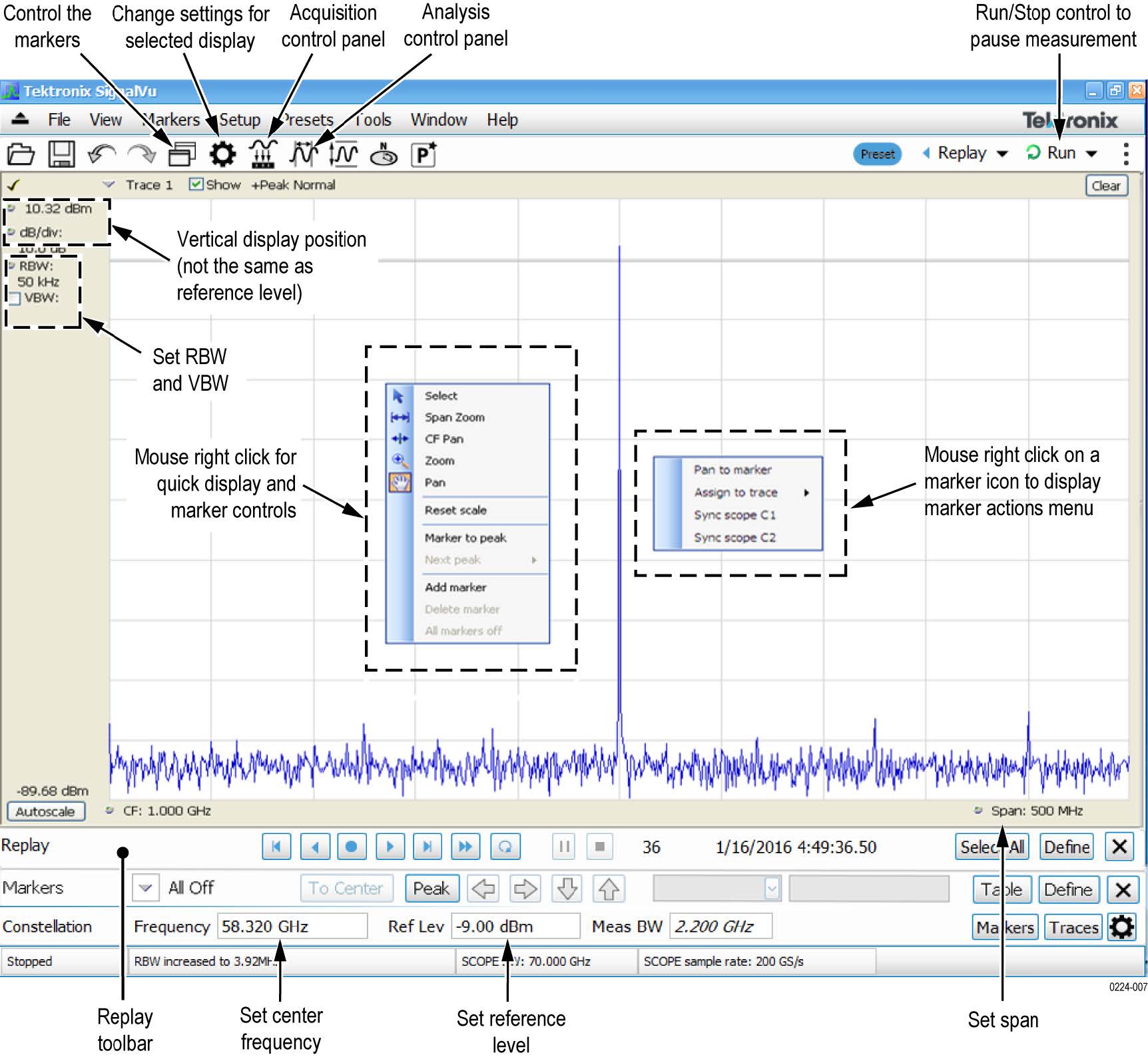
The following figure shows the spectrogram, time overview, and spectrum displays: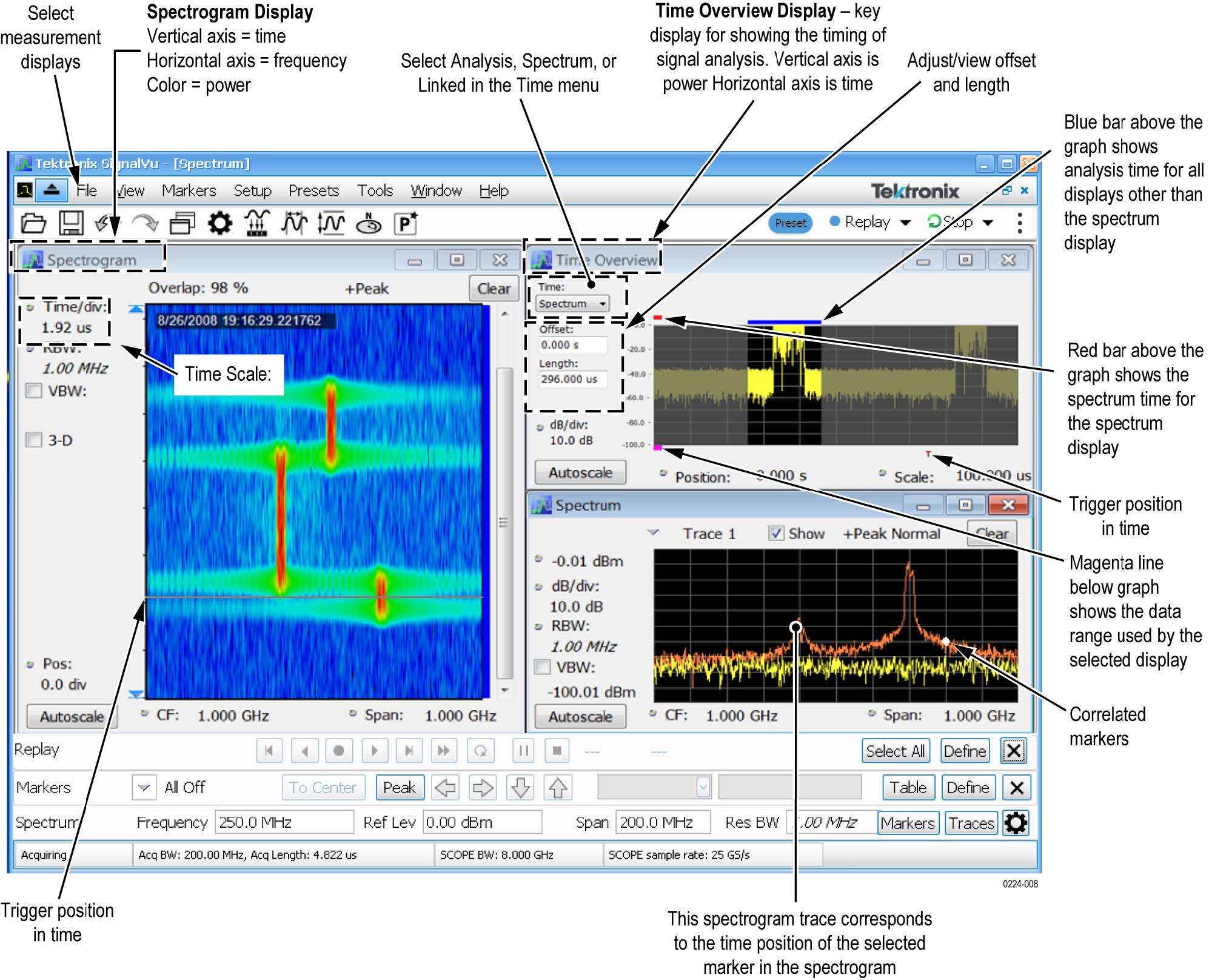
SignalVu ordering information
This software runs on DPO/MSO5000, DPO7000C, DPO/DSA/MSO70000C, and DPO/MSO70000DX Series oscilloscopes.
- Option SVE: SignalVu Essentials – Vector signal analysis software
- Option SVP: SignalVu Advanced Signal Analysis – Advanced signal analysis software (including pulse measurements); Requires Option SVE
- Option SVM: SignalVu General Purpose Modulation Analysis; Requires Option SVE
- Option SVT: SignalVu Settling Time (Phase and Frequency) Analysis; Requires Option SVE
- Option SVO: SignalVu Flexible OFDM Analysis; Requires Option SVE
- Option SVA: SignalVu Audio Analysis; Requires Option SVE
- Option SV23: SignalVu WLAN 802.11a/b/g/j/p Measurements; Requires Option SVE
- Option SV24: SignalVu WLAN 802.11n Measurements; Requires Option SVE
- Option SV25: SignalVu WLAN 802.11ac Measurements; Requires Option SVE
- Option SV26: SignalVu APCO P25 Analysis; Requires Option SVE
- Option SV27: SignalVu Bluetooth® LE and Bluetooth® Basic Rate RF Measurements; Requires Option SVE1
- Option SV28: SignalVu LTE™ Downlink (Base Station) RF Analysis Measurements (includes Cell ID)2
- Option SV30: SignalVu 802.11ad/11ay Analysis; Requires Option SVE
- Option 5GNR: 5G NR Uplink/Downlink RF Power, Bandwidth, Demodulation, and Error Vector Magnitude measurements
How to manage the 5GNR analysis license
After installing the SignalVu 5GNR Analysis plugin, it needs to be activated on that instrument/PC/laptop. The activation requires an activation code which is 20 digit alphanumeric characters separated by a hyphen between every four characters. The following topics give procedure to activate or deactivate the 5GNR Analysis.
5GNR Analysis activation
- Start the SignalVu application.
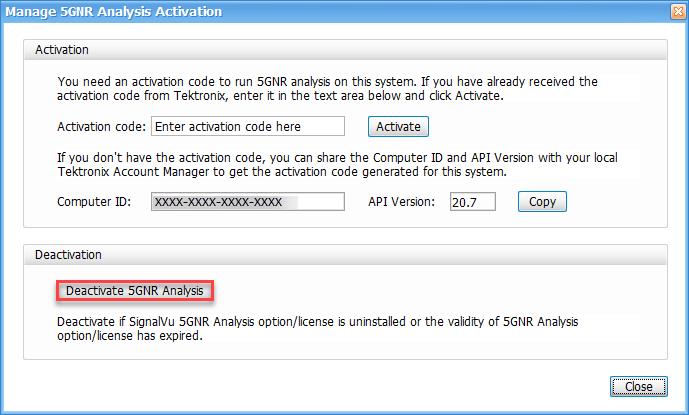
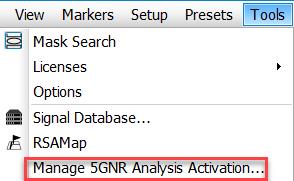
- On the Tools menu, click Manage 5GNR Analysis Activation…. The Manage 5GNR Analysis Activation dialog box appears.

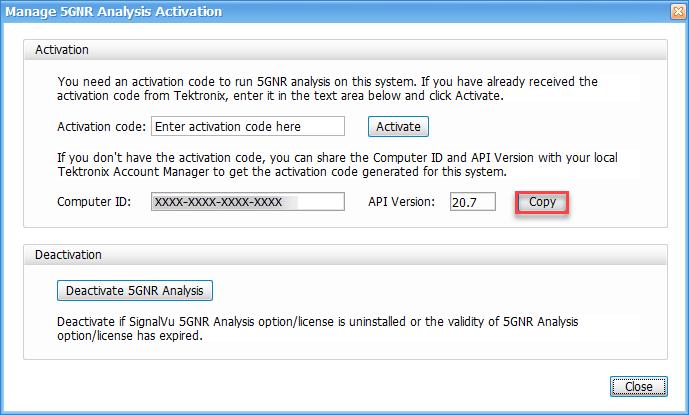
- If you do not have the activation code, under Activation, click Copy, and then close the Manage 5GNR Analysis Activation dialog box.Note:Share the Computer ID and API Version that you have copied with your local Tektronix account manager to get the activation code generated for this system.
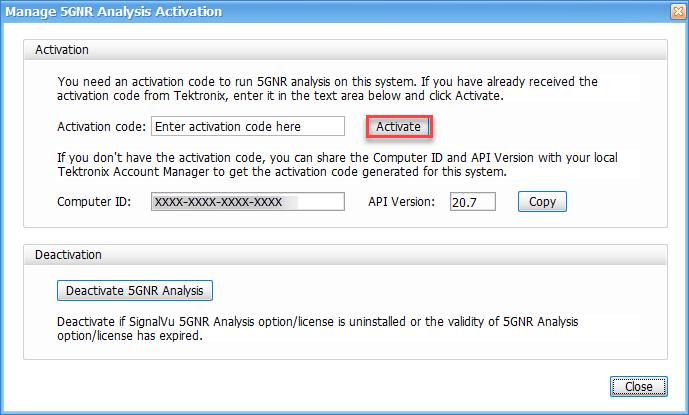
- If you have the activation code, under Activation, in the Activation code box, enter the activation code that you received from Tektronix, and then click the Activate.
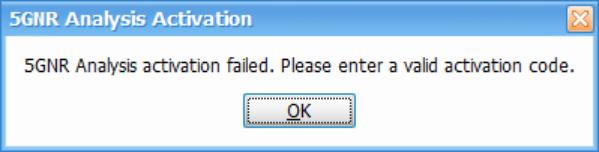
- If you receive the “5GNR Analysis activation failed. Please enter a valid activation code.” message, click OK, and then contact your local Tektronix support or Account Manager to get the correct activation code.
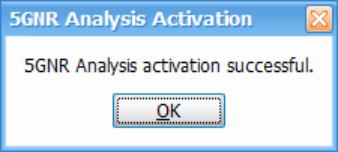
- If you receive the “5GNR Analysis activation successful” message, click OK.
- Close the Manage 5GNR Analysis Activation dialog box and restart the SignalVu application.
5GNR Analysis de-activation
- Start the SignalVu application.
- On the Tools menu, click Manage 5GNR Analysis Activation…. The Manage 5GNR Analysis Activation dialog box appears.
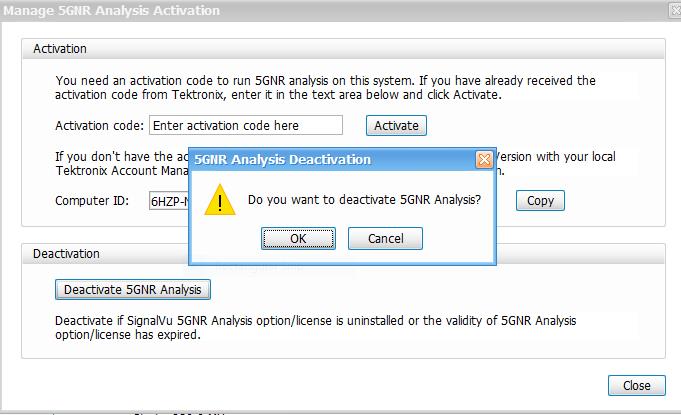
- Under Deactivation, click Deactivate 5GNR Analysis.
- Click OK and continue with 5GNR Analysis de-activation.
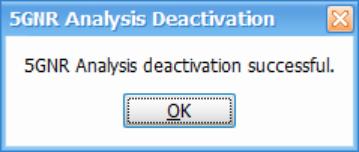
- If you receive the “5GNR Analysis deactivation successful” message, click OK, and then restart the SignalVu application.