

Question: When using SignalVu-PC how do I find my system's Host ID?
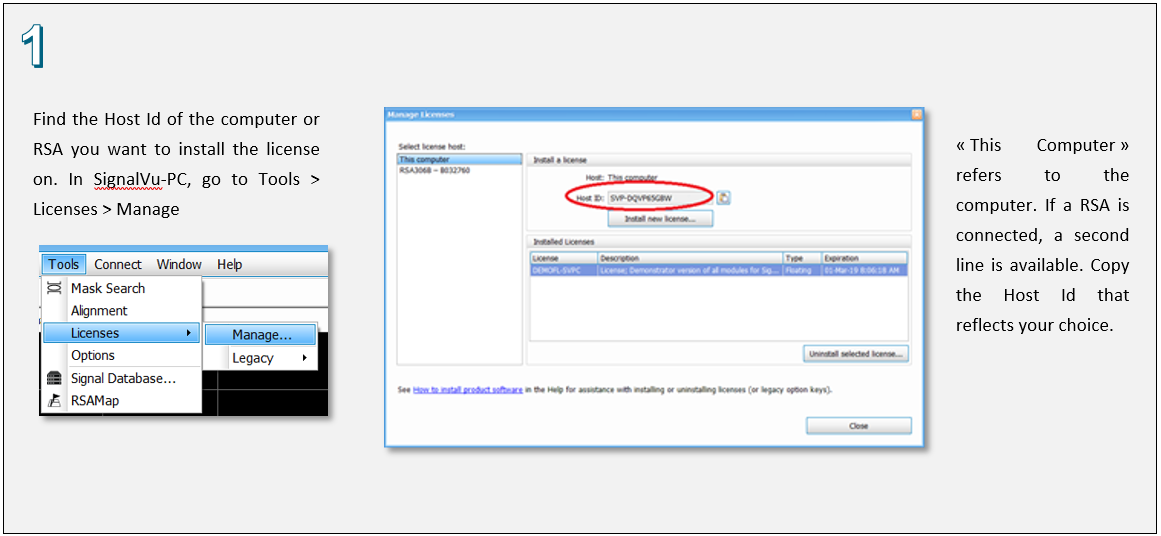
Answer: To find the Host Id while using SignalVu-PC select Tools > Licenses > Manage. This will open the Manage Licenses window. Under the Select license host window on the left choose the system that you wish to view the Host ID. <<This computer >> refers to the computer, if the RSA is connected, a second line is available.
Note: With the release of SignalVu-PC version 3.11.47 you can put the SignalVu-PC application licenses directly on your USB instrument or to the connected computer.
This is valid also when SignalVu-PC is installed on Oscilloscope Series MSO 5, MOS5B, MSO6, MSO6B and DPO7
Product Series: RSA306B USB Spectrum Analyzer RSA500 Series Real Time Spectrum Analyzers RSA600 Series Real Time Spectrum Analyzers