

Question: How do I find the Host ID for SourceXpress or for the optional application plug-ins?
Answer:
Within SourceXpress, from the Tools menu, click on “Licenses” to display the license management screen. The Host ID is listed at the top of the screen.
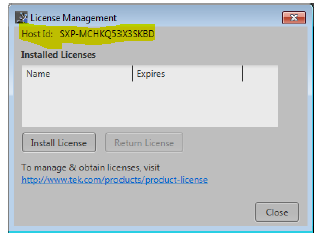
You can also find the Host ID under the select "Help>About" menu.
To learn how to install and manage licenses for SourceXpress and related s/w plug-ins go the SourceXpress Help menu and search for “Licenses”. You can also search Tek.com for the printable version of the Help manual by searching on “SourceXpress Help”.