

Contact us
Call
Call us at
Available 6:00 AM – 5:00 PM (PST) Business Days
Download
Download Manuals, Datasheets, Software and more:
Feedback
SATA/SAS Application Software
TekExpress SATA/SAS and SAS3 Datasheet

TekExpress SATA/SAS and SAS3 Datasheet
Features and benefits
TekExpress automated conformance test software is an application that automates SATA testing with Tektronix Windows-based instruments. TekExpress SATA provides a completely automated, simple, and efficient way to test SATA Gen1, Gen2, and Gen3 hosts and devices according to the requirements of the SATA-IW (Serial ATA Interoperability Working Group) as defined in accepted Methods of Implementation (MOI).
Key features
- 100% SATA Gen1, Gen2, and Gen3 Physical Layer Test Coverage for Hosts and Devices according to the latest UTD
- Performs all SATA Interoperability Program Approved Transmitter and Receiver Measurements
- SATA Receiver Margin Testing
- 1.5, 3, 6, and 12 Gb/s SAS Physical Layer Transmitter Conformance Testing
- Significant Reduction in Testing Time through Automation
- Repeatable and Accurate Results
- Automatic Report Generation
Applications
- Device and Host Conformance to SAS-3 and SATA Specifications
- PHY/TSG/OOB Transmitter Conformance Measurements
- RSG Receiver Conformance Measurements
- RMT (Receiver Margin Testing)
- Device and Host Validation
- Manufacturing Test and Factory Automation
TekExpress™ automated conformance test software
TekExpress SAS provides an automated, simple, and efficient way to test SAS hosts and devices according to the requirements of the SCSI Trade Association (STA), as documented in the University of New Hampshire's Interoperability Laboratory (UNH-IOL) test specification. TekExpress SATA enables automated BIST-L negotiation, measurement analysis of the latest SATA United Test Document (UTD) and HTML-based report generation.
Support of all required SATA Gen1, Gen2, Gen3 PHY/TSG/OOB measurements
100% automated – save time and resources
There’s no longer a need to be an expert on all the required instrument user interfaces. Remembering how to use the instrumentation is often time consuming and typically requires a senior engineer who monitors the test spec development. Even if you remember how to use all the instruments, it’s common for even the most experienced operator to forget steps in the procedure, like calibration, or setting up parameters correctly, like clock recovery, only to have to restart the test. The TekExpress software takes the human element out of the equation and yields accurate and repeatable measurements every time. No need to spend hours in the lab testing a single device or configuring a single test instrument. Provided that automated DUT test state control (Loopback/BIST-L or BIST-T) is supported, a user can simply press the Run button in the TekExpress test automation system, and let the system run to completion without user intervention.
Setting up the bench
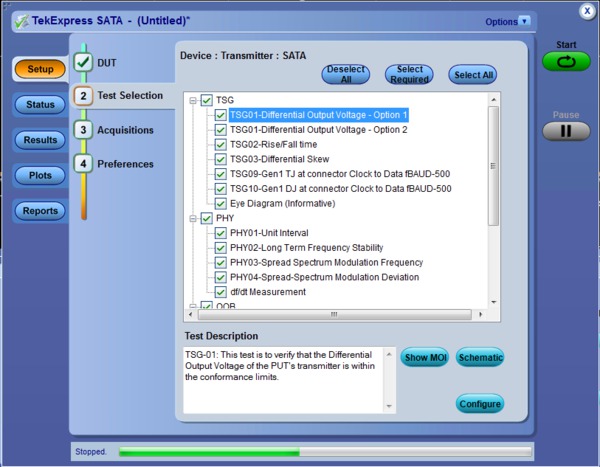
When setting up a test, nothing can be simpler than hooking up the test system by looking at a schematic. View the schematic of the selected test with a push of a button.

Host/Device testing to the i/u/mSATA electrical specifications
One-button testing
Once the test bench is set up, the DUT is properly connected, and state control methods are established, simply press the Run button to perform the selected test suite.
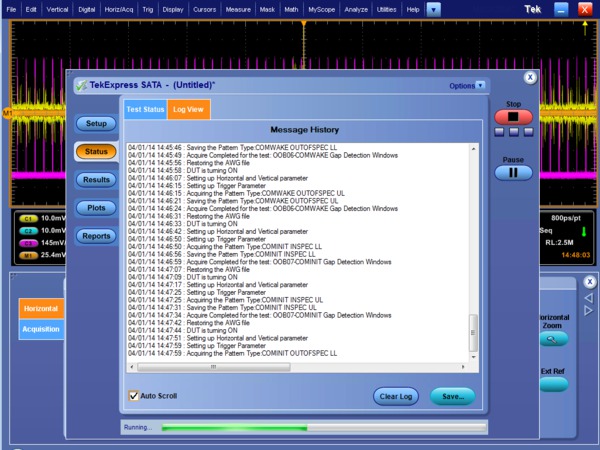
Step-by-step status view of BIST-L negotiation, pattern validation, signal acquisition and analysis
Online help and Show MOI
Online help is available through the Help menu and direct access to the approved SATA MOI (Method of Implementation) and UNH-IOL Physical Layer Test Suite through the Show MOI button. This allows users to understand the theory behind the measurements and better understand test results.
Pass/Fail report
The Report tab provides an HTML view of test results along with Pass/Fail status. Once testing is complete, an extensive report is automatically generated. If your report has a 100% passing score, your device can then be considered physical-layer conformant.
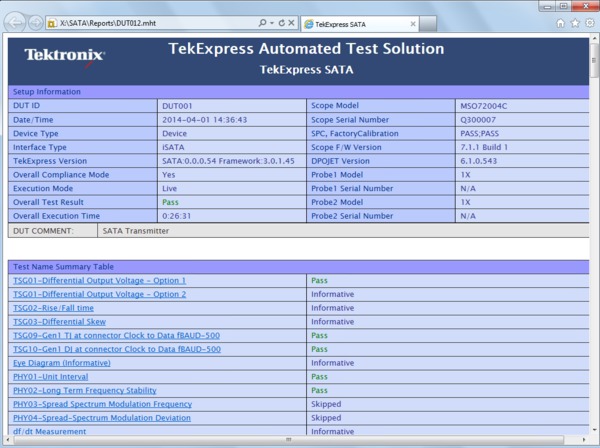
TekExpress Report with Setup Information, Summary View, Margin Analysis and Measurement Plots
100% SATA Gen1, Gen2, and Gen3 Physical Layer test coverage to the latest Unified Test Document (UTD)
Signaling Group (TSG), Physical Layer (PHY), Out-of-Bound (OOB), and Receiver Signaling Group (RSG). The TekExpress SATA software is an easy-to-use software package that automates 100% of the required SATA physical layer using the Tektronix multi-instrument test bench. The SATA test bench includes a real-time oscilloscope (DPO/MSO70000C/DX) and a high-performance signal generator.(AWG7000C Series).
Required test procedures (MOI) can be found at http://www.serialata.org. Now, using TekExpress SATA automated conformance test software, you can perform 100% of the physical layer tests performed in the ‘Gold Suite’ at SATA-IO Interop Workshops in your own lab.

Comprehensive SSC Analysis Tools
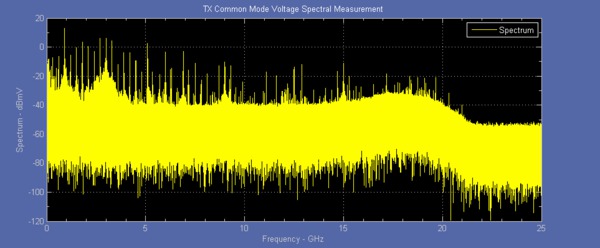
Transmitter Spectral Profile for Common Mode Analysis
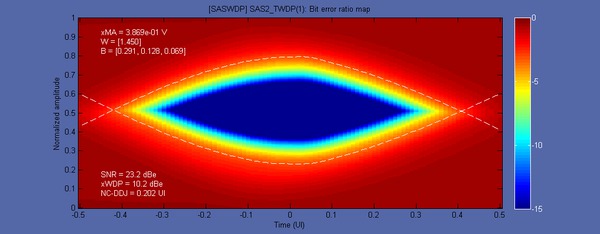
SAS-2 Waveform Dispersion Penalty (WDP measurement)
SAS physical layer transmitter conformance testing
Basic Spread Spectrum Clock modulation parameters such as frequency and spread, as mandated by the SAS specification, provide insight into potential interoperability problems. Noisy SSC, which can come from coupled power supply switching noise or mis-programmed clock circuits, has been the primary sources of system interoperability issues. The dFdT (rate of change of modulation frequency versus time) measurement allows in-depth analysis of Spread Spectrum Clocking issues.
SAS device characteristics are required to transmit common mode voltage and spectral power below specified levels for reliable system interoperability. The relative amplitude of the first and second signal harmonics offers insight into pulse symmetry and AC common mode components in the signal. TekExpress software saves you time by fully automating both time- and frequency-domain based common mode measurements.
TSG/PHY/OOB and SAS-WDP automation
For transmitter testing, TekExpress (Opt. SATA-TSG, SAS3-TSG, and SAS3-TSGW) performs all the tests required by the specification. SATA and SAS transmitter conformance measurements involve a multitude of complex measurements, including a unique vertical amplitude measurement.
The SAS3-TSGW test suite automates the Waveform Dispersion Penalty (WDP) measurement. This key measurement applies a worst-case channel and then processes the far-end response through a reference equalizer. The WDP result provides a measurement of non-compensable ISI and provides more insight into potential BER issues related to channel effects.
Direct synthesis and device state control in a single instrument
An AWG7000C Series arbitrary waveform generator with Option 01 (64M waveform length), Option 06 (24 GS/s interleaving), and Option 8 (Fast Sequencing) is a key component of the TekExpress Serial ATA Conformance Test Solution. It provides state control for the device or host under test as well as direct synthesis of the waveform patterns (impaired and unimpaired) needed for testing.
In SATA, state control is required to initiate a BIST-L (Built-In Self Test – Loopback) sequence to the device under test from its receiver port. This is used for all measurement test suites: transmitter and receiver. Other solutions attempt to initiate the BIST-L with an off-the-shelf host system or a digital generator and then try to apply the appropriate pattern for testing. This often requires the user to disconnect the BIST-L source from the device and then reconnect to a second source causing many devices to fall out of BIST-L mode. This leads to frequent rework and wasted time.
For signal impairment, alternative solutions require a multitude of sources to create the proper signal impairment (jitter and amplitude loss) for receiver testing. These include a pattern generator, a noise source, and a sinusoidal jitter source. This configuration is difficult to set up and even more difficult to duplicate reliably at different sites. With the AWG7000C Series, the signal impairment is synthesized digitally with a single setup file so it can be reproduced reliably. Further, it can also transition seamlessly from BIST-L initiation to a digitally impaired signal, a unique capability of a high-speed arbitrary waveform generator. TekExpress SATA-RSG and SAS-RSG both allow operation from static, pre-configured waveforms, but for automated waveform generation the AWG will require Option SDX100 (SerialXpress) to be installed.
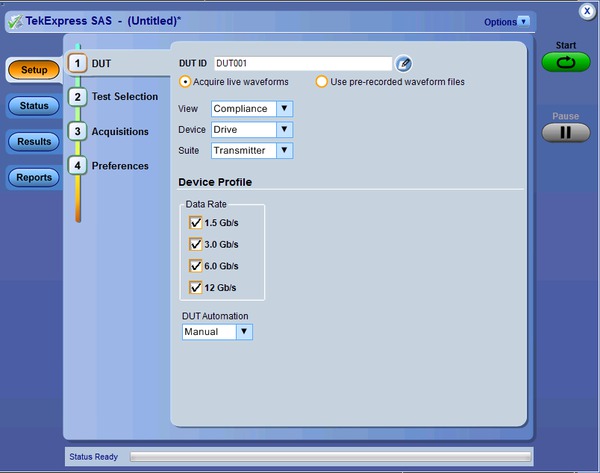
SAS-3 Transmitter Measurement Suite
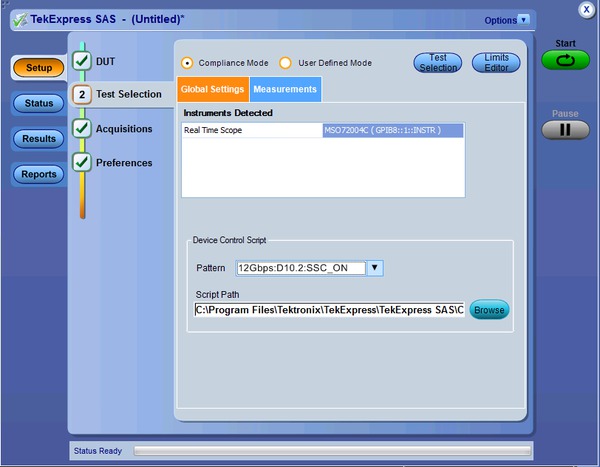
Simple DUT State Control with Custom Scripts
SAS-3 automated conformance test software
SAS-3 adds additional measurements and specification limits for next-generation SAS devices. The addition of the 12 Gb/s data rate has led to the introduction of more advanced methods of compensating for channel loss with transmitter and receiver equalization. With the higher data rate and multi-lane topology SAS designers are presented with a number of test and measurement challenges, including fixture effects and the need to isolate crosstalk. Coupling of energy from adjacent signaling lanes adds noise and jitter that can affect system interoperability. Effective debug requires jitter analysis tools that can properly separate and classify the jitter components of a signal, including those stemming from crosstalk. Option SAS3 and DPOJET software provide the in-depth analysis for characterizing Bounded Uncorrelated Jitter (BUJ) that results from cross-channel coupling of adjacent lanes.
Because of reduced margins due to test fixture losses it’s often necessary to perform test fixture de-embedding. De-embed filters can be easily created using Serial Data Link Analysis (Option SDLA64) software and then easily applied while making SAS measurements. In addition to jitter, option SAS3 also provides voltage, spread spectrum clocking (SSC), and other AC parametric measurements.
Option SAS3 also includes a new measurement, SAS3_EYEOPENING, for accurate analysis of ISI and crosstalk effects and relative vertical eye opening after reference equalization. Similar to WDP for testing 6 Gb/s SAS designs, this measurement provides a figure of merit for evaluating non-compensable ISI and crosstalk while including both reference Tx and Rx equalization effects. SAS3_EYEOPENING as implemented in option SAS3-TSGW directly reports the ratio of Vertical Eye Opening to Reference Pulse Response Cursor Ratio. This measurement is also used for calibration of ISI channel effects for 12 Gb/s SAS receiver testing.
Fast transmitter testing with the TekExpress SAS3-TSG and SAS3-TSGW software provides complete 1.5, 3, 6, and 12 Gb/s SAS validation with minimal user intervention. In addition to the measurements included with Option SAS3, the TekExpress SAS software automatically sets up the measurements, archives captured waveform data, and generates a test report. This report includes pass/fail results, including margin results, and waveform images, plots, and other relevant reference information.
SATA receiver margin testing
- RSG-01 – Gen1 (1.5 Gb/s) Receiver Jitter Test
- RSG-02 – Gen2 (3.0 Gb/s) Receiver Jitter Test
- RSG-03 – Gen3 (6.0 Gb/s) Receiver Jitter Test
- RSG-05 – Asynchronous Receiver Stress Test
- RSG-06 – Asynchronous Receiver Stress Test with SSC
- RMT-01 – Gen1 (1.5 Gb/s) Receiver Margin Test
- RMT-02 – Gen2 (3.0 Gb/s) Receiver Margin Test
- RMT-03 – Gen3 (6.0 Gb/s) Receiver Margin Test
Option SATA-RSG and SAS-RSG offer full Receiver Margin Testing (RMT) capability. While the SATA RSG (Receive Signaling Group) test is a Pass/Fail test on whether the receiver can tolerate a laboratory-grade impaired framed composite test signal, designers will want to know ‘how much margin do I have?’ TekExpress SATA software provides both a Pass/Fail RSG test and Receiver Margin Testing (RMT). When the RMT test is selected, jitter is synthesized at different frequencies and amplitudes increasingly until errors are detected on the frame error analyzer. A jitter tolerance curve is then created that shows where the device fails. This information is useful in validating the design of the receiver.
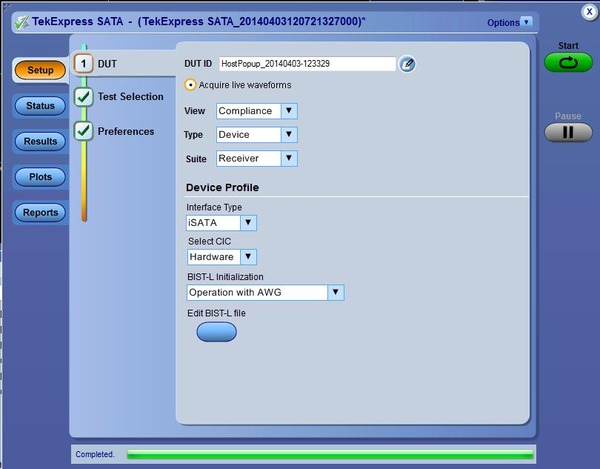
SATA Receiver Testing
Characteristics
SATA Gen1, Gen2, and Gen3 6 Gb/s PHY/TSG/OOB transmitter testing with TekExpress software
TekExpress (Opt. SATA-TSG) provides 100% automation of the SATA-IO approved PHY/TSG/OOB Method of Implementation (MOI). The software requires a DPO/MSO70000C/DX oscilloscope (or other supported oscilloscope) equipped with DPOJET (Advanced Jitter Analysis) and AWG7000C Series arbitrary waveform generator. TekExpress SATA software (run on the DPO/MSO70000C/DX) sequences through the entire test suite. The AWG is used as the device state controller to put the device or host into BIST-L (Built-In Self Test – Loopback). The AWG then sends the proper patterns (LFTP, MFTP, LBP, and HFTP) for the PHY/TSG categories. The out-of-bound (OOB) measurements include testing the OOB signal thresholds, timing, as well as gap length and detection windows of COMINIT/RESET, COMWAKE, and COMINIT OOB signals. TekExpress SATA Opt. TSG also supports ‘semi-automated’ PHY/TSG/OOB testing if the device under test supports the proper signaling without the use of an AWG.
PHY/TSG/OOB transmitter test suite
| PHY/TSG/OOB Transmitter | Description |
| PHY-01 | Unit Interval |
| PHY-02 | Frequency Long-term Stability |
| PHY-03 | Spread-spectrum Modulation Frequency |
| PHY-04 | Spread-spectrum Modulation Deviation |
| TSG-01 | Differential Output Voltage |
| TSG-02 | Rise/Fall Time |
| TSG-03 | Differential Skew |
| TSG-04 | AC Common Mode Voltage |
| TSG-05 | Rise/Fall Imbalance |
| TSG-06 | Amplitude Imbalance |
| TSG-09 | TJ at Connector, Clock to Data, Fbaud/500 (Gen1) |
| TSG-10 | DJ at Connector, Clock to Data, Fbaud/500 (Gen1) |
| TSG-11 | TJ at Connector, Clock to Data, Fbaud/500 (Gen2) |
| TSG-12 | DJ at Connector, Clock to Data, Fbaud/500 (Gen2) |
| TSG-13 | Transmit Jitter (Gen3i) |
| TSG-14 | Tx Maximum Differential Output Voltage Amplitude (Gen3i) |
| TSG-15 | Tx Minimum Differential Output Voltage Amplitude (Gen3i) |
| OOB-01 | OOB Signal Detection Threshold |
| OOB-02 | UI during OOB Signaling |
| OOB-03 | COMINIT/RESET and COMWAKE Transmit Burst Length |
| OOB-04 | COMINIT/RESET Transmit Gap Length |
| OOB-05 | COMWAKE Transmit Gap Length |
| OOB-06 | COMWAKE Gap Detection Windows |
| OOB-07 | COMINIT Gap Detection Windows |
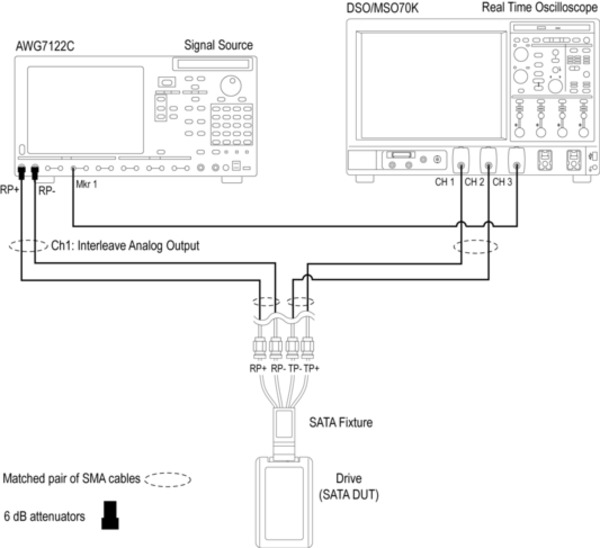
Single setup for both PHY/TSG/OOB Transmitter and RSG/RMT Receiver Testing
SATA RSG-RMT receiver testing with TekExpress software
TekExpress (Opt. SATA-RSG) provides automation of the SATA-IO approved Receiver Signaling Group / Receiver Margin Test (RSG/RMT) MOI. A supported configuration includes a DPO/MSO70000C/DX Series oscilloscope (or other supported oscilloscope) equipped with DPOJET (Advanced Jitter Analysis), an AWG7000C Series arbitrary waveform generator, and a frame error analyzer. The TekExpress SATA software first initiates a BIST-L sequence to the device under test to put the device into loopback. After loopback is achieved and the loopback transmitter is transmitting good data to the frame error analyzer, the AWG sends jitter at the frequency tones and amplitudes defined in the specification to the receiver. If the frame error detector detects errors on the loopback channel, then the device fails the RSG test. Prior to the test, the oscilloscope is used to calibrate the impaired signal (jitter and amplitude) to be used in the test.
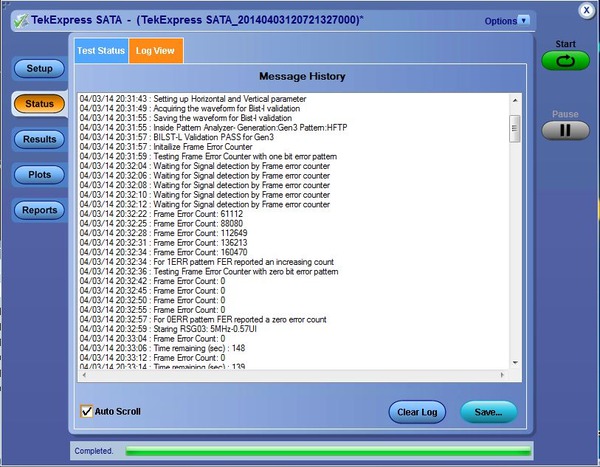
SATA RSG/RMT Test Status - Configuring and Verifying the Scope Error Detector
| RSG/RMT Receiver | Description |
| RSG-01 | Gen1 (1.5 Gb/s) Receiver Jitter Test |
| RSG-02 | Gen2 (3.0 Gb/s) Receiver Jitter Test |
| RSG-03 | Gen3 (6.0 Gb/s) Receiver Jitter Test |
| RSG-05 | Asynchronous Receiver Stress Test |
| RSG-06 | Asynchronous Receiver Stress Test with SSC |
| RMT-01 | Gen1 (1.5 Gb/s) Receiver Margin Test |
| RMT-02 | Gen2 (3.0 Gb/s) Receiver Margin Test |
| RMT-03 | Gen3 (6.0 Gb/s) Receiver Margin Test |
Complete device/host test system
TekExpress (Opt. SATA-DHB) provides complete automation of tests required for devices and hosts. It combines RSG/RMT and PHY/TSG/OOB tests using a DPO/MSO70000C/DX Series oscilloscope and an AWG7000C Series arbitrary waveform generator.
SAS3 transmitter characterization
TekExpress (Opt. SAS3-TSG and SAS3-TSGW) software provides physical layer validation measurements which adhere to the SCSI Trade Association’s SAS-3 (1.5, 3, 6, and 12 Gb/s) Physical Layer Test conformance program. It encompasses the breadth of SAS conformance tests defined by UNH-IOL and the SCSI Trade Association (STA). TekExpress supports full test automation with devices and host designs that have incorporated test mode initiation. For designs that don’t include test mode support TekExpress SAS-TSG has two options for testing:
Manual Operation (Default) – Prompts the user to output the required test signals from their SAS device or host. Users need to be able to control SSC on or off, Scrambled Zero, D10.2 (Clock patterns), and D24.3.
Batch File Scripting – TekExpress SAS-TSG can be configured to call a batch scripting mechanism at the required pattern transitions if interactions with customer-specific serial ports or other interfaces are required.
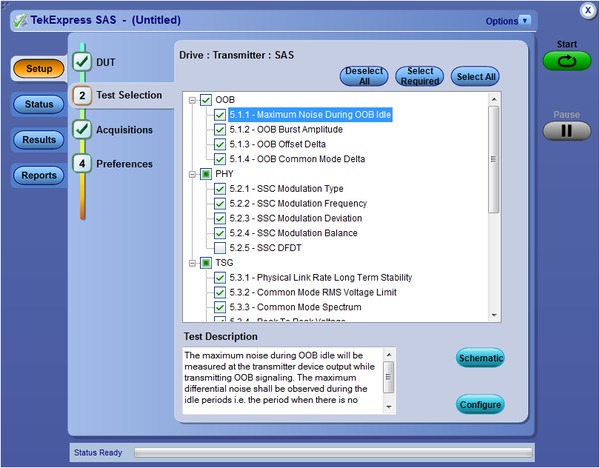
SAS-3 Transmitter Test Suite
SAS3 transmitter test suite
Options SAS3-TSG, SAS3-TSGW, and SAS3 software provide physical-layer validation measurements which adhere to the latest SAS-3 physical-layer specification.
| Test | Description |
| Group 1: OOB Signaling | |
| 5.1.1 | Maximum Noise During OOB Idle |
| 5.1.2 | OOB Burst Amplitude |
| 5.1.3 | OOB Offset Delta |
| 5.1.4 | OOB Common Mode Delta |
| Group 2: Spread Spectrum Clocking (SSC) Requirements | |
| 5.2.1 | SSC Modulation Type |
| 5.2.2 | SSC Modulation Frequency |
| 5.2.3 | SSC Modulation Deviation |
| 5.2.4 | SSC Balance |
| 5.2.5 | SSC DFDT |
| Group 3: NRZ Data Signaling Requirements | |
| 5.3.1 | Physical Link Rate Long Term Stability |
| 5.3.2 | Common Mode RMS Voltage |
| 5.3.3 | Common Mode Spectrum |
| 5.3.4 | Peak-to-Peak Voltage |
| 5.3.5 | Voltage Modulation Amplitude (VMA) |
| 5.3.6 | Equalization |
| 5.3.7 | Rise Time |
| 5.3.8 | Fall Time |
| 5.3.9 | Random Jitter (RJ) |
| 5.3.10 | Total Jitter (TJ) |
| 5.3.11 | Waveform Distortion Penalty (WDP) |
| 5.3.12 | SAS3_EYEOPENING |
| 5.3.13 | Pre Cursor Equalization |
| 5.3.14 | Post Cursor Equalization |
| 5.3.15 | Transition Bit Voltage PK-PK (VHL) |
| 5.3.16 | Unit Interval |
Ordering Information
| Conformance Testing | Models |
|---|---|
| SATA/SAS (6 Gb/s) | 12.5 GHz or higher bandwidth models |
| SAS-3 (12 Gb/s) | 25 GHz or higher bandwidth models recommended, minimum of 20 GHz is required |
TEKEXP (for SAS-RSG)
TekExpress automated conformance test software. For a new system, order one or more of the options listed below. The software installs on the controller PC or instrument. A USB key dongle with software key enables the selected option set.
Includes: Latest TekExpress product software DVD kit (020-2913-xx), USB key dongle (119-6963-xx), online documentation, and printable manual in PDF format are supplied.
TEKEXPUP (for SAS-RSG)
TekExpress automated conformance test software upgrade. To upgrade an existing system, order one or more of the options listed below. The above USB key dongle is upgraded with the upgraded option set through a software key.
Includes: Latest TekExpress product software DVD kit (020-2913-xx) and upgrade SW key. Online documentation and printable manual in PDF format are supplied.
Prerequisite host system software requirements
- Microsoft Windows XP OS with SP2 or later, or Windows 7 OS (64 bit support)
- Microsoft Excel 2002 or above
- Microsoft Explorer 6.0 SP1 or later
- Microsoft Photo Editor 3.0 or equivalent for viewing image files
- Adobe Reader 6.0 or equivalent software for viewing portable document format (PDF) files
Options
Note: At least one option required when ordering TEKEXP or TEKEXPUP. TekExpress options may also be ordered as an option to a DPO/MSO70000C/DX Series oscilloscope.
| Option | Description |
|---|---|
| Opt. SAS-RSG 1 | SAS RSG/RMT Receiver Tests for TekExpress |
1 SAS-RSG and SATA-RSG testing uses the AWG as a test pattern generator and DPO/MSO oscilloscope as the frame error detector. For RSG testing, the oscilloscope options ERRDT and ST6G are required.
SAS3-TSG, SAS3-TSGW, SAS3
| Model | New Instrument Orders | Product Upgrades | Floating Licenses |
|---|---|---|---|
| DPO/MSO70000C/DX Series Real-Time Oscilloscope | Opt. SAS3-TSG 1 3 | DPO-UP SAS3-TSG | DPOFL-SAS3-TSG |
| Opt. SAS3-TSGW 2 | DPO-UP SAS3-TSGW | DPOFL-SAS3-TSGW | |
| Opt. SAS3 3 | DPO-UP-SAS3 | DPOFL-SAS3 |
1 SAS3-TSG includes SAS3 free of charge as a bundle option as the keycode for SAS3-TSG also enables SAS3
2 SAS3-TSG required to run SAS3-TSGW.
3 Requires Option DJA (DPOJET Jitter and Eye Diagram Analysis) and 5XL record length (50 Million point memory). DJA is standard on MSO70000 Series oscilloscopes.
SATA-TSG, SATA-RSG, SATA-DHB
| Model | New Instrument Orders | Product Upgrades | Floating Licenses |
|---|---|---|---|
| DPO/MSO70000C/DX Series Real-Time Oscilloscope | Opt. SATA-TSG | DPO-UP SATA-TSG | DPOFL-SATA-TSG |
| Opt. SATA-RSG 1 1 | DPO-UP SATA-RSG | DPOFL-SATA-RSG | |
| Opt. SATA-DHB 2 | DPO-UP-SATA-DHB | DPOFL-SATA-DHB |
1 Opt. SATA-RSG requires opt ERRDT and opt ST6G
2 Opt. SATA-DHB is a bundle of opt. SATA-TSG and opt. SATA-RSG
Recommended test instruments
|
Test Instruments |
Description |
|---|---|
| DPO/MSO70000C/DX Series Real-Time Oscilloscope | For TSG/PHY/OOB and RSG/RMT testing |
| AWG7000C Series Signal Source with Options 01, 06, 08 | For all device and host test suites including TSG/PHY/OOB and RSG/RMT testing |
Recommended accessories
|
Accessories |
Description |
|---|---|
| TF-SAS-TPA-P | SAS Gen3 Plug Adapter |
| TF-SAS-TPA-R | SAS Gen3 Receptacle Adapter |
| TF-SAS-TPA-PRC | SAS Gen3 Adapter Kit (Plug/Receptacle/Cal) |
| TF-SASHD-TPAR-P | miniSASHD 12G SAS (Right Side) Plug |
| TF-SASHD-TPAL-P | miniSASHD 12G SAS (Left Side) Plug |
| TF-SASHD-TPA-R | miniSASHD 12G SAS Receptacle |
| TF-SASHD-TPA-PR2XC | miniSASHD 12G SAS (Right Side) Plug, Receptacle, Dual 2X Calibration |
| TF-SASHD-TPA-2XC | miniSASHD 12G SAS Dual 2X Calibration |
| TF-SASHD-TPAR-PR | miniSASHD 12G SAS (Right Side) Plug, Receptacle |
| TF-SATA-TPA-P | SATA Gen3 Plug Adapter |
| TF-SATA-TPA-R | SATA Gen3 Receptacle Adapter |
| TF-SATA-TPA-PRC | SATA Gen3 Adapter Kit (Plug/Receptacle/Cal) |
55W-21409-9

Tektronix is registered to ISO 9001 and ISO 14001 by SRI Quality System Registrar. Product(s) complies with IEEE Standard 488.1-1987, RS-232-C, and with Tektronix Standard Codes and Formats.


