

Contact us
Call
Call us at
Available 6:00 AM – 5:00 PM (PST) Business Days
Download
Download Manuals, Datasheets, Software and more:
Feedback
OM4106D, OM4006D Coherent Lightwave Signal Analyzer Datasheet
OM4000 Series Datasheet
The products on this datasheet are no longer being sold by Tektronix.
View Tektronix Encore for reconditioned test equipment.
Check support and warranty status for these products.
OM4000 Series Datasheet
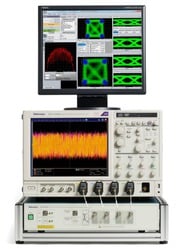
The OM4000 Coherent Lightwave Signal Analyzer (CLSA) is a 1550 nm (C- and L-band) fiber-optic test system for visualization and measurement of complex modulated signals, offering a complete solution to testing both coherent and direct-detected transmission systems. The CLSA consists of a polarization- and phase-diverse receiver and analysis software enabling simultaneous measurement of modulation formats important to advanced fiber communications, including polarization-multiplexed (PM-) QPSK. The CLSA software performs all calibration and processing functions to enable real-time burst-mode constellation diagram display, eye-diagram display, Poincaré sphere, and bit-error detection.
Key features
Unparalleled flexibility- Coherent lightwave signal analyzer architecture is compatible with both real-time and equivalent-time oscilloscopes 1
- Complete coherent signal analysis system for polarization-multiplexed QPSK, offset QPSK, QAM, differential BPSK/QPSK, and other advanced modulation formats
- Displays constellation diagrams, phase eye diagrams, Q-factor, Q-plot, spectral plots, Poincaré Sphere, signal vs. time, laser phase characteristics, BER, with additional plots and analyses available through the MATLAB interface
- Measures polarization mode dispersion (PMD) of arbitrary order with most polarization multiplexed signals
- Precise coherent receiver hardware provides minimal variation over temperature and time for a high degree of accuracy and high-stability, polarization-diverse, optical field detection
- Highly linear photo detection allows operation at high local oscillator and signal power levels to eliminate electrical amplification
- An integrated pair of ECDL tunable lasers for use as a local oscillator and another for self-test. Both lasers have industry-best linewidth and tuning range for any wavelength within the band
- Coherent lightwave signal analyzer software tolerates >5 MHz instantaneous signal laser linewidth – compatible with standard network tunable sources such as DBR and DFB lasers
- No laser phase or frequency locking required
- Smart polarization separation follows signal polarization
- User access to internal functions with a direct MATLAB 2 interface
- Remote access available through Ethernet
- Superior user interface offers comprehensive visualization for ease-of-use combined with the power of MATLAB
- Coherent lightwave signal analyzer software included with OM1106 and OM4000 series products
- Multi-carrier software option allows user-definable superchannel setup
- Superchannel configuration allows user to define number of channels, channel frequency, and channel modulation format
- Test automation acquires complete measurements at each channel
- Integtrated measurement results allow easy channel-to-channel comparisons
1 Certain features may be available only when used with Tektronix oscilloscopes.
2 MATLAB is a registered trademark of MathWorks.
OM4000 Series instrument flexibility
The OM4000 is unique in the industry in that it works with both real-time and equivalent-time oscilloscopes. This unprecedented architecture allows the user to get the benefits of either acquisition format all with a single CLSA. For customers whose analysis requires a high sample rate, using the CLSA with a real-time oscilloscope, such as the Tektronix DPO73304D, may be optimal. For customers whose analysis requires high vertical resolution – such as modulator characterization – an equivalent-time oscilloscope may be the most beneficial. Using a Tektronix oscilloscope solution of sufficient bandwidth provides bit rate analysis that exceeds 240 Gb/s.
OM4000 Series user interface (OUI)
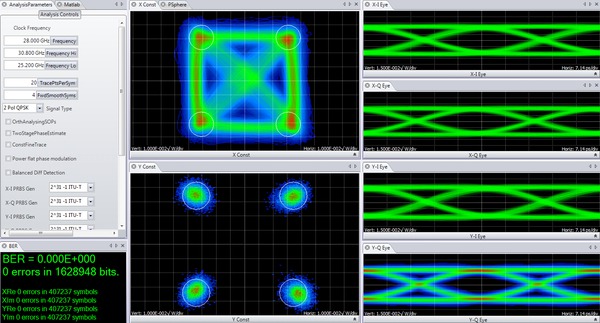
The common thread through the Coherent Lightwave Signal Analyzer product line is the OUI which controls the operation and display of data. Color-grade, persistence, and color-key options are available to help you visualize the data. In the figure, the horizontal transitions are more rare than the vertical transitions due to the relative timing of the IQ data sequence (upper middle of figure). The other polarization constellation is shown in color grade with only the symbol points (lower middle). Color grade is also available for the eye diagram (bottom right).
This OUI can also be ordered separately without the OM4000 for to analyze data with another coherent receiver system. The data-capture and analysis only version of the OUI software is called the OM1106.
OM4000 user interface (OUI) showing color-grade graphics options. Symbols can also be colored to a key indicating prior state. Data shown is 112 Gb/s PM-QPSK.
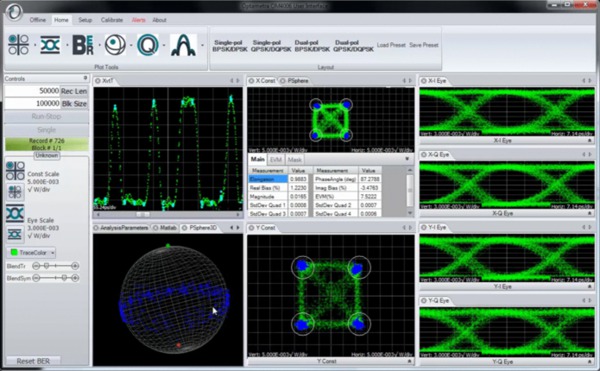
OM4000 User Interface (OUI) showing display of select equivalent-time measurements.
Interaction between OM4000 Series user interface (OUI) and MATLAB
A series of MATLAB scripts are then called to process the data and produce the resulting field variables. The OUI then retrieves these variables and plots them. Automated tests can be accomplished by connecting to the OUI or by connecting directly to the MATLAB workspace.
The user does not need any familiarity with MATLAB; the OUI can manage all MATLAB interactions. However, advanced users can access the MATLAB interface internal functions to create user-defined demodulators and algorithms, or for custom analysis visualization.
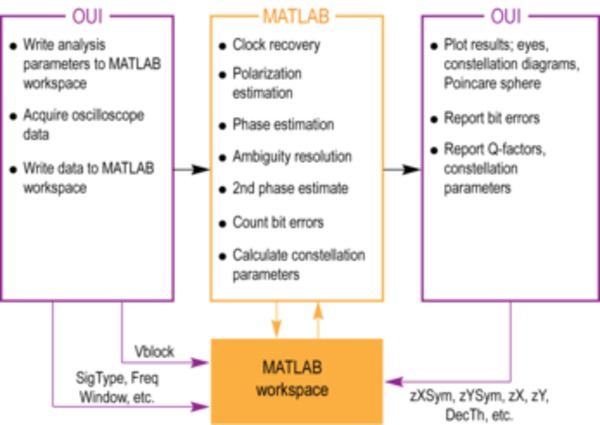
OUI/MATLAB data flow
Signal processing approach
For real-time sampled systems, the first step after data acquisition is to recover the clock and retime the data at 1 sample per symbol at the symbol center for the polarization separation and following algorithms (shown as upper path in the figure). The data is also re-sampled at 10X the baud rate (user settable) to define the traces that interconnect the symbols in the eye diagram or constellation (shown as the lower path).
The clock recovery approach depends on the chosen signal type. Laser phase is then recovered based on the symbol-center samples. Once the laser phase is recovered, the modulation part of the field is available for alignment to the expected data for each tributary. At this point bit errors can be counted by looking for the difference between the actual and expected data after accounting for all possible ambiguities in data polarity. The software selects the polarity with the lowest BER. Once the actual data is known, a second phase estimate can be done to remove errors that may result from a laser phase jump. Once the field variables are calculated, they are available for retrieval and display by the OUI.
At each step the best algorithms are chosen for the specified data type, requiring no user intervention unless desired.
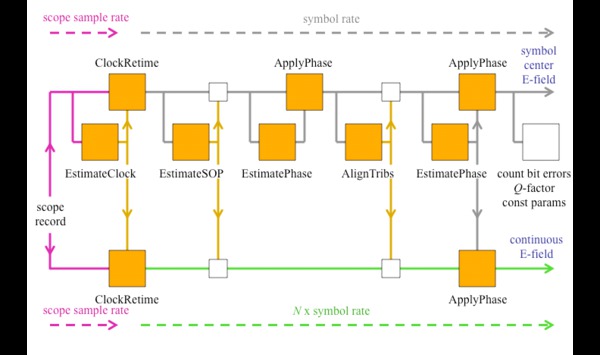
Data flow through the “Core Processing” engine.
Get up and running fast with the easy-to-use OUI
The user interface for the Coherent Lightwave Signal Analyzer is called the OUI. The OUI allows you to easily configure and display your measurements and also provides a means of software control for third-party applications using WCF or .NET communication. It can also be controlled from MATLAB or LabVIEW.
The following image shows a QAM measurement setup. The plots can be moved, docked, or resized. You can close or create plots to display just the information you need.
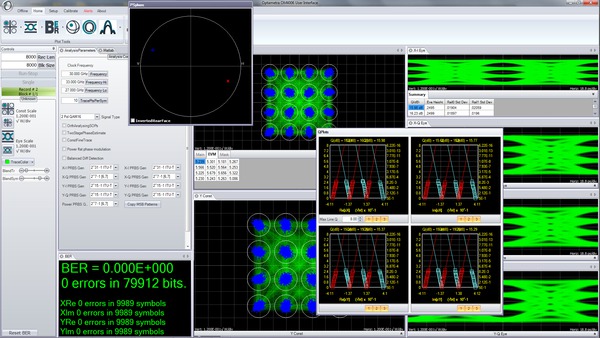
QAM measurements on the OM4000 User Interface (OUI).
In addition to the numerical measurements provided on the plots, the measurements are also summarized on the Measurements window where statistics are also displayed. An example of some of these measurements is shown in the figure.
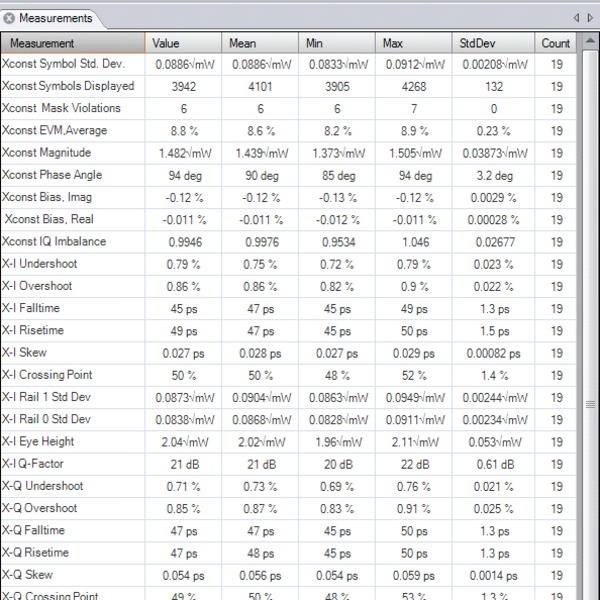
Annotated measurement table from OM4000 User Interface (OUI).
Make adjustments faster
The OUI is designed to collect data from the oscilloscope and move it into the MATLAB workspace with extreme speed to provide the maximum data refresh rate. The data is then processed in MATLAB and the resulting variables are extracted for display.
Take control with tight MATLAB integration
Since 100% of the data processing occurs in MATLAB, test engineers can easily probe into the processing to understand each step along the way. R&D labs can also take advantage of the tight MATLAB integration by writing their own MATLAB algorithms for new techniques under development.
Use the optimum algorithm
Don’t worry about which algorithm to use. When you select a signal type in our OUI (for example, PM-QPSK), the software applies optimal algorithm to the data for that signal type. Each signal type has a specially designed signal processing approach that is best for the application. This means that you can get results right away.
Don’t get stymied by laser phase noise
Signal processing algorithms designed for electrical wireless signals don’t always work well with the much noisier sources used for complex optical modulation signals. Our robust signal processing methods tolerate enough phase noise to even make it possible to test signals which would traditionally be measured by differential or direct detection such as DQPSK.
Find the right BER
Our Q-plots are a great way to get a handle on your data signal quality. Numerous BER measurements vs. decision threshold are made on the signal after each data acquisition. Plotting BER vs. decision threshold shows the noise properties of the signal. Gaussian noise will produce a straight line on the Q-plot. The optimum decision threshold and extrapolated BER are also calculated. This gives you two BER values: the actual counted errors divided by the number of bits counted, as well as the extrapolated BER for use when the BER is too low to measure quickly.
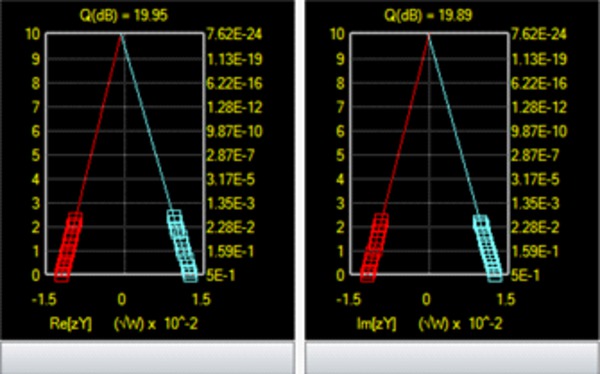
Q-plot.
Constellation diagrams
Once the laser phase and frequency fluctuations are removed, the resulting electric field can be plotted in the complex plane. When only the values at the symbol centers are plotted, this is called a Constellation Diagram. When continuous traces are also shown in the complex plane, this is often called a Phase Diagram. Since the continuous traces can be turned on or off, we refer to both as the Constellation Diagram. The scatter of the symbol points indicates how close the modulation is to ideal. The symbol points spread out due to additive noise, transmitter eye closure, or fiber impairments. The scatter can be measured by symbol standard deviation, error vector magnitude, or mask violations.
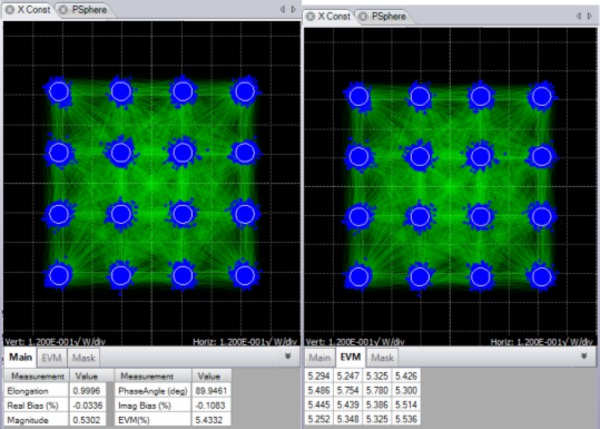
Constellation diagram.
Constellation measurements
Measurements made on constellation diagrams are available on the “fly-out” panel associated with each graphic window. The measurements available for constellations are described below.
| Measurement | Description |
|---|---|
| Elongation | The ratio of the Q modulation amplitude to the I modulation amplitude is a measure of how well balanced the modulation is for the I and Q branches of a particular polarization’s signal |
| Real Bias | Expressed as a percent, this says how much the constellation is shifted left or right. Real (In-phase) bias other than zero is usually a sign that the In-phase Tributary of the transmitter modulator is not being driven symmetrically at eye center |
| Imag Bias | Expressed as a percent, this says how much the constellation is shifted up or down. Imaginary (Quadrature) bias other than zero is usually a sign that the Quadrature Tributary of the transmitter modulator is not being driven symmetrically at eye center |
| Magnitude | The mean value of the magnitude of all symbols with units given on the plot. This can be used to find the relative sizes of the two Polarization Signals |
| Phase Angle | The transmitter I-Q phase bias. It should normally be 90 |
| StdDev by Quadrant | The standard deviation of symbol point distance from the mean symbol in units given on the plot. This is displayed for BPSK and QPSK |
| EVM (%) | The RMS distance of each symbol point from the ideal symbol point divided by the magnitude of the ideal symbol expressed as a percent |
| EVM Tab | The separate EVM tab shown in the right figure provides the EVM% by constellation group. The numbers are arranged to correspond to the symbol arrangement. This is ideal for setting Transmitter modulator bias. For example, if the left side groups have higher EVM than the right side, adjust the In-phase Transmitter modulator bias to drive the negative rail harder |
| Mask Tab | The separate Mask tab shown in the right figure provides the number of mask violations by constellation group. The numbers are arranged to correspond to the symbol arrangement. The mask threshold is set in the Engine window and can be used for pass/fail transmitter testing |
Color features
The Color Grade feature provides an infinite persistence plot where the frequency of occurrence of a point on the plot is indicated by its color. This mode helps reveal patterns not readily apparent in monochrome. Note that the lower constellation groups of the example below have higher EVM than the top groups. In most cases this indicates that the quadrature modulator bias was too far toward the positive rail. This is not evident from the crossing points which are approximately correct. In this case an improperly biased modulator is concealing an improperly biased driver amp.
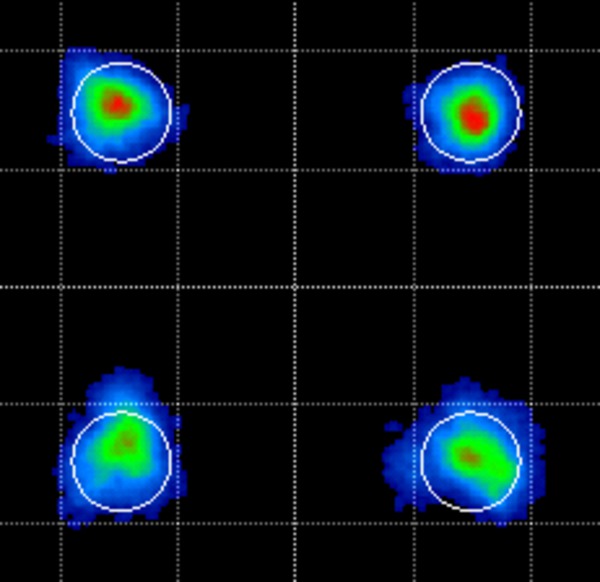
Color Grade Constellation.
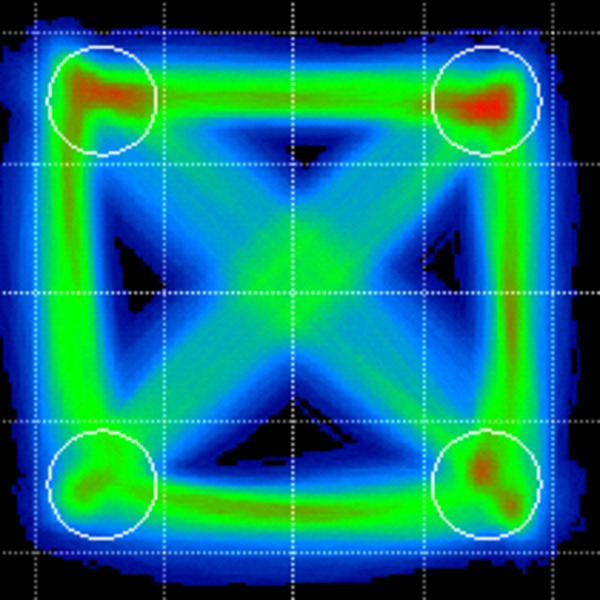
Color Grade with fine traces.
Color Key Constellation Points is a special feature that works when not in Color Grade. In this case the symbol color is determined by the value of the previous symbol. This helps reveal pattern dependence. Here it shows that pattern dependence is to blame for the poor EVM on the other groups. The modulator nonlinearity would normally mask this type of pattern dependence due to RF cable loss, but here the improper modulator bias is allowing that to be transferred to the optical signal.
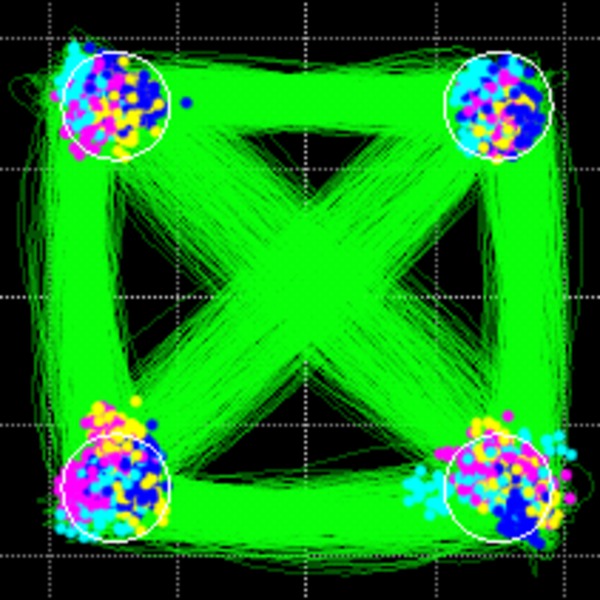
Color Key Constellation – If the prior symbol was in Quadrant 1 (upper right) then the current symbol is colored Yellow. If the prior symbol was in Quadrant 2 (upper left) then the current symbol is colored Magenta. If the prior symbol was in Quadrant 3 (lower left) then the current symbol is colored Light Blue (Cyan). If the prior symbol was in Quadrant 4 (lower right) then the current symbol is colored Solid Blue.
Eye diagrams
Eye diagram plots can be selected for appropriate modulation formats. Supported eye formats include Field Eye, which is simply the real part of the phase trace in the complex plane, Power Eye which simulates the eye displayed with a Tektronix oscilloscope optical input, and Diff-Eye, which simulates the eye generated by using a 1-bit delay-line interferometer. As with the Constellation Plot you can right-click to choose color options as well. The Field Eye diagram provides the following measurements:
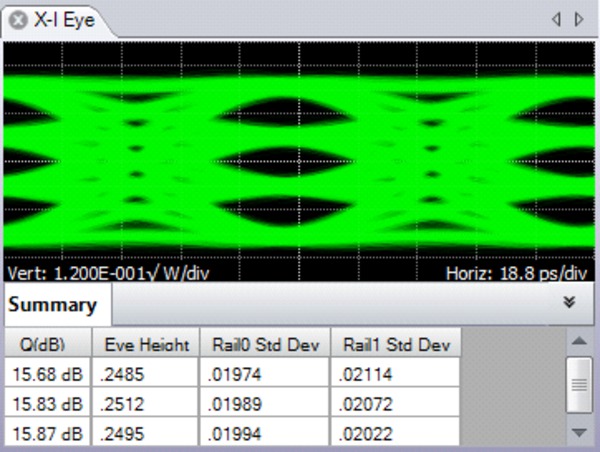
Field eye diagram.
Field eye measurements
| Measurement | Description |
|---|---|
| Q (dB) | Computed from 20 × Log10 of the linear decision threshold Q-factor of the eye |
| Eye Height | The distance from the mean 1-level to the mean 0-level (units of plot) |
| Rail0 Std Dev | The standard deviation of the 0-level as determined from the decision threshold Q-factor measurement |
| Rail1 Std Dev | The standard deviation of the 1-level as determined from the decision threshold Q-factor measurement |
In the case of multilevel signals, the above measurements are listed in the order of the corresponding eye openings in the plot. The top row values correspond to the top-most eye opening.
The above functions involving Q-factor use the decision threshold method described in the paper by Bergano 1. When the number of bit errors in the measurement interval is small, as is often the case, the Q-factor derived from the bit error rate may not be an accurate measure of the signal quality. However, the decision threshold Q-factor is accurate because it is based on all the signal values, not just those that cross a defined boundary.
1 N.S. Bergano, F.W. Kerfoot, C.R. Davidson, “Margin measurements in optical amplifier systems,” IEEE Phot. Tech. Lett., 5, no. 3, pp. 304-306 (1993).
Additional measurements available for nonoffset formats
| Measurement | Description |
|---|---|
| Overshoot | The fractional overshoot of the signal. One value is reported for the tributary, and for a multilevel (QAM) signal it is the average of all the overshoots |
| Undershoot | The fractional undershoot of the signal (overshoot of the negative-going transition) |
| Risetime | The 10-90% rise time of the signal. One value is reported for the tributary, and for a multilevel (QAM) signal it is the average of all the rise times |
| Falltime | The 90-10% fall time of the signal |
| Skew | The time relative to the center of the power eye of the midpoint between the crossing points for a particular tributary |
| Crossing Point | The fractional vertical position at the crossing of the rising and falling edges |
Measurements vs. Time
In addition to the eye diagram, it is often important to view signals versus time. For example, it is instructive to see what the field values were doing in the vicinity of a bit error. All of the plots which display symbol-center values will indicate if that symbol is errored by coloring the point red (assuming that the data is synchronized to the indicated pattern). The Measurement vs. Time plot is particularly useful in this way as it helps to distinguish errors due to noise, pattern dependence, or pattern errors.
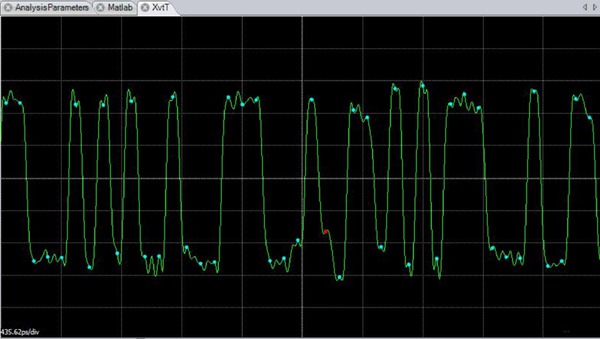
Errored symbol in Measurement vs. Time plot.
3D visualization tools
Complex-modulation signals are inherently 3D since in-phase and quadrature components are being changed vs. time. The 3D Eye Diagram provides a helpful combination of the Constellation and Eye diagrams into a single 3D diagram. This helps to visualize how the complex quantity is changing through the bit period. The diagram can be rotated and scaled.
Also available in 3D is the Poincaré Sphere. The 3D view is helpful when viewing the polarization state of every symbol. The symbols tend to form clusters on the Poincaré Sphere which can be revealing to expert users. The non-normalized Stokes Vectors can also be plotted in this view.
Analysis Controls
The Analysis Controls window allows you to set parameters relevant to the system and its measurements.
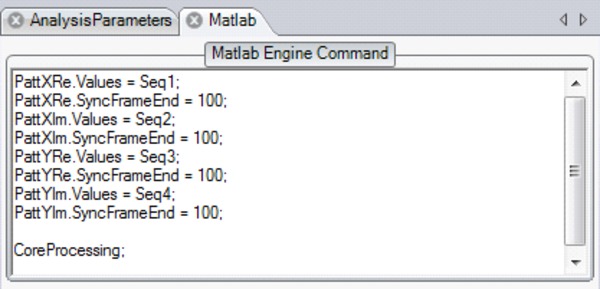
MATLAB window.
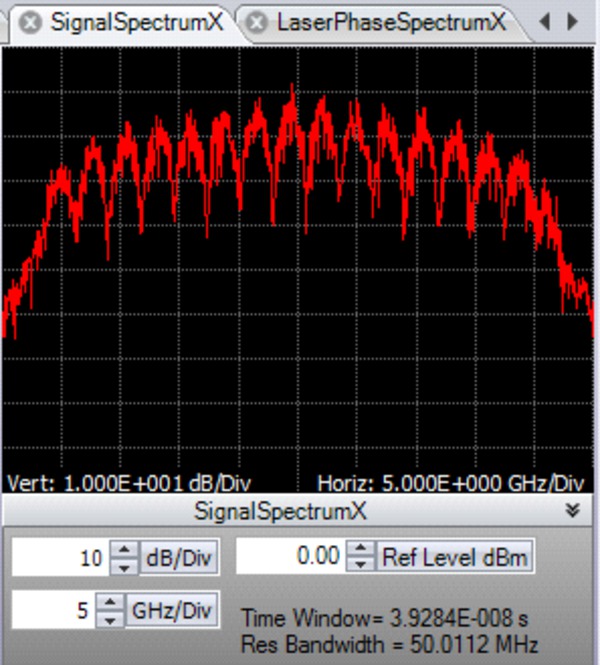
Signal Spectrum window.
| Parameter | Description |
|---|---|
| Frequency | Clock recovery is performed in software, so only a frequency range of expected clock frequencies is required |
| Signal Type | The signal type (such as PM-QPSK) determines the algorithm used to process the data |
| Data Patterns | Specifying the known PRBS or user pattern by physical tributary permits error counting, constellation orientation, and two-stage phase estimation |
User patterns may be assigned in the MATLAB window shown here. The data pattern can be input into MATLAB or found directly through measurement of a high SNR signal.
Signal spectra
An FFT of the corrected electric field vs. time can reveal much about the data signal. Asymmetric or shifted spectra can indicate excessive laser frequency error. Periodicity in the spectrum shows correlation between data tributaries. The FFT of the laser phase vs. time data can be used to measure laser phase noise.
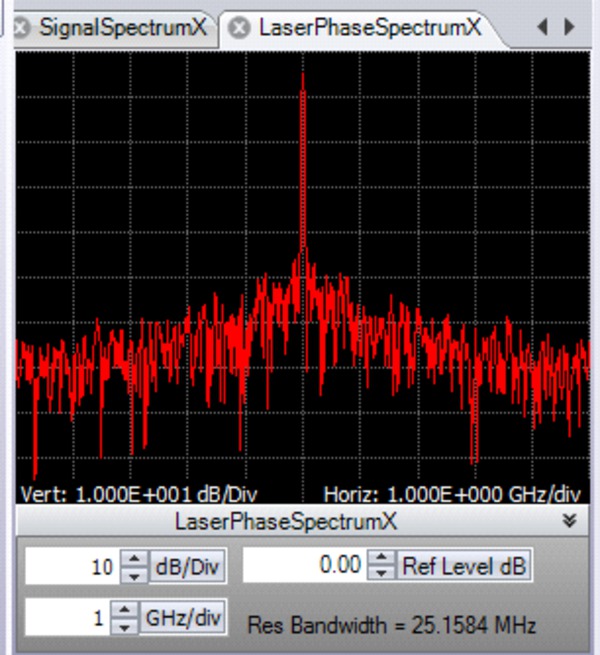
Laser Phase Spectrum window
Poincaré Sphere
Polarization data signals typically start out well aligned to the PM-fiber axes. However, once in standard single mode fiber, the polarization states will start to drift. However, it is still possible to measure the polarization states and determine the polarization extinction ratio. The software locks on each polarization signal. The polarization states of the two signals are displayed on a circular plot representing one face of the Poincaré sphere. States on the back side are indicated by coloring the marker blue. The degree of orthogonality can be visualized by inverting the rear face so that orthogonal signals always appear in the same location with different color. So, Blue means back side (negative value for that component of the Stokes vector), X means X-tributary, O means Y-tributary, and the Stokes vector is plotted so that left, down, blue are all negative on the sphere.
InvertedRearFace – Checking this box inverts the rear face of the Poincaré sphere display so that two orthogonal polarizations will always be on top of each other.
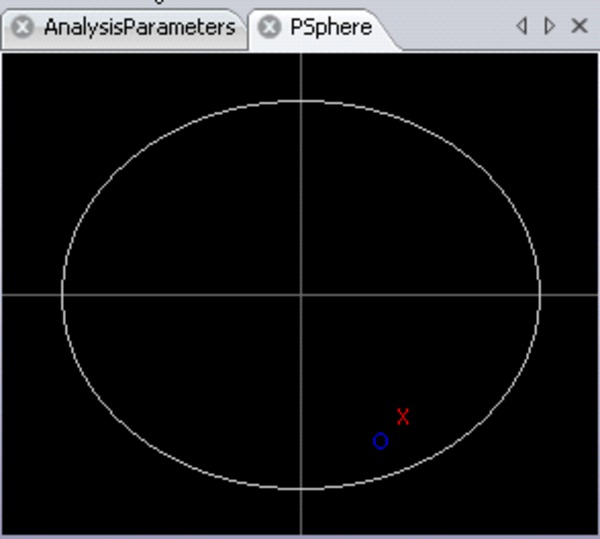
Poincaré Sphere window.
Impairment measurement and compensation
When studying transmission implementations, it is important to be able to compensate for the impairments created by long fiber runs or optical components. Chromatic Dispersion (CD), and Polarization Mode Dispersion (PMD) are two important linear impairments that can be measured or corrected by the OM4000 software. PMD measurement is based on comparison of the received signal to the back-to-back transmitter signal or to an ideal signal. This produces a direct measure of the PMD instead of estimating based on adaptive filter behavior. The user can specify the number of PMD orders to calculate. Accuracy for 1st-order PMD is ~1 ps at 10 Gbaud. There is no intrinsic limit to the CD compensation algorithm. It has been used successfully to compensate for many thousands of ps/nm.
Recording and payback
You can record the workspace as a sequence of .MAT files using the Record button in the Offline ribbon. These files are recorded in a default directory, usually the MATLAB working directory, unless previously changed. You can play back the workspace from a sequence of .MAT files by first using the Load button in the Offline Commands section of the Home ribbon. Load a sequence by marking the files you want to load using the Ctrl key and marking the filenames with the mouse. You can also load a contiguous series using the Shift key and marking the first and last filenames in the series with the mouse. Use the Run button in the Offline Commands section of the Home ribbon to cycle through the .MAT files you recorded. All filtering and processing you have implemented occurs on the recorded files as they are replayed.
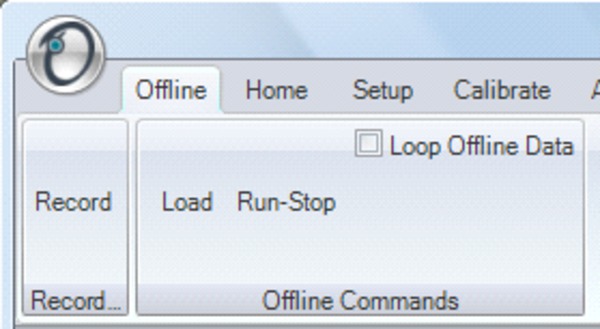
Workspace record and playback.
Multi-carrier superchannel support
Even as 100G coherent optical systems are being deployed, architectures for 400G and beyond are being proposed and developed. One architecture gaining prominence is the “superchannel.” The configurations of superchannels vary considerably. Some proposals call for 400G to be achieved by 2 carriers of DP-16QAM. Other proposals are for 500 Gb/s consisting of 10 or more carriers of DP-QPSK. Some of these carriers are arranged on a standard ITU carrier grid, while others support 12.5 GHz “grid-less” layouts. Clearly, flexible test tools are needed for such next-generation systems. Option MCS to the OM4106D and OM1106 offers the complete flexibility to carrier out such tests.
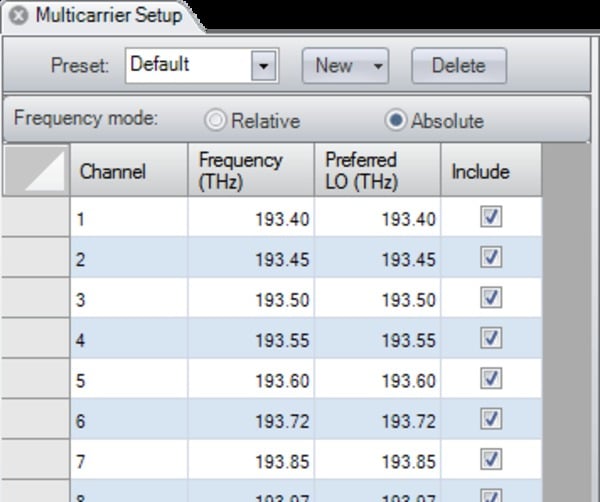
Multi-carrier setup.
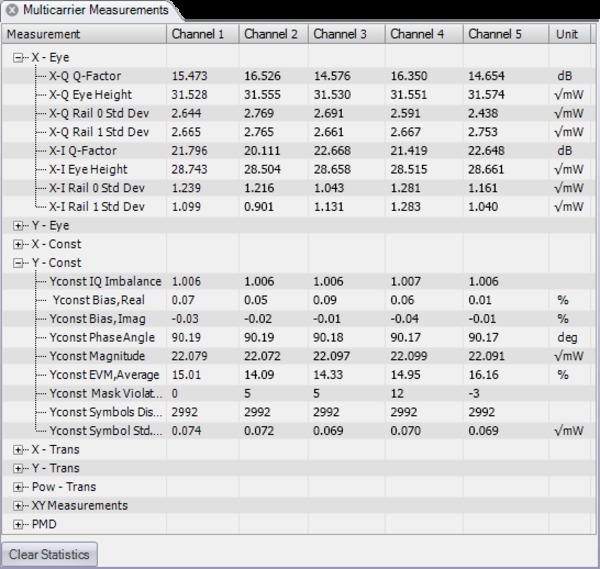
Multi-carrier measurements.
User-definable superchannels
For manufacturers getting a jump on superchannels, or researchers investigating alternatives, user-definable superchannel configurations are a must. Option MCS allows the user to set up as many carriers within the superchannel definition as necessary. Each carrier can have an arbitrary center frequency; no carrier grid spacing is imposed. The carrier center frequencies can be set as absolute values (in THz) or as relative values (in GHz). Typically, the OUI will retune the OM4106D local oscillator for each carrier. However, in cases where multiple carriers may fit within the oscilloscope bandwidth, multiple carriers can be demodulated in software from a common local oscillator frequency. The user is given the flexibility to specify the preferred local oscillator frequency for each carrier.
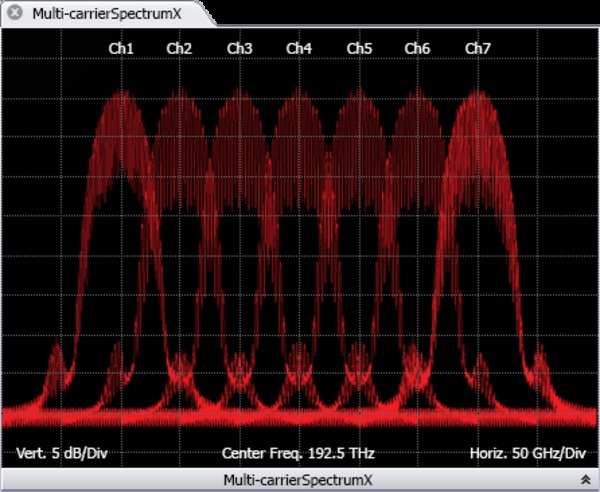
Superchannel spectrum.
Automated measurements
Once the superchannel is configured, the system can take measurements on each channel without further intervention by the user. The OUI automatically tunes the OM4106D local oscillator, takes measurements at that channel, re-tunes to the next channel, and so forth until measurements of the entire superchannel have been taken. Results of each channel are displayed in real-time and persist after all measurements are made for easy comparison.
Integrated measurement results
All of the same measurement results that are made for single channels are also available for individual channels in a superchannel configuration. Additionally, multi-carrier measurement results are available side-by-side for comparison between channels. Visualizations such as eye diagrams, constellation diagrams, and optical spectrum plots can be viewed a single channel at a time, or with all channels superimposed for fast comparison. For separating channels in a multi-carrier group, several different filters can be applied, including raised cosine, Bessel, Butterworth, Nyquist, and user-defined filters. These filters can be any order or roll-off factor and track the signal frequency.
The OM4106D is part of a complete coherent optical test system
Tektronix is the only test and measurement vendor that can offer a complete coherent optical test system from signal generation, to modulation, acquisition, and analysis.
Coherent optical signal generation
Tektronix offers several signal generation instruments capable of generating coherent optical waveforms. The AWG70000 Series Arbitrary Waveform Generators (AWG) and the PPG3000 Series Programmable Pattern Generators offer the flexibility to choose the type of signal generation instrument suited to the test requirements.
The AWG70000 Series can reach sampling rates as high as 50GSa/s with 10 bits vertical resolution. This level of performance allows for the direct generation of IQ basebands signals required by modern coherent optical communication systems. The arbitrary waveform generation capabilities of the AWG70000 Series makes it possible to create multi-level signals such as 16QAM or 64QAM, add impairments to a signal, or to create waveforms that are pre-compensated for the real-world effects of the test system.
The PPG3000 Series can generate patterns up to 32 Gb/s and offers 1, 2, or 4 channels in a single instrument. The patterns can be standard PRBS patterns or user-defined. Using a 4-channel pattern generator makes creating dual-polarization I-Q waveforms very simple.
Coherent optical signal generation is one of the more demanding applications for an AWG. The requirements in terms of number of channels sampling rate, bandwidth, record length, and timing and synchronization quality can be only met by the highest performance instruments, such as the Tektronix AWG70000 series. The unique capability of generating ideal or distorted signals, and the ease to add new modulation schemes and signal processing algorithms without the need to add any extra hardware, make AWGs an ideal tool for coherent optical communication research and development.
Coherent optical modulation: the OM5110
Engineers need instrument-grade optical signal sources to test the latest 100G, 400G, and 1Tb/s coherent optical products. The Tektronix OM5110 Multi-format Optical Transmitter provides the flexibility to modulate all the most common coherent optical formats at rates up to 46 GBaud.
The OM5110 Multi-Format Optical Transmitter is a C-and L-Band transmitter capable of modulating the most common coherent optical modulation formats such as PM-QPSK and PM-16QAM. When combined with a signal source, such as the AWG70001A Arbitrary Waveform Generator or the PPG3204 32 Gb/s Pattern Generator, it offers a complete coherent optical test signal generation system.
For coherent optical transmitter or transceiver manufacturers, the OM5110 may be used as a golden reference against which to compare module designs. The OM4106D optical modulation analyzer can be used to measure the performance of a transmitter under development and then compared against the OM5110 reference transmitter. The flexibility to automatically or manually set all amplifier and modulator bias points provides the user to simulate less-than-ideal performance of their own device.
Coherent optical receiver manufacturers can also use the OM5110 as the ideal transmitter with which to test their receiver’s performance and prove functionality under best-case conditions. Then, using an instrument such as the AWG70001A Arbitrary Waveform Generator, optical impairments can be added to the signal to test the receiver under a wide range of real-world scenarios.
As the demand for network bandwidth has increased, new transmission schemes such as multi-carrier “superchannels” are under investigation. The OM5110 can function as the heart of a superchannel system. Multiple optical carriers can be externally combined and used as the laser source to the OM5110 using the external signal input. Tektronix offers external laser sources, such as the OM2012 Tuneable Laser Source which can be used to create a superchannel system. With such a configuration systems with aggregate data rates such as 400G, 1Tb/s, and beyond, can be created.
Supported measurements and display tools
| Characteristic | Description |
Real-time supported feature |
Equivalent time supported feature |
|---|---|---|---|
| Constellation Diagram | Constellation diagram accuracy including intradyne and demodulation error can be measured by the RMS error of the constellation points divided by the magnitude of the electric field for each polarization signal | X | X |
| Constellation Elongation | Ratio of constellation height to width | X | X |
| Constellation Phase Angle | Measure of transmitter IQ phase angle | X | X |
| Constellation I and Q Bias | Measure of average symbol position relative to the origin | X | X |
| Constellation Mask | User-settable allowed EVM level. Symbols violating the mask are counted | X | X |
| Eye Decision Threshold Q-factor | The actual Q achieved will depend on the quality of the data signal, the signal amplitude, and the oscilloscope used for digitalization. Using the Tektronix DPO73304D oscilloscope (4-Ch), a Q-factor of 20 dB is achievable at 40 GBaud | X | X |
| Decision Threshold Q-plot | Displays BER vs. decision threshold for each eye opening. The Q value at optimum decision threshold is the Q-factor | X | X |
| Phase Diagram Signal Spectrum and Laser Spectrum | Display of signal electric field vs. time in the complex plane FFT of power signal or laser phase noise | X | X |
| MATLAB Window | Commands may be entered that execute each time signals are acquired and processed | X | X |
| Measurements vs. Time | Optical field, symbol-center values, errors, and averaged waveforms are displayed vs. time in the OUI; any parameter can be plotted vs. time using the appropriate MATLAB expression | X | X |
| 3D Measurements | 3D Eye (complex field values vs. time), and 3D Poincaré Sphere for symbol and tributary polarization display | X | X |
| Differential Eye Diagram Display | Balanced or single-ended balanced detection is emulated and displayed in the Differential Eye Diagram | X | |
| Frequency Offset | Frequency offset between signal and reference lasers is displayed in Measurement panel | X | X |
| Poincarè Sphere | Polarizations of the Pol-muxed signal tributaries are tracked and displayed on the Poincaré Sphere. PER is measured | X | |
| Signal Quality | EVM, Q-factor, and mask violations | X | X |
| Tributary Skew | A time offset for each tributary is reported in the Measurement panel | X | X |
| CD Compensation | No intrinsic limit for offline processing – FFT-based filter to remove CD in frequency domain based on a given dispersion value | X | |
| PMD Measurement | PMD values are displayed in the Measurement panel for Polarization-multiplexed formats with a user-specified number of PMD orders | X | |
| Oscilloscope and/or Cable Delay Compensation | Cable, oscilloscope, and receiver skew is corrected through interpolation in the OUI. Additional cable adjustment is available using the oscilloscope UI | ±0.5 ns | |
| Oscilloscope Skew Adjustment | Equivalent-time oscilloscope skew is adjusted using the "Delay" feature in the supported sampling head plug-ins | ±100% | |
| Calibration Routines | Receiver Skew, DC Offset, and Path Gain Mismatch Hybrid angle and state of polarization are factory calibrated | X | X |
| Data Export Formats | MATLAB (other formats available through MATLAB or ATE interface); PNG | X | X |
| Raw Data Replay with Different Parameter Setting | Movie mode and reprocessing | X | X |
| Bit Error Ratio Measurements | Number of counted bits/symbols | X | X |
| Number or errors detected | X | X | |
| Bit error ratio | X | X | |
| Differential-detection errors | X | X | |
| Save acquisition on detected error | X | X | |
| Offline Processing | Run software on a separate PC or on the oscilloscope | X | X |
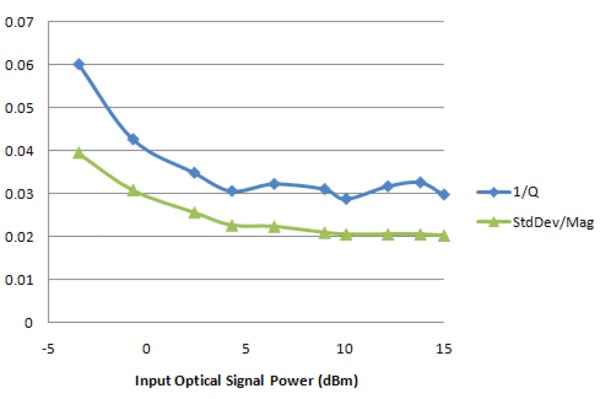
Constellation diagram accuracy including intradyne and demodulation error can be measured by the RMS error of the constellation points divided by the magnitude of the electric field for each polarization signal. The following plot was measured on a 2.5 GBaud NRZ 1-pol QPSK transmitter using a Tektronix MSO72004 digitizer.
Specifications
Values stated in the following tables are typical unless stated otherwise (some values are oscilloscope limited).
Coherent Lightwave Signal Analyzer
- Maximum detectable baud rate (at Q of 9.5 dB)
-
60 Gbaud with Tektronix DPO73304D (2-Ch)
46 Gbaud with Tektronix DPO73304D (4-Ch)
40 Gbaud with Tektronix DPO72004
- Maximum detectable bit rate for PM-QPSK (at Q of 9.5 dB)
-
240 Gb/s with Tektronix DPO73304D (×2)
180 Gb/s with Tektronix DPO73304D (×1)
160 Gb/s with Tektronix DPO72004
- Sample Rate
-
100 GS/s with Tektronix DPO73304D
50 GS/s with Tektronix DPO72004
- Optical field uncertainty (RMS)
- 2%
- O/E gain imbalance between I and Q
- 0.1 dB
- Available modulation formats
-
OOK, 3-state OOK, (PM) BPSK, (PM) QPSK, (PM) 8, 16, 32, 64-QAM, (PM) Offset QPSK, (PM) 8-PSK
Any PRBS or user-supplied pattern
Contact factory for new modulation formats
- Control
- Built-in Ethernet interface
OM4000 Series Coherent Receiver
- Optical input
-
C-band: 1530 to 1570 nm
L-band: 1570 to 1610 nm (Optional)
C- and L-band: 1530 to 1610 nm (Optional)
- Maximum input power
- +15 dBm
- Maximum input power damage level
- +20 dBm
- Polarization extinction ratio
- >35 dB
- Optical local oscillator CW output power
-
+14.5 dBm
C-band: 1527.6 to 1565.5 nm
L-band: 1570.01 to 1608.76 nm (Optional)
- Electrical bandwidth
-
OM4106D: 33 GHz
OM4006D: 23 GHz
- Optical phase angle of IQ mixer after correction
- 90° ±1°
- Skew after correction
- ±1 ps
External local oscillator input
- Optical input wavelength range
-
C-band: 1530 to 1570 nm
L-band: 1570 to 1610 nm (Optional)
- Suggested external local oscillator input power range
- +7 to +15 dBm
- Maximum input peak power (damage level)
- +20 dBm
- Instantaneous linewidth
Local oscillator
- Wavelength range
-
C-band: 1527.6 to 1565.5 nm
L-band: 1570.01 to 1608.76 nm
- Minimum wavelength step
- 10 GHz
- Minimum frequency step
- 100 MHz
- Absolute wavelength accuracy
- 10 pm
- Linewidth (short term)
- 100 kHz
- Sidemode suppression ratio
- 55 dB
High-resolution spectrometer
- Maximum frequency span
- LO frequency ± oscilloscope bandwidth
- LO Wavelength Range
-
C-band: 1527.6 to 1565.5 nm
L-band: 1570.01 to 1608.76 nm
- Number of FFT points
- 500k
- Minimum RBW
- 1/maximum oscilloscope time window
- Frequency accuracy
- 10 pm
Software requirements
Supported platforms for the OM4000 software:
- Computer with nVidia graphics card running US Windows 7 64-bit and MATLAB 2011b (64-bit)
- Computer with nVidia graphics card running US Windows XP 32-bit and MATLAB 2009a (32-bit)
The following platforms are supported by may not be able to use certain advanced graphics features such as color grade and 3D:
- Tektronix 70000 Series Oscilloscopes running Windows 7 64-bit and MATLAB 2011b (64-bit)
- Computer with non-nVidia graphics running US Windows 7 64-bit and MATLAB 2011b (64-bit)
- Computer with non-nVidia graphics running US Windows XP 32-bit and MATLAB 2009a (32-bit)
Please check with Tektronix when ordering for the most up-to-date detailed requirements including support for the latest releases of MATLAB software.
Please contact Tektronix for a price quote or to arrange a demonstration. All product descriptions and specifications are subject to change without notice.
Power requirements
- Power requirements
-
100/115/230 V AC, ~50 to 60 Hz, 1 power cable, max. 100 VA
Physical characteristics
- Dimension
-
- Height
- 89 mm, 3.5 in.
- Width
- 432 mm, 17.0 in.
- Depth
- 298.5 mm, 11.75 in.
- Weight
-
- Net
- 11.8 kg, 26 lb.
- Shipping
- 15.9 kg, 35 lb.
Environmental characteristics (does not include oscilloscope)
- Temperature
-
- Operating
- +10 +35 °C
- Storage
- –20 to +70 °C, noncondensing humidity
- Humidity
- 15% to 80% relative humidity, noncondensing
CAUTION
This device is a Class 1M laser product for use only under the recommended operating conditions and ratings specified in the data sheet. Use of controls or adjustments or performance of procedures other than those specified in the data sheet may result in hazardous radiation exposure.
Invisible laser radiation – Do not view the laser output from this device directly with optical instruments.
This device complies with 21CFR1040.10 except for deviations pursuant to Laser Notice No. 50, dated June 24, 2007.

Ordering information
Models
| Model | Option | Description |
Receiver bandwidth |
C-band lasers included |
L-band lasers included |
Wavelength band |
|---|---|---|---|---|---|---|
| OM4006D | CC | 23 GHz C-band Coherent Lightwave Signal Analyzer | 23 GHz | 2 | 0 | 1530 to 1570 nm |
| OM4006D | LL | 23 GHz L-band Coherent Lightwave Signal Analyzer | 23 GHz | 0 | 2 | 1570 to 1610 nm |
| OM4006D | CL | 23 GHz C- and L-band Coherent Lightwave Signal Analyzer | 23 GHz | 1 | 1 | 1530 to 1610 nm |
| OM4106D | CC | 33 GHz C-band Coherent Lightwave Signal Analyzer | 33 GHz | 2 | 0 | 1530 to 1570 nm |
| OM4106D | LL | 33 GHz L-band Coherent Lightwave Signal Analyzer | 33 GHz | 0 | 2 | 1570 to 1610 nm |
| OM4106D | CL | 33 GHz C- and L-band Coherent Lightwave Signal Analyzer | 33 GHz | 1 | 1 | 1530 to 1610 nm |
Recommended configurations
| Oscilloscope type | Receiver model | Receiver options |
Receiver bandwidth |
Recommended oscilloscope model |
Oscilloscope bandwidth |
|---|---|---|---|---|---|
| Real-time systems | OM4006D | Recommended: Opt. CC, Opt. QAM, Opt. TSI, OMRACK | 23 GHz | DPO/DSA72504C | 25 GHz |
| OM4106D | Recommended: Opt. CC, Opt. QAM, Opt. TSI, OMRACK | 33 GHz | DPO/DSA73304D | 33 GHz | |
| Equivalent-time 30 GHz systems | OM4006D | Recommended: Opt. CC, Opt. QAM, Opt. TSI, OMRACK Required: Opt. EXT | 23 GHz | DSA8300 with Opt. ADVTRIG and 2 each 80E07 | 30 GHz |
| OM4106D | Recommended: Opt. CC, Opt. QAM, Opt. TSI, OMRACK Required: Opt. EXT | 33 GHz | DSA8300 with Opt. ADVTRIG and 2 each 80E09 | 60 GHz |
OM1106 Coherent Lightwave Signal Analyzer software
Enter a short description of your reference here (optional).
A stand-alone software-only tool that can perform all the data acquisition, analyses, filtering, and display of the OM4000 system using the customer’s polarization-diverse coherent receiver.
OM2210 Coherent Receiver calibration source
See Tektronix OM2210 data sheet for more detail. The OM2210 can be used to maintain calibration of the OM4000 Series hardware or to characterize 3rd-party receivers.
Instrument options
OM4006D options
- OM4006D
-
23 GHz Coherent Lightwave Signal Analyzer (requires choice of lasers)
- OM4006D CC
- C-band lasers (receiver tested over C-band)
- OM4006D LL
- L-band lasers (receiver tested over L-band)
- OM4006D CL
-
Coupled C- and L-band lasers (receiver calibrated over Cand L-band)
- OM4006D NL
- No lasers (receiver calibrated over C- and L-band)
- OM4006D EXT
-
Adds external connections for reference laser. Required for ET
- OM4006D QAM
- Adds QAM and other software demodulators
OM4106D options
- OM4106D
-
33 GHz Coherent Lightwave Signal Analyzer (requires choice of lasers)
- OM4106D CC
- C-band lasers (receiver tested over C-band)
- OM4106D LL
- L-band lasers (receiver tested over L-band)
- OM4106D CL
-
Coupled C- and L-band lasers (receiver calibrated over Cand L-band)
- OM4106D NL
- No lasers (receiver calibrated over C- and L-band)
- OM4106D EXT
- Adds external connections for reference laser
- OM4106D QAM
- Adds QAM and other software demodulators
- OM4106D MCS
- Adds multi-carrier superchannel support
OM1106 options
- OM1106
- OUI signal analysis software only
- OM1106 QAM
- Adds QAM and other software demodulators
- OM1106 MCS
- Adds multi-carrier superchannel support
Power plug options
- Opt. A0
- North America power plug (115 V, 60 Hz)
- Opt. A1
- Universal Euro power plug (220 V, 50 Hz)
- Opt. A2
- United Kingdom power plug (240 V, 50 Hz)
- Opt. A3
- Australia power plug (240 V, 50 Hz)
- Opt. A5
- Switzerland power plug (220 V, 50 Hz)
- Opt. A6
- Japan power plug (100 V, 110/120 V, 60 Hz)
- Opt. A10
- China power plug (50 Hz)
- Opt. A11
- India power plug (50 Hz)
- Opt. A12
- Brazil power plug (60 Hz)
User manual options
- Opt. L0
- English manual
Service options
- Opt. C3
- Calibration Service 3 Years
- Opt. C5
- Calibration Service 5 Years
- Opt. R3
- Repair Service 3 Years (including warranty)
- Opt. R5
- Repair Service 5 Years (including warranty)
Software options
- QAM
- Adds QAM and other software demodulators
- MCS
- Adds multi-carrier superchannel support
OM2210 Coherent Receiver calibration source configuration recommendations
| When used with OM4006D or OM4106D Receiver model option: | Recommended OM2210 Coherent Receiver calibration source |
|---|---|
| Opt. CC – 2 C-band lasers | OM2210 Opt. NL – To be able to fully calibrate the receiver with Opt. CC
OM2210 Opt. CC – To be able to fully calibrate the receiver with Opt. CC or a 3rd-party C-band receiver |
| Opt. LL – 2 L-band lasers | OM2210 Opt. NL – To be able to fully calibrate the receiver with Opt. LL
OM2210 Opt. LL – To be able to fully calibrate the receiver with Opt. LL or a 3rd-party C-band receiver |
| Opt. CL – 1 each C-band and L-band lasers | OM2210 Opt. CL – To be able to fully calibrate the receiver with Opt. CL |
| Opt. NL – no lasers | Both of the following instruments are required:
OM2210 Opt. CL – To be able to fully calibrate the receiver with Opt. CL OM2012 Opt. CL – Provides lasers sources required for calibration of receiver |
Upgrade options
- OM1106
-
- OM11UP QAM
- Adds QAM and other software demodulators
- OM11UP MCS
- Adds multi-carrier superchannel support
- OM4006D
-
- OM40DUP CC
- Replaces OM4006 lasers with 2 C-band lasers
- OM40DUP LL
- Replaces OM4006 lasers with 2 L-band lasers
- OM40DUP CL
-
Replaces OM4006 lasers with 1 C-band laser and 1 L-band laser
- OM40DUP EXT
- Adds external connections for reference laser
- OM40DUP 4006D
- Upgrades OM4006 (any model) to OM4006D
- OM40DUP 4106D
- Upgrades OM4006 (any model) to OM4106D
- OM4106D
-
- OM41DUP QAM
- Adds QAM and other software demodulators
- OM41DUP CC
- Replaces OM4106 lasers with 2 C-band lasers
- OM41DUP LL
- Replaces OM4106 lasers with 2 L-band lasers
- OM41DUP CL
-
Replaces OM4106 lasers with 1 C-band laser and 1 L-band laser
- OM41DUP EXT
- Adds external connections for reference laser
- OM41DUP 4106D
-
Upgrade an OM4106B, OM3105A, or OM3105B to an OM4106D
- OM41DUP TSI
- Adds integration with Tektronix oscilloscope
Standard accessories
OM4106D, OM4006D standard accessories
- OM4106D, OM4006D User Manual
- 071-3184-xx
- Power cable
- Type depends on ordered power cord option
- RF Cable 2.92mm (4)
- 174-6229-xx
- Ethernet cable
- 174-6230-xx
- Patch Cord Fiber 8" (Opt. EXT)
- 174-6231-xx
- Programmed HASP key
- 650-5642-xx
- Programmed USB Flash Drive
- 650-5643-xx
Calibration and warranty
- Calibration interval
- 1 year
Accessories
Recommended accessories
- OMCABLE
- Replacement OM cable kit
- OMCABLE9
-
Set of (4), 9 semi-rigid cables. Required for 2-oscilloscope systems
- OMDONGLE
-
Replacement OM license dongle (requires software license key number)
- OMRACK
- Tabletop mounting rack for OM4000 Series
- OMTRAIN
- On-site training and/or installation for OMxxxx products
- OMADDLSW
-
Additional set of Coherent Lightwave Signal Analyzer Software (requires OM4106D instrument serial number)
- DPOACQSYNC
- Multi-oscilloscope synchronization kit
- OMINSTALL AMR
- On-site OM-series install for the Americas
- OMINSTALL JPN
- On-site OM-series install for Japan
- OMINSTALL EMEA
- On-site OM-series install for Europe, Middle East, and Africa
- OMINSTALL APAC
- On-site OM-series install for Asia Pacific
Related products
- OM5110
- 46 GBaud Multi-Format Optical Transmitter
- OM2210
- Coherent Receiver Calibration Source
- OM2012
- Tunable Laser Source
- OM1106
- Coherent Lightwave Signal Analyzer Software (included with the OM4106D)

Tektronix is registered to ISO 9001 and ISO 14001 by SRI Quality System Registrar. 52W-27474-6

