

Contact us
Call
Call us at
Available 6:00 AM – 5:00 PM (PST) Business Days
Download
Download Manuals, Datasheets, Software and more:
Feedback
TDS5000 Series Digital Phosphor Oscilloscope Datasheet
TDS5000 Series Datasheet. (Recommended Replacement: MSO/DPO5000B Series.)
The products on this datasheet are no longer being sold by Tektronix.
View Tektronix Encore for reconditioned test equipment.
Check support and warranty status for these products.
TDS5000 Series Datasheet. (Recommended Replacement: MSO/DPO5000B Series.)
Recommended replacement: MSO/DPO5000B Series.
*
Features & Benefits
- 350 MHz, 500 MHz, and 1 GHz Bandwidth Models
- 4 Channels on all Models
- Up to 5 GS/s Sample Rate
- Up to 16 M Record Length
- 100,000 wfms/s Maximum Waveform Capture Rate
- MyScope™ Custom Control Windows Enhance Productivity
- Right Mouse-click Menus for Exceptional Efficiency
- OpenChoice® Platform with Windows 2000 delivers Built-in Networking and Analysis
- Small Footprint / Lightweight
- 10.4 in. Bright Display
- Standard Touch Screen on TDS5054B and TDS5104B
- Suite of Advanced Triggers
- Communication Mask Testing
- Pass/Fail Limit Testing
- Remote Viewing and Control
- E-mail on Event
- CD-RW Drive
- Interoperability with Tektronix Logic Analyzers
- GPIB Controller
Applications
- Digital Design and Debug
- Mask Testing for Telecomm/Datacomm/Video Standards
- Investigation of Transient Phenomena
- Power Measurements
- Video Design and Debug
- Spectral Analysis
- Automotive Electronics
- Manufacturing Test
- Electromechanical
- Biomedical
- Industrial Control
The World’s Easiest-to-Use Midrange Oscilloscope
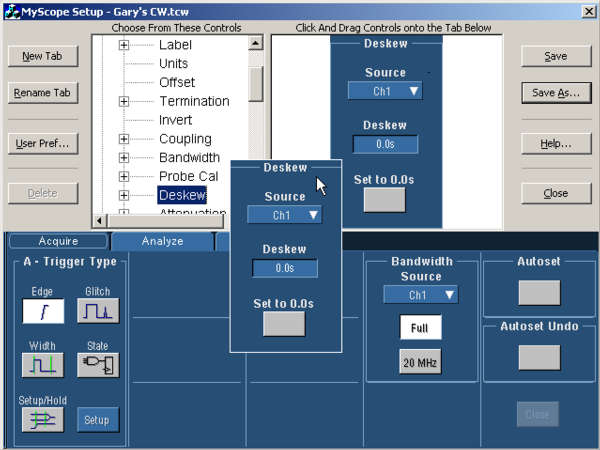
MyScope: MyScope control windows are created using a simple, visual drag-and-drop process.
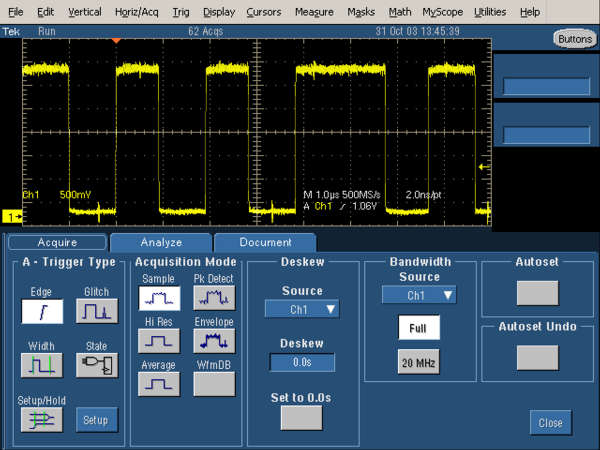
MyScope: Once created, they are just like other control windows in the instrument and are easily accessed from either the menu or button bars.
MyScope™ Custom Control Windows
The TDS5000B models offer a Tektronix-exclusive MyScope customizable oscilloscope user interface. MyScope is a powerful feature that allows you to build your own control windows with only the controls, features, and capabilities that you care about and are important in your job. Only with Tektronix oscilloscopes, can you pull all the functionality you need from all the various parts of the oscilloscope into one control window, effectively creating your own personalized “toolbox” of oscilloscope features. No longer do you need to search through menus for features or relearn how to drive the oscilloscope after a break from the lab. MyScope control windows enable you to spend your valuable time focused on the task at hand rather than navigating menus on your oscilloscope. And creating these custom control windows isn’t a long drawn-out or complex process. They are easily created in a matter of minutes using a simple, visual, drag-and-drop process. Once created, these custom control windows are easily accessed through a dedicated MyScope button and menu selection on the oscilloscope button/menu bar, just like any other control window. You can make an unlimited number of custom control windows, enabling each person who uses the oscilloscope, in a shared environment, to have their own unique control window. Since the control windows are stored as files on the hard drive, they can easily be transferred to other TDS5000B Series oscilloscopes, or they can even be e-mailed to a coworker around the world when the need arises. MyScope control windows will benefit all oscilloscope users, from eliminating the ramp-up time that many face when returning to the lab after not using an oscilloscope for a while, to the power user who can now operate far more efficiently. Everything you need is found in one control window rather than having to constantly navigate through menu after menu to repeat similar tasks.
Right-clicks
The TDS5000B Series also enables a comprehensive suite of right mouse-click menus to make simple things as they should be – simple. Right-click menus are context sensitive, meaning the choices presented in the menu depend on where you right-clicked the mouse. This makes right-click menus extremely intuitive. Want to change the cursor type? Right-click on a cursor or the cursor readouts. Want to change the reference levels of an automatic measurement? Right-click on the measurement. Want to change trigger parameters? Right-click on the trigger readouts. Want to change a waveform’s color? Right-click on the waveform handle. Virtually all objects on the oscilloscope display have right-click menus associated with them that include all the appropriate actions or features relative to those objects. There are also right-click menus for regions of the display in addition to just objects. For example, right-clicking in the main graticule brings up a menu with choices such as Clear Data, Default Setup, Autoset, Screen Captures, Save All Waveforms, and Add Screen Text, providing single-click access to many of your most commonly performed tasks.
The customization and efficiency provided by MyScope control windows and right-click menus make the TDS5000B models the world’s easiest-to-use midrange oscilloscopes, enabling you to achieve levels of productivity you wouldn’t have thought possible with your current oscilloscope.
The Performance and Feature Set You Expect
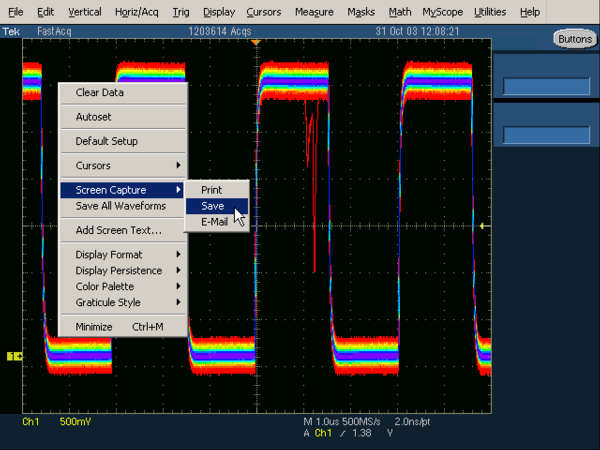
Elusive Glitch. Fast waveform capture rate, enabled by Tektronix proprietary DPX acquisition technology, maximizes the probability of capturing elusive glitches and other infrequent events.
Performance
The TDS5000B Digital Phosphor Oscilloscopes (DPO) deliver 350 MHz, 500 MHz, or 1 GHz bandwidth, 5 GS/s real-time sample rate, up to 16 M record length, and a suite of advanced triggers, enabling you to capture and characterize even your most demanding signals. DPOs provide unmatched insight into signal behavior by displaying, storing, and analyzing complex signals in real time using three dimensions of signal information: amplitude, time, and distribution of amplitude over time. The TDS5000B DPO models, enabled by Tektronix proprietary DPX® acquisition technology, deliver greater than 100,000 waveforms per second capture rates. Some oscilloscope vendors claim high waveform capture rates for short bursts of time, but only DPOs, enabled by DPX technology, can deliver these fast waveform capture rates on a sustained basis – saving minutes, hours, or even days by quickly revealing the nature of faults so sophisticated trigger modes can be applied to isolate them.
Advanced Waveform Analysis
The TDS5000B models include a complete parametric measurement system for signal characterization. Select from 53 automatic measurements using a graphical palette that logically organizes measurements into Amplitude, Time, Combination, Histogram, and Communications categories. Gather further insight into your measurement results with statistical data such as mean, min, max, standard deviation, and population. Waveform cursors make it easy to measure trace-to-trace timing characteristics, while cursors that link between YT and XY display modes make it easy to investigate phase relationships and Safe Operating Area violations. Define and apply math expressions to waveform data for on-screen results in terms that you can use. Access common waveform math functions with the touch of a button. Or, for advanced applications, create algebraic expressions consisting of waveforms sources, math functions, measurement values, scalars, and user-adjustable variables with an easy-to-use calculator-style editor.
Applied measurement extensions can be installed to enhance the TDS5000Bs’ capabilities. These software applications build on the precision acquisition performance of the TDS5000B Series to address the need for application-specific measurements to quickly quantify device and system performance. Optional applications include power measurement and analysis, jitter and timing analysis, disk drive measurements, ANSI/ITU telecom pulse compliance, and Ethernet compliance testing.
OpenChoice Architecture
The TDS5000B Series includes open access to the MS Windows 2000 operating environment. While the instrument remains a dedicated oscilloscope, the ability to access the MS Windows desktop creates a powerful tool. Built-in applications such as WordPad, Paint, and a Web browser allow you to concurrently maintain lab notes while working with the instrument. This saves time and eliminates error-prone steps associated with transporting images for later report development. Other applications such as Microsoft Word or Excel, MATLAB, and LabVIEW can be used with the instrument to accomplish local documentation or signal analysis. Installation of the oscilloscope on the LAN enables Web-based information browsing, e-mail exchange, printing, and file sharing. Using the embedded PCI bus, waveform data can be moved directly from acquisition to analysis applications on the Windows desktop at much faster speeds than conventional GPIB transfers.
In addition, the OpenChoice architecture provides a comprehensive software infrastructure for faster, more versatile operations. Data transfer programs, such as the Excel Toolbar, Word Toolbar, and Report Generator are used to simplify analysis and documentation on the Windows desktop or on external PCs. Implementation by Tektronix of industry-standard protocols, such as TekVISA™ interface and ActiveX Control, is included for using and enhancing Windows applications for data analysis and documentation. These tools enhance your ability to create custom software to automate multistep processes in waveform collection and analysis with Visual BASIC, C, C++, MATLAB, LabVIEW, LabWindows/CVI, and other common Application Development Environments (ADE). Integration of the oscilloscope with external PCs and non-Windows hosts is also supported by the TDS5000B Series software solutions. Plug-and-Play and IVI instrument drivers are included to enable easy communication with the oscilloscope using GPIB, Serial, and LAN connections from programs running on the instrument or an external PC. Applications, and other LAN resources, can connect directly over Ethernet using the VXI 11.2 server included on the TDS5000B models.
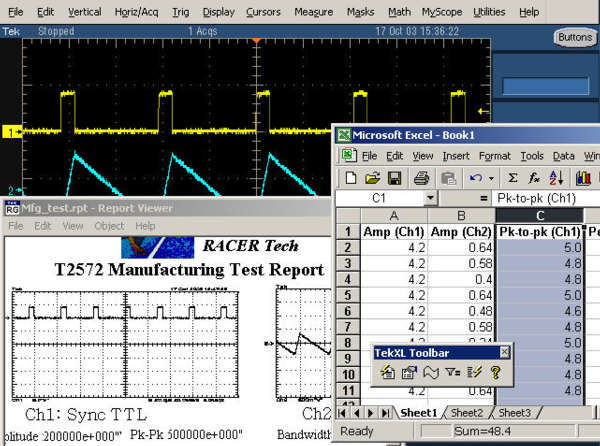
OpenChoice Platform. Capturing data into Microsoft Excel using the unique Excel Toolbar and then creating a custom report using the Tektronix Report Generator.
The unparalleled ease of use, coupled with the TDS5000B’s performance, OpenChoice platform, and comprehensive feature set all in a compact benchtop package, provides exceptional value.
Applications
The TDS5000B's performance features make it ideal for a multitude of applications, such as digital design and debug, power measurements, communications mask testing, and video design.
Digital Design and Debug
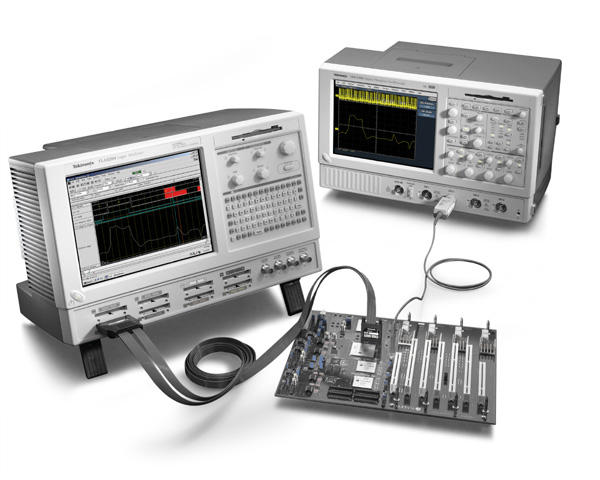
Digital Design and Debug. Tektronix Integrated View (iView) fully integrates the performance and measurement accuracy of a Tektronix oscilloscope with the multichannel and powerful triggering capabilities of a Tektronix logic analyzer in one display, allowing designers to quickly verify and debug their designs.
The interoperability of the TDS5000B oscilloscopes with the Tektronix TLA5000 Series logic analyzer made possible by Tektronix Integrated View (iView™) enables digital designers to solve signal integrity challenges and effectively debug and verify their systems more quickly and easily. The iView feature fully integrates the industry-leading performance and measurement accuracy of a Tektronix oscilloscope with the multichannel and powerful triggering capabilities of a Tektronix logic analyzer. This integration allows designers to view time-correlated digital and analog data in the same display window and isolate the analog characteristics of the digital signals that are causing failures in their systems.
The iView Wizard simplifies this integration of the oscilloscope and logic analyzer by guiding the user through setup and connection. No user calibration is required. And, once set up, the iView feature is completely automated. The result – an integrated tool set for digital design and troubleshooting.
Power Measurements
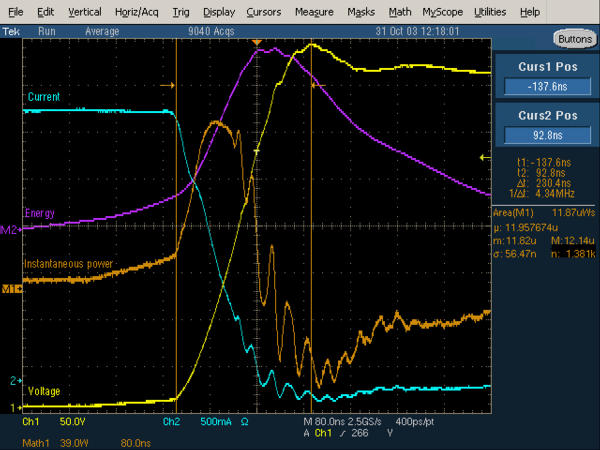
Power Measurements. Channel 1 (yellow, labeled Voltage) shows the turn-off voltage on the FET of a switching power supply, with current on Channel 2 (blue, labeled Current). The Math 1 waveform, M1 (orange, labeled Power), is the instantaneous power resulting from the multiplication of the voltage and current waveforms (Ch. 1 * Ch. 2). The Math 2 waveform, M2 (purple, labeled Energy), is the result of a calculation of the integral of M1, a math-on-math operation of the TDS5000B models. An energy measurement, located to the right of the display, is a gated measurement made on M1 and includes statistics.
The TDS5000B's powerful and flexible measurements, math, and math-on-math capabilities make them ideal solutions for making power measurements, such as voltage, current, instantaneous power, and energy for power device designers.
Communications Mask Testing
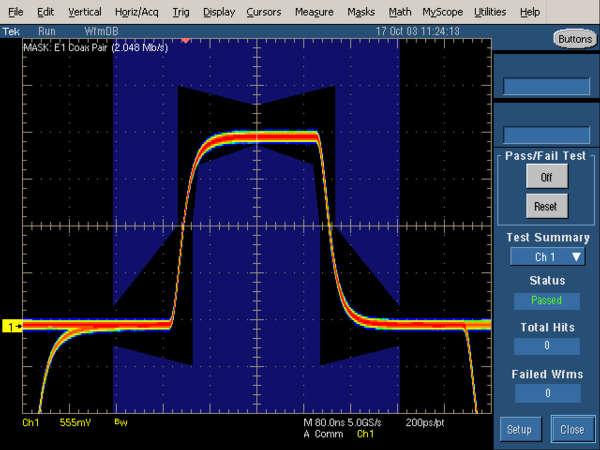
Communication Mask Testing. Testing an E1 signal against the mask specified by the standard.
Option SM provides a complete portfolio of masks for verifying compliance to serial communications standards. Masks are provided for electrical standards. Easily tailor mask testing to your specific requirements using features such as one-button mask autoset, autofit, user-adjustable mask margin tolerance, hit counting, failure notifications, and built-in mask editing.
Video Design
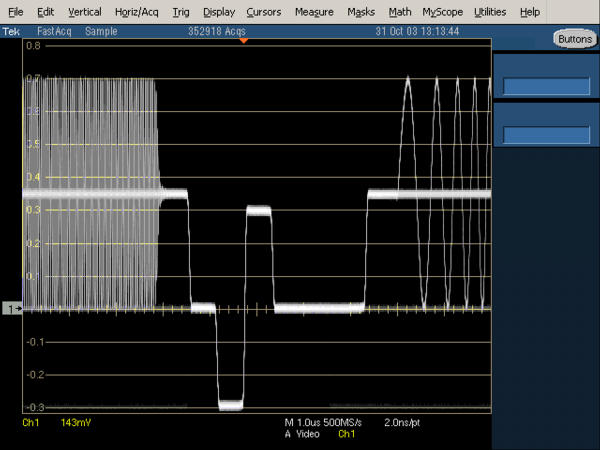
Video Design. Illustration of triggering on an analog HDTV tri-level sync signal and examining horizontal blanking interval.
Tektronix-exclusive DPX acquisition technology sets the TDS5000B Series apart from competitive digital oscilloscopes, enabling the capture of up to 100,000 waveforms per second for a live, analog-like display. The TDS5000B models also support a wide variety of video standards with dedicated triggers including NTSC, PAL, SECAM, and analog HDTV. In addition, IRE and mV graticules can be selected for easier measurements and visual inspection. All of this together makes the TDS5000B Series an ideal tool for video design and development.
Characteristics
Vertical System
Characteristic | TDS5034B | TDS5054B | TDS5104B |
|---|---|---|---|
Input Channels | 4 | ||
Analog Bandwidth (–3 dB) 5 mV/div - 1 V/div | 350 MHz | 500 MHz | 1 GHz |
Calculated Rise Time 5 mV/div (Typical) | 1.15 ns | 800 ps | 300 ps |
Hardware Bandwidth Limits | 150 MHz or 20 MHz | ||
Input Coupling | AC, DC, GND | ||
Input Impedance, 1 MΩ | ±1% | ||
Input Impedance, 50 Ω | ±1% | ±2.5% | |
Input Sensitivity, 1 MΩ | 1 mV/div to 10 V/div | ||
Input Sensitivity, 50 Ω | 1 mV/div to 1 V/div | ||
Vertical Resolution | 8 bits (>11 bits w/ averaging) | ||
Max Input Voltage, 1 MΩ | 150 V CAT I, ≤400 V peak. Derate at 20 dB/decade to 9 VRMS above 200 kHz | ||
Max Input Voltage, 50 Ω | 5 V RMS with peaks < ±30 V | <100 mV/div <1 VRMS ≥100 mV/div <5 VRMS | |
DC Gain Accuracy | 1.5% with offset set to 0 V | ||
Offset Range, 1 MΩ | 1 mV/div - 99.5 mV/div ±1 V 100 mV/div - 1 V/div ±10 V 1.01 V/div - 10 V/div ±100 V | ||
Offset Range, 50 Ω | 1 mV/div - 99.5 mV/div ±1 V 100 mV/div - 1 V/div ±10 V | 1 mV/div - 50 mV/div ±0.5 V 50.5 mV/div - 99.5 mV/div ±0.25 V 100 mV/div - 500 mV/div ±5 V 505 mV/div - 1 V/div ±2.5 V | |
Channel-to-Channel Isolation for Any Two Channels at Equal Vertical Scale | ≥100:1 at ≤100 MHz and ≥30:1 at >100 MHz up to the rated bandwidth | ||
Time-base System
Characteristic | Description |
|---|---|
Time-base Range | 200 ps/div to 1000 s/div |
Time-base Delay Time Range | (s/div × 10) to 1000 s |
Channel-to-Channel Deskew Range | ±75 ns |
Time-base Accuracy | 15 ppm |
Delta Time Measurement Accuracy | (0.06/sample rate + 15 ppm × |Reading|) RMS |
Trigger Jitter (RMS) | 8 psRMS (typical) |
Long-term Sample Rate and Delay Time Accuracy | ±15 ppm over any ≥1 ms interval |
Acquisition System
Characteristic | TDS5034B | TDS5054B / TDS5104B |
|---|---|---|
Real-time Sample Rates | ||
1 Channel (Max) | 5 GS/s | |
2 Channels (Max) | 2.5 GS/s | |
3-4 Channels (Max) | 1.25 GS/s | |
Equivalent Time Sample Rate (Max) | 250 GS/s | |
Maximum Record Length per Channel with Standard Memory | 8M/4M/2M | 16M/8M/4M |
With Opt. 3M | 16M/8M/4M | NA |
Maximum Duration at Highest Real-time Resolution (1 ch)
Characteristic | TDS5034B | TDS5054B / TDS5104B |
|---|---|---|
Time Resolution (Single shot) | 200 ps (5 GS/s) | |
Max Duration with Standard Memory | 1.6 ms | 3.2 ms |
Max Duration with Opt. 3M | 3.2 ms | NA |
Acquisition Modes
Characteristic | Description |
|---|---|
FastAcq Acquisition | FastAcq optimizes the instrument for analysis of dynamic signals and capture of infrequent events. Maximum FastAcq waveform capture rate is 100,000 wfms/s |
Sample | Acquire sampled values |
Peak Detect | Captures narrow glitches (<1 ns) at all real-time sampling rates |
Averaging | From 2 to 10,000 waveforms included in average |
Envelope | From 2 to 20,000,000 waveforms included in min-max envelope |
Hi-Res | Real-time boxcar averaging reduces random noise and increases resolution |
Waveform Database | Accumulates a waveform database that provides a three-dimensional array of amplitude, time, and counts |
FastFrame™ Acquisition | Acquisition memory divided into segments; maximum trigger rate >100,000 waveforms per second |
Trigger System
Characteristic | Description |
|---|---|
Sensitivity | |
Internal DC Coupled | 0.35 div DC to 50 MHz increasing to 1 div at rated bandwidth |
External (Auxiliary input) | 400 mV from DC to 50 MHz increasing to 750 mV at 100 MHz |
Main Trigger Modes | Auto, Normal, and Single |
Trigger Sequences | Main, Delayed by Time, Delayed by Events. All sequences can include separate horizontal delay after the trigger event to position the acquisition window in time |
Standard Trigger Types | Edge, Glitch, Runt, Window, Width, Transition Time, Timeout, Pattern, Video, State, Setup/Hold |
A Event and Delayed B Event Trigger Types | |
A Event | All above types |
Delayed B Event | Edge |
Communications-related Triggers (Requires Option SM) | Support for AMI, HDB3, BnZS, CMI, MLT3, and NRZ encoded communications signals. Select among isolated positive or negative one, zero pulse form, or eye patterns as applicable to standard |
Trigger Level Range | |
Any Channel | ±10 divisions from center of screen |
External (Auxiliary input) | ±8 V |
Line | Fixed at 0 V |
Trigger Coupling | DC, AC (attenuate <60 Hz), HF reject (attenuate >30 kHz) LF reject (attenuates <80 kHz) Noise reject (reduce sensitivity) |
Trigger Holdoff Range | 1.5 μs to 12 s maximum |
Trigger Modes
Mode | Description |
|---|---|
Edge | Positive or negative slope on any channel or front-panel auxiliary input. Coupling includes DC, AC, noise reject, HF reject, and LF reject |
Video | Trigger on NTSC, PAL, SECAM, analog HDTV, and nonstandard video formats |
Glitch | Trigger on or reject glitches of positive, negative, or either polarity. Minimum glitch width is 1.0 ns with 200 ps resolution |
Width | Trigger on width of positive or negative pulse either within or out of selectable time limits ranging from 1 ns to 1 s with 200 ps resolution |
Runt | Trigger on a pulse that crosses one threshold but fails to cross a second threshold before crossing the first again. Event can be time or logic qualified (logic on 4-channel models only) |
Window | Trigger on an event that enters or exits a window defined by two user-adjustable thresholds. Event can be time or logic qualified (logic on 4-channel models only) |
Timeout | Trigger on an event which remains high, low, or either, for a specified time period, selectable from 1 ns to 1 s with 200 ps resolution |
Transition | Trigger on pulse edge rates that are faster or slower than specified. Slope may be positive, negative, or either |
Setup/Hold | Trigger on violations of both setup time and hold time between clock and data present on any two input channels |
Pattern | Trigger when pattern goes false or stays true for specified period of time. Pattern (AND, OR, NAND, NOR) specified for four input channels defined as High, Low, or Don't Care |
State | Any logical pattern of channels (1, 2, 3) clocked by edge on channel 4. Trigger on rising or falling clock edge |
Comm (Requires Option SM) | Support for AMI, HDB3, B3ZS, B6ZS, B8ZS, CMI, NRZ, and MLT3 encoded communication signals. Select among isolated positive or negative one, zero pulse form, or eye patterns as applicable to standard |
Trigger Delay by Time | 16 ns to 250 s |
Trigger Delay by Events | 1 to 10,000,000 events |
Waveform Measurements
Characteristic | Description |
|---|---|
Automatic Measurements | 53, of which 8 can be displayed on-screen at any one time |
Amplitude related | Amplitude, High, Low, Maximum, Minimum, Peak-to-Peak, Mean, Cycle Mean, RMS, Cycle RMS, Positive Overshoot, Negative Overshoot |
Time related | Rise Time, Fall Time, Positive Width, Negative Width, Positive Duty Cycle, Negative Duty Cycle, Period, Frequency, Delay |
Combination | Area, Cycle Area, Phase, Burst Width |
Histogram related | Waveform Count, Hits in Box, Peak Hits, Median, Maximum, Minimum, Peak-to-Peak, Mean (μ), Standard Deviation (σ), μ ± 1σ, μ ± 2σ, μ ± 3σ |
Communications related | Extinction Ratio (abs, %, dB), Eye Height, Eye Width, Eye Top, Eye Base, Crossing %, Jitter (P-P, RMS, 6σ), Noise (P-P, RMS), Signal/Noise Ratio, Cycle Distortion, Q-factor |
Measurement Statistics | Mean, Min, Max, Standard Deviation, Population |
Reference Levels | User definable for each of the eight measurements |
Histograms | Vertical or horizontal with linear or log scaling |
Gating | Isolate the specific occurrence within an acquisition to take measurements on |
Cursors | Horizontal Bars, Vertical Bars, Waveform, and Screen |
Waveform Processing/Math
Characteristic | Description |
|---|---|
Arithmetic | Add, subtract, multiply, and divide waveforms |
Algebraic Expressions | Define extensive algebraic expressions including waveforms, scalars, user-adjustable variables, and results of parametric measurements e.g. (Integral (Ch1 – Mean(Ch1)) × 1.414 × VAR1) |
Math Functions | Average, Invert, Integrate, Differentiate, Square Root, Exponential, Log 10, Log e, Abs, Ceiling, Floor, Min, Max, Sin, Cos, Tan, ASin, ACos, ATan, Sinh, Cosh, Tanh |
Frequency Domain Functions | Spectral magnitude and phase, real and imaginary spectra |
Vertical Units | Magnitude: Linear, dB, dBm Phase: degrees, radians, group delay |
Window Functions | Rectangular, Hamming, Hanning, Kaiser-Bessel, Blackman-Harris, Gaussian, Flattop2, Tek Exponential |
Limit Testing | Compare live waveforms against a known “golden” reference waveform with user-defined vertical and horizontal tolerances |
Display Characteristics
Characteristic | Description |
|---|---|
Display Type | 10.4 in. Liquid-crystal active-matrix color display |
Touch Screen | Standard on TDS5054B and TDS5104B. Optional touch screen on TDS5034B |
Display Resolution | 640 horizontal × 480 vertical pixels |
Waveform Styles | Vectors, Dots, Intensified Samples, Variable Persistence, Infinite Persistence |
Display Format | YT, XY, XYZ |
Color Palettes | Individual color palettes for Record View and FastAcq/WfmDB modes include Normal, Green, Gray, Temperature, Spectral, and User Defined |
Computer System and Peripherals
Characteristic | Description |
|---|---|
Operating System | Windows 2000 |
CPU | Intel Celeron Processor, 2.0 GHz |
PC System Memory | 512 MB |
Internal Hard Disk Drive | ≥80 GB capacity |
CD-RW Drive | Side-panel CD-RW drive, ≥24x read and write speed |
Mouse | Optical wheel mouse, USB interface |
OpenChoice Features
Characteristic | Description |
|---|---|
TekVISA | Application Programmers Interface (API) for Windows developers. Documentation includes descriptions and samples of programming test and measurement applications on the unit in Visual BASIC, C, and C++ |
TekVISA Control (TVC) | Active controls to make access to TekVISA easy for integration into Microsoft Windows applications |
VXI-11 Server | An Application Programmers Interface (API) for LAN connectivity from non-Windows environments |
Plug-and-Play Drivers | Provides support to run National Instrument's LabVIEW and LabWindows on an external PC connected to a TDS5000B or on the oscilloscope itself. Instrument drivers are version specific and might not support the version of your software development tools |
IVI Drivers | Provides support for new and existing program environments utilizing the IVI instrumentation standard, such as LabVIEW, LabWindows/CVI, MATLAB, Visual BASIC, and C/C++. Instrument drivers are version specific and might not support the version of your software development tools |
Excel and Word Toolbars | Provides direct access to screen images, waveform data, and measurements on the oscilloscope from a toolbar in Excel and/or Word |
Report Generator | Enables the ability to design and create customized report templates that extract the oscilloscope's waveforms, settings, measurements, and other on-screen information with a click of the mouse |
Input/Output Ports
Port | Description |
|---|---|
Auxiliary Input | Front-panel BNC connector. Trigger level range is adjustable from +8 V to –8 V. The maximum input voltage is ±20 V (DC + peak AC) and input resistance is ≥1.5 kΩ |
Probe Compensator Output | Front-panel pins. Amplitude 1 V ±1% into a ≥10 kΩ load, frequency 1 kHz ±5% |
Analog Signal Output | Rear-panel BNC connector, provides a buffered version of the signal that is attached to the Channel 3 input (4-channel models only). Amplitude: 50 mV/div ±20% into a 1 MΩ load, 25 mV/div ±20% into a 50 Ω load. Bandwidth (typical): 100 MHz into a 50 Ω load |
Auxiliary Output Levels | Rear-panel BNC connector, provides a TTL-compatible, negative-polarity pulse when the oscilloscope triggers |
External Reference In | Rear-panel BNC connector. 9.8 MHz to 10.2 MHz |
Parallel Port | IEEE 1284, DB-25 connector |
Audio Ports | Miniature phone jacks for stereo microphone input and stereo line output |
USB Port | Four USB 2.0 ports allows connection or disconnection of USB keyboard and/or mouse while oscilloscope power is on |
Keyboard Port | PS-2 compatible |
Mouse Port | PS-2 compatible |
LAN Port | RJ-45 connector, supports 10BASE-T and 100BASE-T |
Serial Port | DB-9 COM1 port |
Video Port | DB-15 female connector; connect a second monitor to use dual-monitor display mode. Supports basic requirements of PC99 specification and display resolutions up to 1,920 × 1,440 |
GPIB Port | IEEE 488.2 standard, can be configured for talk/listen or controller mode |
Oscilloscope VGA Video Port | DB-15 female connector, connect to show the oscilloscope display on an external monitor or projector |
Power Source
Characteristic | Description |
|---|---|
Power | 100 to 240 VRMS ±10%, 47 to 63 Hz; CAT II, or 115 VRMS ±10%, 360 to 440 Hz |
Power Consumption | <220 W |
Physical Characteristics
Configuration | Benchtop | Rackmount | Benchtop | Rackmount |
|---|---|---|---|---|
Dimensions | mm | in. | ||
Height | 361 | 267 | 11.2*1 | 10.5 |
Width | 447 | 483 | 17.6 | 19 |
Depth | 288 | 231*2 | 11.35 | 9.1*2 |
Weight | kg | lb. | ||
Net | 11.23 | 13.49 | 24.75 | 29.75 |
Shipping | 25.63 | — | 56.5 | — |
Cooling | ||||
Cooling Clearance | 76 mm required on left side | 3 in. required on left side | ||
*1 Does not include accessory pouch.
*2 From rack mounting rear to back of instrument.
Environmental
Characteristic | Description |
|---|---|
Temperature | |
Operating | +5 °C to +45 °C |
Nonoperating | –20 °C to +60 °C without diskette in floppy drive |
Humidity | |
Operating | 20% to 80% relative humidity with a maximum wet bulb temperature of +29 °C at or below +45 °C, noncondensing. Upper limit derates to 30% relative humidity at +45 °C |
Nonoperating | Without diskette in floppy disk drive. 5% to 90% relative humidity with a maximum wet bulb temperature of +29 °C at or below +60 °C, noncondensing. Upper limit derates to 20% relative humidity at +60 °C |
Altitude | |
Operating | 10,000 ft. (3,048 m) |
Nonoperating | 40,000 ft. (12,190 m) |
Random Vibration | |
Operating | 0.1 GRMS from 5 to 500 Hz, 10 minutes each axis, 3 axes, 30 minutes total |
Nonoperating | 2.0 GRMS from 5 to 500 Hz, 10 minutes each axis, 3 axes, 30 minutes total |
Regulatory Certifications | |
Electromagnetic compatibility | 89/336/EEC |
Safety | UL61010, CSA-22.2 No. 1010.1, EN61010-1, IEC61010-1 |
Ordering Information
TDS5034B
350 MHz, 5 GS/s, 4-channel digital phosphor oscilloscope.
TDS5054B
500 MHz, 5 GS/s, 4-channel digital phosphor oscilloscope.
TDS5104B
1 GHz, 5 GS/s, 4-channel digital phosphor oscilloscope.
Includes: (1) P5050 500 MHz, 10x passive probe per channel, Accessory Pouch (016-1935-xx), Front Cover (200-4651-xx), Mouse (119-6936-xx), Quick Start User Manual, TDS5000B Product Software CD-ROM, TDS5000B Operating System Restoration CD-ROM, GPIB Programmer's Reference, Optional Applications Software CD-ROM, Getting Started with OpenChoice ® book (020-2513-xx), Performance Verification Procedure PDF file, Calibration Certificate Documenting NIST Traceability, Z540-1 Compliance, and ISO9001 Registration, Power Cord.
Note: Please specify power plug and manual version when ordering.
Recommended Probes
Probe | Description |
|---|---|
P5050 | 500 MHz, 10x passive probe |
P6243 | 1.0 GHz active probe |
P6245 | 1.5 GHz active probe |
P6246 | 400 MHz differential probe |
P6247 | 1.0 GHz differential probe |
P6248 | 1.7 GHz differential probe |
P6250 | DC to 500 MHz, 42 V, differential probe |
P6251 | DC to 1 GHz, 42 V, differential probe |
Recommended Accessories
Accessory | Order Number |
|---|---|
Service Manual | Order 071-1362-xx |
Transit Case | Order 016-1937-xx |
Probe Calibration, Compensation, and Deskew Adapter | Order 067-0405-xx |
Power Deskew Fixture | Order 067-1478-xx |
Mini Keyboard | Order 118-9402-xx |
USB Test Fixture | Order TDSUSBF |
Ethernet Test Fixture | Order TF-GBE-ATP or TF-GBE-BTP |
CAN Trigger Module | Order ATM-1 |
Instrument Options(Available on all models unless indicated otherwise)
Option | Description |
|---|---|
Opt. 18 | Touch-screen interface for TDS5034B |
Opt. 3M | Increase record length to 16 MSamples max (1 ch) for TDS5034B |
Opt. 1R | Rackmount kit |
Opt. SM | Communication mask testing |
Opt. VNM | CAN bus decode requires ATM1 trigger module |
Opt. PS1 | Power bundle that includes TCP202 DC-coupled current probe, P5205 high-voltage differential probe, TDSPWR3 power measurement software, and power deskew fixture |
Opt. CP2*3 | TDSCPM2 – ANSI/ITU telecom pulse compliance testing software |
Opt. ET3 | TDSET3 – Ethernet compliance test software |
Opt. J2*4 | TDSDDM2 – Disk drive measurement software |
Opt. JA3 | TDSJIT3 v2.0 Advanced – Jitter and timing analysis software |
Opt. JE3 | TDSJIT3 v2.0 Essentials – Jitter and timing analysis software |
Opt. PW3 | TDSPWR3 – Power measurement software |
Opt. USB | USB 2.0 compliance test software only |
*3 Requires Option SM.
*4 Not available on TDS5034B.
Power Plug Options
Option | Description |
|---|---|
Opt. A0 | North America |
Opt. A1 | Universal Euro |
Opt. A2 | United Kingdom |
Opt. A3 | Australia |
Opt. A4 | 240 V North America |
Opt. A5 | Switzerland |
Opt. A6 | Japan |
Opt. A10 | China |
Opt. A99 | No power cord or AC adapter |
Manual Options
Option | Description |
|---|---|
Opt. L0 | English Manual |
Opt. L1 | French Manual |
Opt. L3 | German Manual |
Opt. L5 | Japanese Manual |
Opt. L7 | Simple Chinese Manual |
Opt. L8 | Traditional Chinese Manual |
Opt. L9 | Korean Manual |
Opt. L10 | Russian Manual |
Service Options
Option | Description |
|---|---|
Opt. C3 | Calibration Service 3 Years |
Opt. C5 | Calibration Service 5 Years |
Opt. D1 | Calibration Data Report |
Opt. D3 | Calibration Data Report 3 Years (with Opt. C3) |
Opt. D5 | Calibration Data Report 5 Years (with Opt. C5) |
Opt. G3 | Complete Care 3 Years (includes loaner, scheduled calibration and more) |
Opt. G5 | Complete Care 5 Years (includes loaner, scheduled calibration and more) |
Opt. R3 | Repair Service 3 Years (including warranty) |
Opt. R5 | Repair Service 5 Years (including warranty) |
Instrument Upgrades
Upgrades equivalent to original options can be ordered to extend instrument performance after initial purchase. Users can install upgrades without opening the instrument case or requiring on-site service (except for touch-screen upgrade for TDS5034B). To upgrade, order a TDS5BUP with one or more of the following options: 18, M03, 1R, SM, CP2, ET3, J2, JE3, JA3, PW3, USB, VNM. Factory installation of selected options is available by ordering Option IF on your TDS5BUP upgrade order.

Product(s) are manufactured in ISO registered facilities.
55W-14869-15
