Using Keithley’s
All-In-One Battery Test
Solution to Characterize,
Optimize, and Exercise IoT
Home Security Products
APPLICATION NOTE
Using Keithley’s All-In-One Battery Test Solution to Characterize, Optimize, and
APPLICATION NOTE
Exercise IoT Home Security Products
Introduction
With the increasing prevalence of wireless technology
and IoT devices, the need for rechargeable batteries that
perform consistently over multiple charge cycles has
grown exponentially. Consumers want to be certain that
IoT controlled thermostats, lighting, security systems, and
other appliances will continue operating long term and not
degrade significantly over time. Thus, supplying safe, stable
batteries to power these devices and meet the increasing
demand is paramount.
One of the ways that batteries are exercised to determine
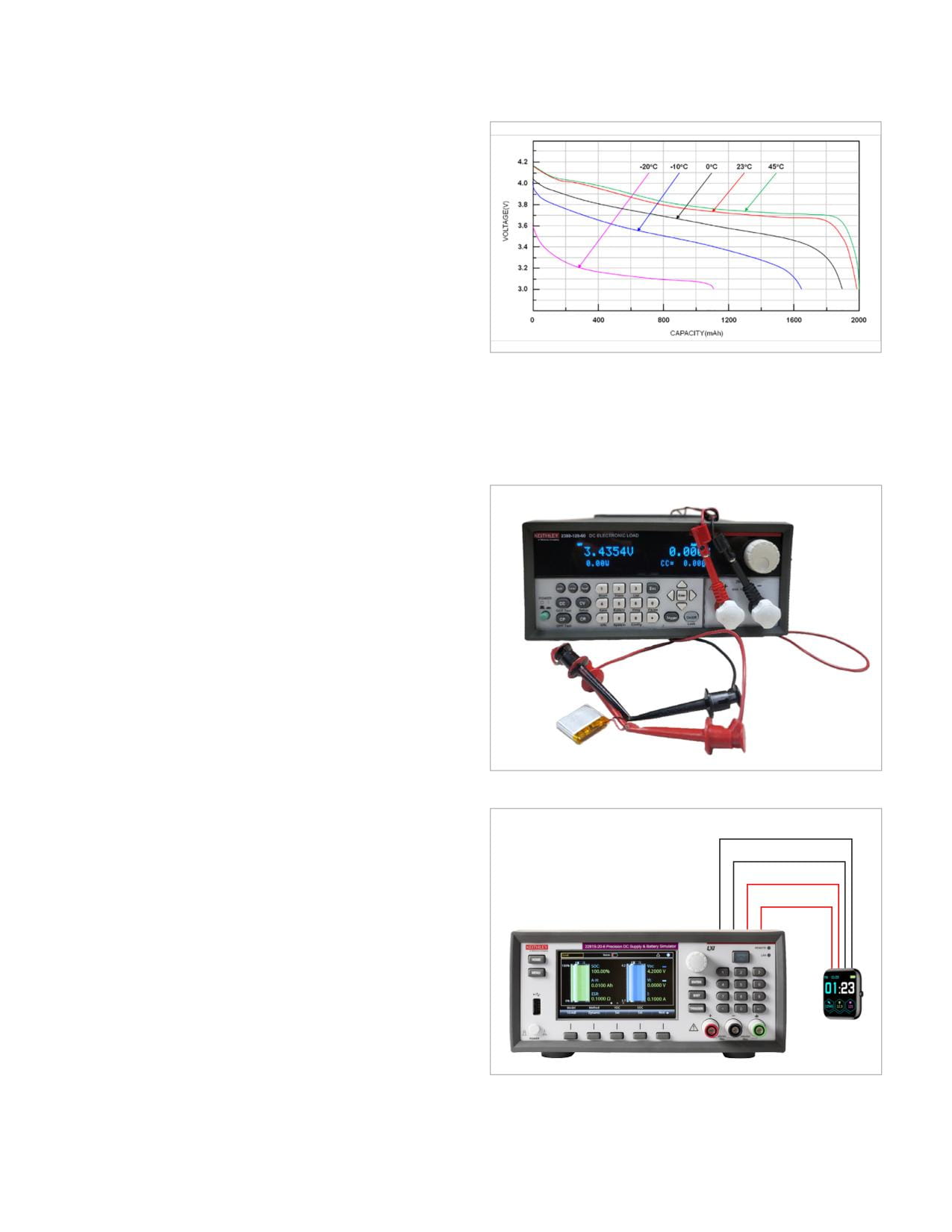
Figure 1: Li-Ion Discharge Curve and Temperature
reliability and lifespan is via battery cycle testing. Battery
cycling involves charging and discharging a battery
The previous solution offered by the KickStart Software
repeatedly for a specified number of cycles to determine its
Battery Simulator App involved generating a battery model
performance over time and after heavy usage.
using a 2380 Series Electronic Load and then simulating
that model using a 2281S Battery Simulator.
This application note will discuss some of the features
available starting in version 2.11.0 of the KickStart Software
Battery Simulator App. This version of the Battery Simulator
App introduces the new battery cycling functionality, and
source measure unit (SMU) support allowing for both battery
simulation and model generation in a one-box solution. We
will also discuss improvements made to the battery cycling
functionality in version 2.11.5, which include the addition
of a sequencing mode. In sequencing mode, the user has
the freedom to configure charge, discharge, and delay
operations into a custom sequence, unlocking opportunities
to gain insight into battery performance under real-world
conditions.
In addition to discussing these new features, we will
demonstrate the Battery Simulator App’s ability to test
Figure 2: 2380 and Kalinco Fitness Tracker Battery
batteries and generate and simulate battery models using a
wireless Ring Video Doorbell and Ring Security Camera.
-
S-
The Previous Solution
S+
In a previous application note on this topic, Battery
+
Optimization using Keithley 2281S and 2380 and KickStart
Battery Simulator App, we discussed how to determine
battery performance through discharge curve analysis and
battery simulation. The discharge curve generated during
battery model generation can give significant insight into
a battery’s performance under different environmental
conditions. Meanwhile, the simulation of these battery
models allows for precise, repeatable test conditions. This
can then be used to gauge the consistency of a device’s
behavior as seen in Figure 1.
Figure 3: 2281S and Kalinco Fitness Tracker
2 | WWW.TEK.COM
Using Keithley’s All-In-One Battery Test Solution to Characterize, Optimize, and
APPLICATION NOTE
Exercise IoT Home Security Products
This setup gets the job done but requires access to two
method applies a voltage bias with a steadily decreasing
separate instruments and does not offer functionality
charge current. A hybrid CC + CV method is also available
beyond battery model generation and battery simulation.
for charge cycles. Hybrid Charge Mode is typically defined
However, if a SMU were to be used, then model generation,
by a constant current charge followed by a constant voltage
battery simulation, and battery cycle testing functionalities
charge. The SMU is placed in a current source mode and
could all be accessed with a single instrument.
supplies a bias to the battery. The battery is charged up to a
voltage specified by the Max Operating Voltage/Threshold
Voltage parameter, which is where the Source V limit is
The New Solution
set. Once the Max Operating Voltage is reached, the SMU
Along with battery model generation and battery simulation
operates in compliance mode, and we see the sourced
capabilities, version 2.11.0 of the KickStart Software
current start to drop. When the sourced current drops to
Battery Simulator App introduces the ability to perform
the Threshold Current, the charge is done.
battery cycling tests using 2400 Graphical Touchscreen and
2600B series SMUs. This can be either as a full charge and
It is also important to consider how long a charge/
discharge cycle, or as just the charge or discharge portions
discharge cycle should be. If the charging or discharging
alone. KickStart version 2.11.5 introduced enhancements
time drastically differs from what is rated, then significant
to the Battery Simulator App, including the ability to create
damage to a battery can be done. Discharging a battery
custom charge and discharge test sequences.
too deeply can crystalize, often permanently, the internal
structure of the battery. This, as well as other stresses,
cause a decrease in capacity. Conversely, overcharging
batteries greatly increases the chance of failure in the
form of overheating, bloating, or even thermal runaway and
explosion. So, if a cycle does not complete before the Max
Charging Time or Max Discharging Time parameters are
met, the test will end with a resulting failure message.
As previously stated, a battery is aged via undergoing
multiple charge and discharge cycles. The goal is for the
total battery capacity to not degrade excessively once
aged. Furthermore, an excessive decrease in rated capacity
indicates that the battery is damaged or is nearing the
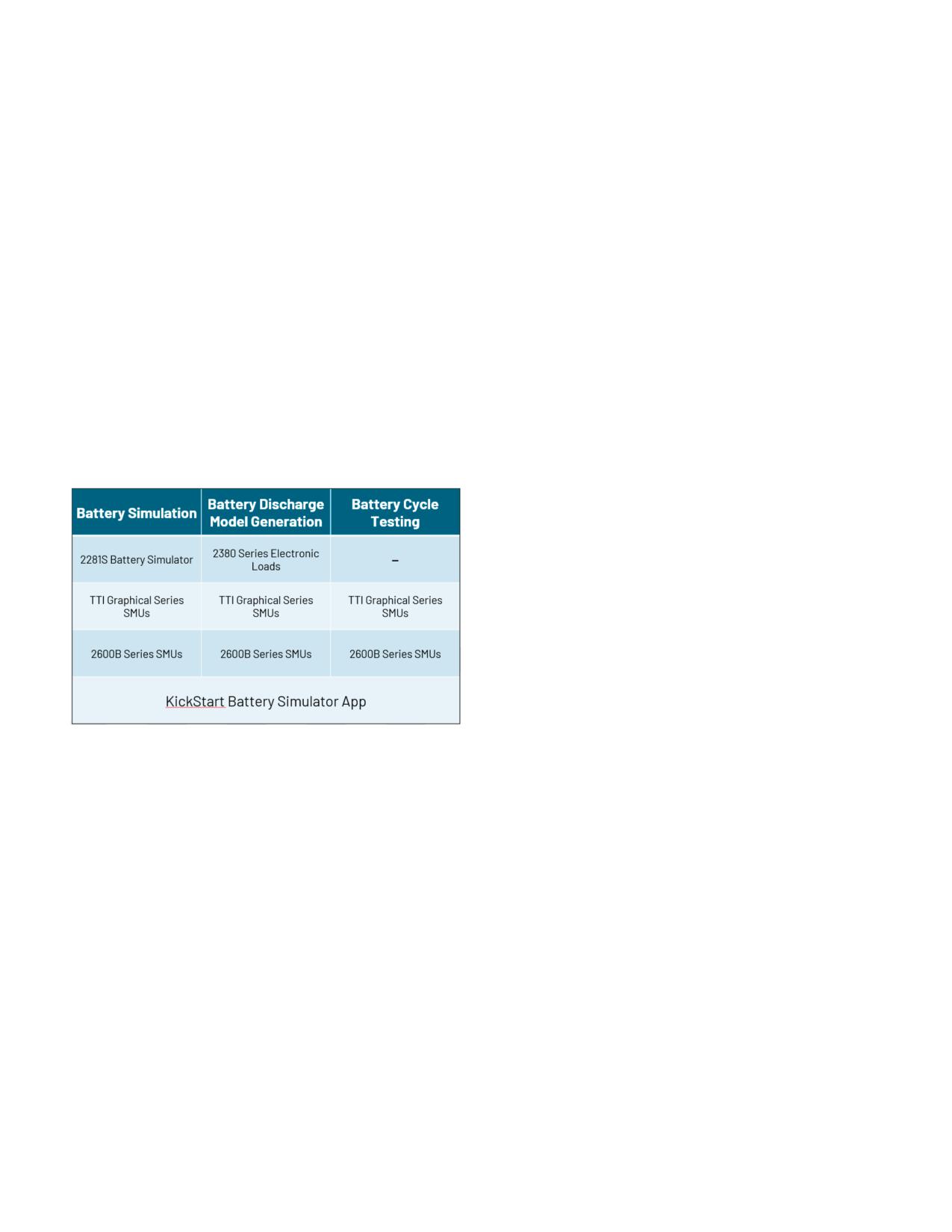
Figure 4: Chart explaining which instruments can perform which operations
end of its lifecycle. This damage increases the chance of
with the Battery Simulator App
battery failure and thermal runaway. The Capacity Target
% parameter allows the user to set the percentage of the
In a battery cycling test, the objective is to exercise a
starting battery capacity which should remain by the end of
battery by charging and discharging it repeatedly to
the test. If the measured battery capacity is lower than the
determine when the battery’s total capacity begins to
(rated capacity * capacity target %) then the test fails.
degrade. Thus, battery lifetime can be discerned through a
long-term battery cycle test.
Sequencing these cycles allows batteries to be exercised
in additional ways. Instead of simply charging a battery
Batteries can be charged or discharged in a few different
to full and then discharging to empty until failure, more
ways. A charge or discharge cycle may employ a constant
realistic conditions such as multiple partial charge cycles
current (CC) or constant voltage (CV) method. The CC
can be sequenced to mimic the act of charging a battery for
method simply applies a current bias to the battery to
short periods throughout the day interspersed with partial
prevent overcurrent charge conditions, while the CV
discharge cycles to imitate periods of battery usage.
WWW.TEK.COM | 3
Using Keithley’s All-In-One Battery Test Solution to Characterize, Optimize, and
APPLICATION NOTE
Exercise IoT Home Security Products
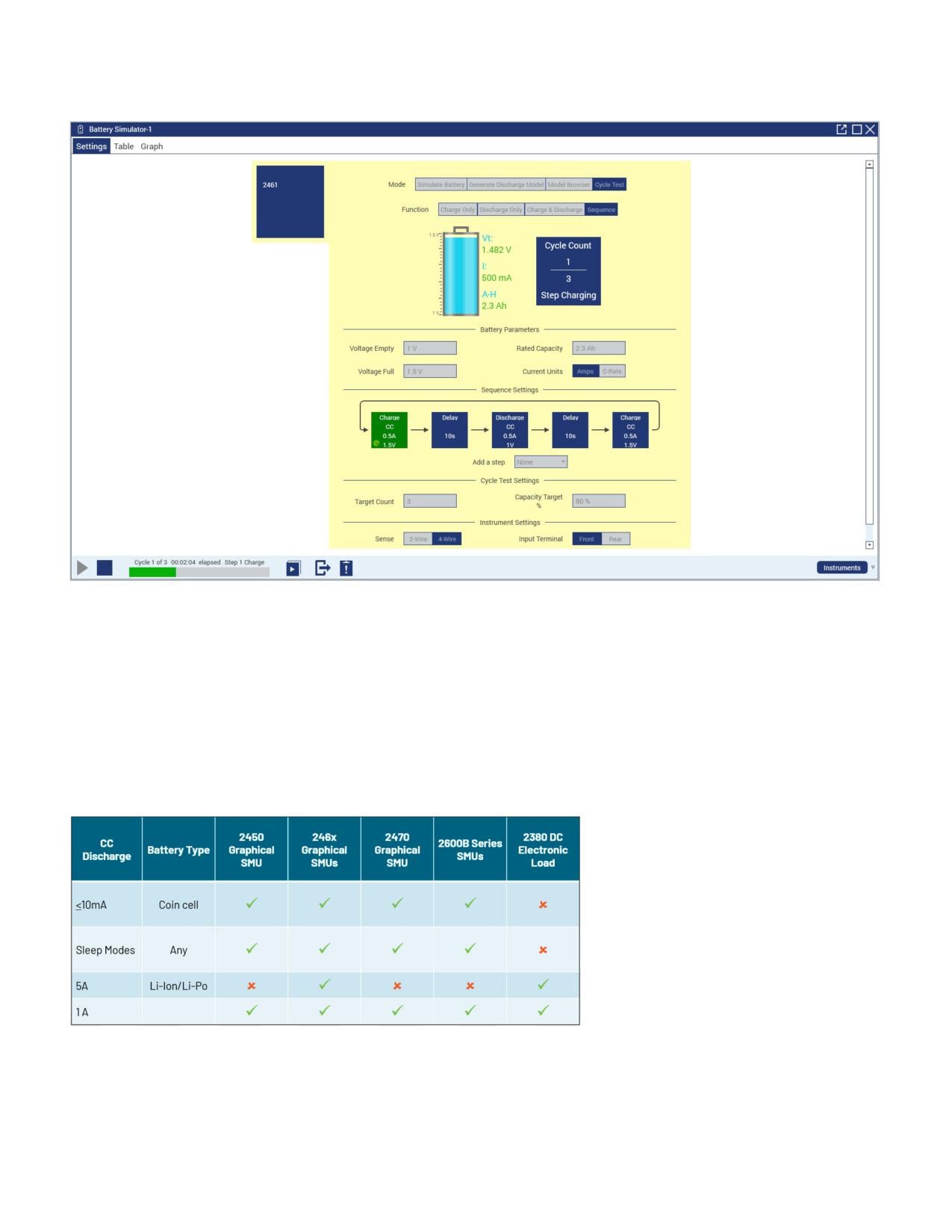
Figure 5. The Battery Cycle Test Sequencing User Interface added in version 2.11.5.
Which Solution is Right for My Application?
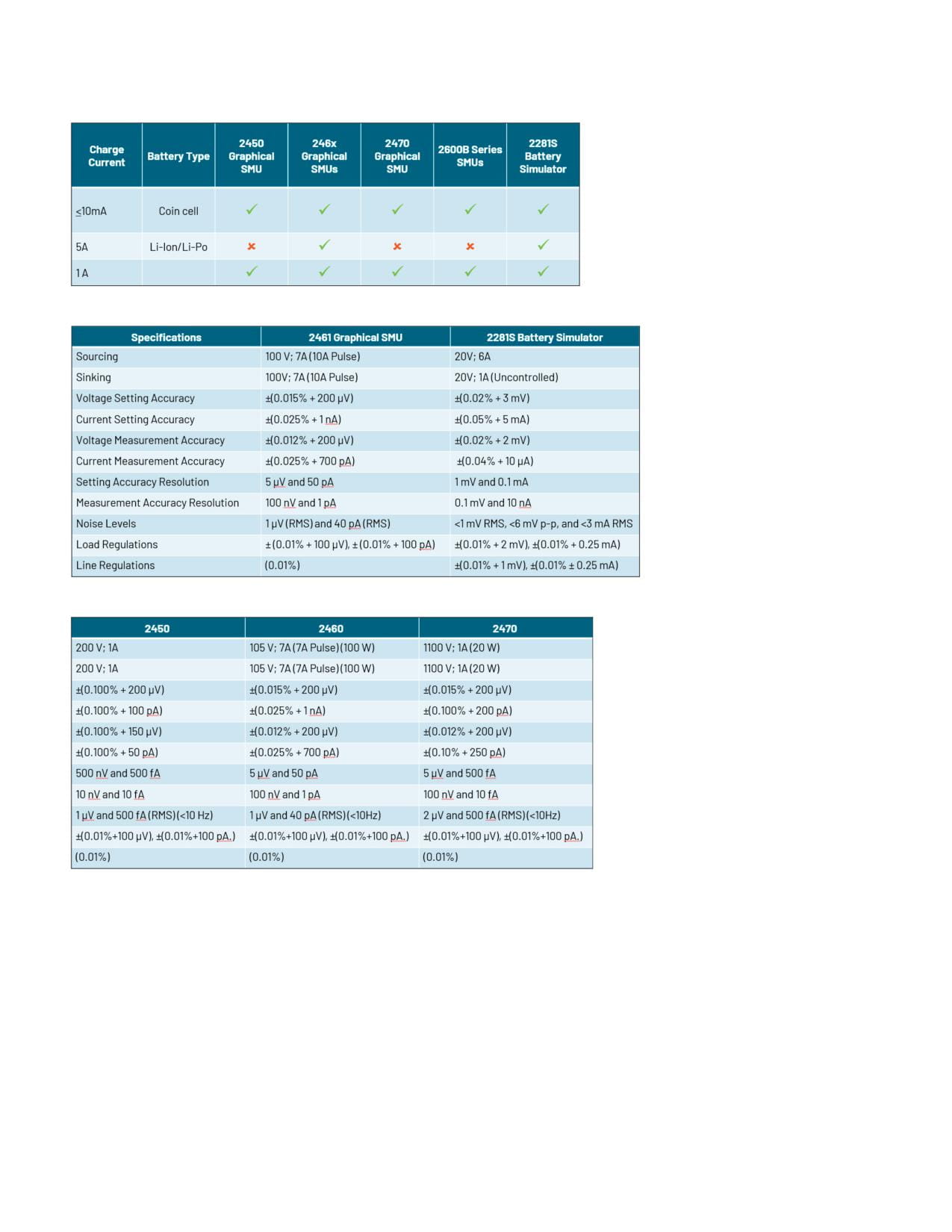
With so many instrumentation options available, it might be difficult to determine which solution will deliver the best results
for your battery test and simulation applications. Each instrument family, or model therein, offers its own advantages due to
differences in ranges, accuracy, speed, and noise levels. For example, while the 2400 graphical series SMUs, 2600B series
SMUs and the 2281S can source, sink, and measure, all offer the same 6.5-digit resolution, and all offer the same sample
interval within KickStart Software, they do have differences in how much voltage, current, or power they can sink. See
Figures 6, 7, 8, and 9 for helpful charts listing suggested instrumentation for different battery modeling applications and
their specifications.
Figure 6: Table outlining the capabilities of different instrumentation options for model generation
4 | WWW.TEK.COM
Using Keithley’s All-In-One Battery Test Solution to Characterize, Optimize, and
APPLICATION NOTE
Exercise IoT Home Security Products
Figure 7: Table outlining the capabilities of different instrumentation options for model simulation
Figure 8: Table outlining the specifications of the 2461 Graphical SMU and the 2281S Battery Simulator
Figure 9: Table outlining the specifications of the 2450, 2460, and 2470 Graphical SMUs
One of the most significant differences between the 2400 graphical series SMUs and the 2281S is the higher ESR range
supported by the 2461 and other SMUs. This higher ESR range allows the SMUs to simulate a greater range of batteries.
WWW.TEK.COM | 5
Using Keithley’s All-In-One Battery Test Solution to Characterize, Optimize, and
APPLICATION NOTE
Exercise IoT Home Security Products
Testing an IoT Device with a SMU and Kickstart Software
To demonstrate the capabilities of the enhanced KickStart
Software Battery Simulator App, as well as of the 2400
graphical series SMUs, a ring wireless security camera was
chosen to act as a DUT. First, to begin the characterization
and optimization process, a model of the device’s battery
needs to be made. To do so, access to the battery cells
themselves is needed. Fortunately, the wireless Ring
Security Camera uses removeable battery packs.
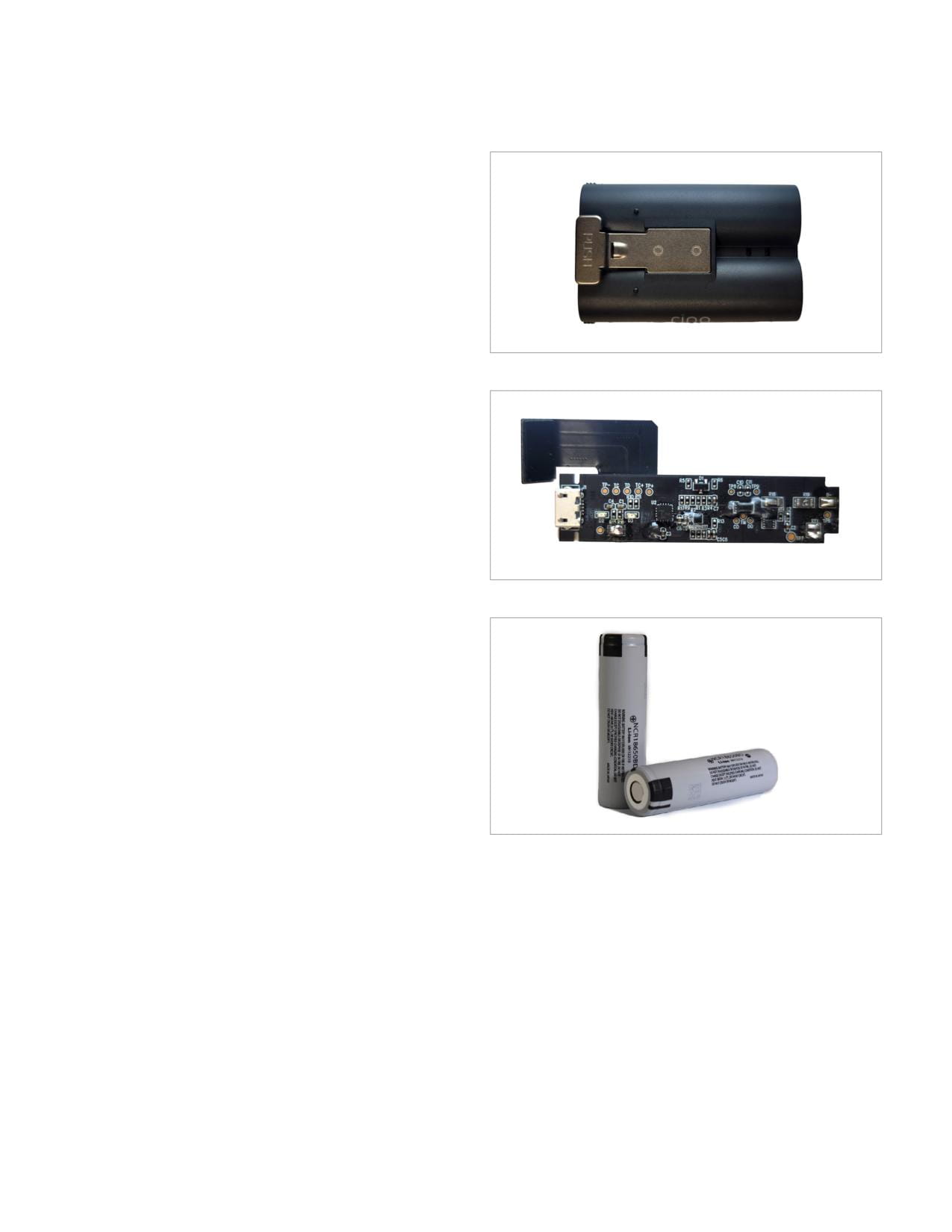
After carefully removing the outer casing of the battery
pack, shown in Figure 10, two 18650 lithium-ion batteries,
Figure 10: Ring Wireless Security Camera Battery Pack
in parallel, along with a battery management system (BMS)
board can be seen. The BMS is displayed in Figure 11, while
the batteries are shown in Figure 12. Next, the battery is
disconnected from the BMS board. From here, a 2450 was
connected to the pair of batteries in a four-wire sense
connection, similar to that in Figure 3.
Figure 11: Ring Battery Pack BMS
Figure 12: 18650 Cells from Ring Battery Pack
6 | WWW.TEK.COM

Using Keithley’s All-In-One Battery Test Solution to Characterize, Optimize, and
APPLICATION NOTE
Exercise IoT Home Security Products
Now that the 2450 is properly connected to the battery, a battery discharge model of the two Li-ion batteries in parallel can
be created in a few mouse clicks. From within KickStart Software, clicking the 2450 SMU and then the Battery Simulator
App will open the simulate battery window. From here, click on “generate discharge model” to begin entering your model
generation settings. As the two 18650 cells are each rated for 3180mAh, the total capacity of the batteries in parallel is
6360 mAh. The settings shown in Figure 13 were chosen for the model generation.
Figure 13: Generate Discharge Model Settings
Figure 14: Battery Discharge and Graphing Tools
WWW.TEK.COM | 7

Using Keithley’s All-In-One Battery Test Solution to Characterize, Optimize, and
APPLICATION NOTE
Exercise IoT Home Security Products
After clicking the run button, the discharge will begin and continue until the Cutoff V parameter is reached. During this time,
you can click on the table tab to see a table of every measurement taken by the 2450, as well as some statistics such as the
maximum, average, and standard deviation. Next, clicking on the graph tab reveals plots for VOC, ESR, and current. Within
the legend you can also see a sigma icon that is used to show or hide statistics. Clicking this button will reveal statistics
such as number of points and area under the curve. Cursors can also be added to the graph to easily view timestamps and
determine the time between two specified samples. The battery discharge curve and these analysis tools can be seen in
Figure 14. The resulting 101-point model can be seen in Figure 15.
Figure 15: 101-point Ring Battery Pack Demo
PW_MODEL_PW2281S_20_6
PW_MODEL_PW2281S_20_6
PW_MODEL_PW2281S_20_6
Capacity = 6.36 AH
Capacity = 6.36 AH
Capacity = 6.36 AH
SOC (%)
Open Voltage (V)
ESR (ohm)
SOC (%)
Open Voltage (V)
ESR (ohm)
SOC (%)
Open Voltage (V)
ESR (ohm)
0
2.5
0.389
34
3.55
0.348
68
3.795
0.347
1
2.929
0.386
35
3.555
0.349
69
3.804
0.347
2
3.057
0.385
36
3.561
0.348
70
3.814
0.347
3
3.144
0.383
37
3.567
0.348
71
3.823
0.347
4
3.204
0.381
38
3.572
0.347
72
3.832
0.348
5
3.242
0.379
39
3.577
0.347
73
3.841
0.348
6
3.268
0.377
40
3.583
0.347
74
3.849
0.348
7
3.286
0.376
41
3.588
0.347
75
3.858
0.348
8
3.3
0.373
42
3.594
0.347
76
3.866
0.348
9
3.312
0.371
43
3.599
0.347
77
3.875
0.348
10
3.323
0.369
44
3.605
0.348
78
3.883
0.348
11
3.332
0.366
45
3.61
0.348
79
3.892
0.348
12
3.342
0.363
46
3.616
0.348
80
3.901
0.348
13
3.352
0.36
47
3.622
0.348
81
3.91
0.348
14
3.365
0.358
48
3.628
0.348
82
3.919
0.349
15
3.379
0.356
49
3.634
0.347
83
3.929
0.349
16
3.392
0.355
50
3.641
0.347
84
3.939
0.35
17
3.405
0.354
51
3.647
0.347
85
3.95
0.35
18
3.418
0.353
52
3.654
0.348
86
3.96
0.35
19
3.43
0.351
53
3.661
0.348
87
3.972
0.35
20
3.441
0.351
54
3.669
0.348
88
3.983
0.35
21
3.452
0.35
55
3.676
0.347
89
3.995
0.349
22
3.462
0.35
56
3.684
0.347
90
4.006
0.35
23
3.471
0.35
57
3.693
0.347
91
4.018
0.35
24
3.48
0.35
58
3.701
0.347
92
4.029
0.35
25
3.489
0.349
59
3.71
0.347
93
4.04
0.35
26
3.497
0.349
60
3.719
0.347
94
4.05
0.351
27
3.505
0.349
61
3.728
0.347
95
4.06
0.352
28
3.512
0.349
62
3.737
0.348
96
4.069
0.353
29
3.519
0.349
63
3.747
0.348
97
4.078
0.353
30
3.525
0.349
64
3.756
0.347
98
4.087
0.353
31
3.532
0.348
65
3.766
0.347
99
4.096
0.354
32
3.538
0.348
66
3.776
0.347
100
4.2
0.355
33
3.544
0.348
67
3.785
0.347
8 | WWW.TEK.COM
Using Keithley’s All-In-One Battery Test Solution to Characterize, Optimize, and
APPLICATION NOTE
Exercise IoT Home Security Products
Once the model has been generated, the battery pack can be simulated by the 2450 SMU, allowing it to act in place of the
batteries to power the wireless Ring security camera. However, during testing it was discovered that the battery packs
included with the Ring security camera come with anti-tamper protections preventing the battery pack from working
after being reassembled. To get around this issue, a wired Ring security camera, normally powered by micro-USB, was
substituted. The micro-USB cable that plugs into the back of the Ring security camera was cut to reveal the positive and
negative power wires. The 2450 was then connected to these exposed wires in a four-wire sense connection similar to what’s
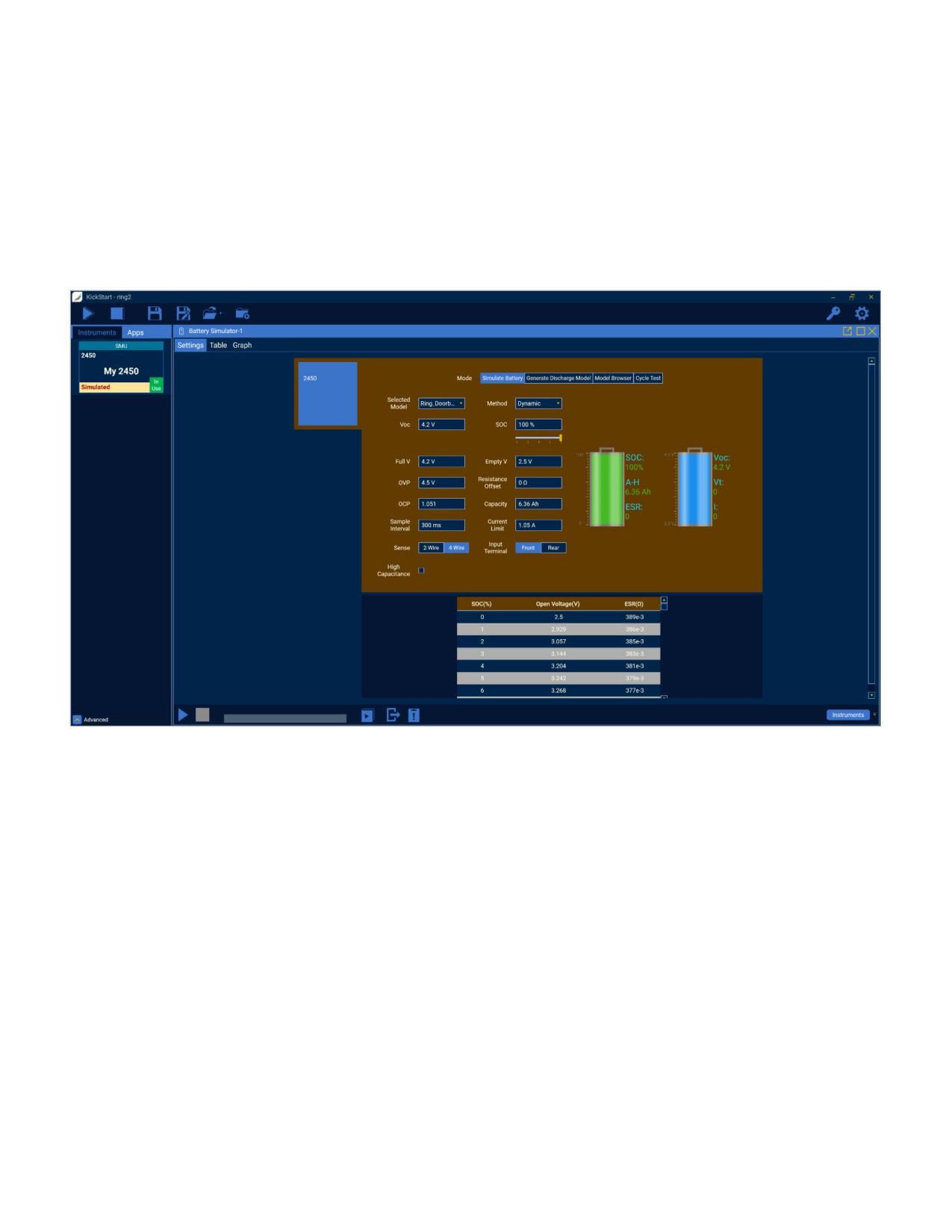
shown in Figure 3. From here, the “simulate” tab in the Battery Simulator App was opened, the previously generated battery
model, “ring_Doorbell_cam.csv” was chosen, and the settings shown in Figure 16 were applied.
Figure 16: Battery Simulation Settings
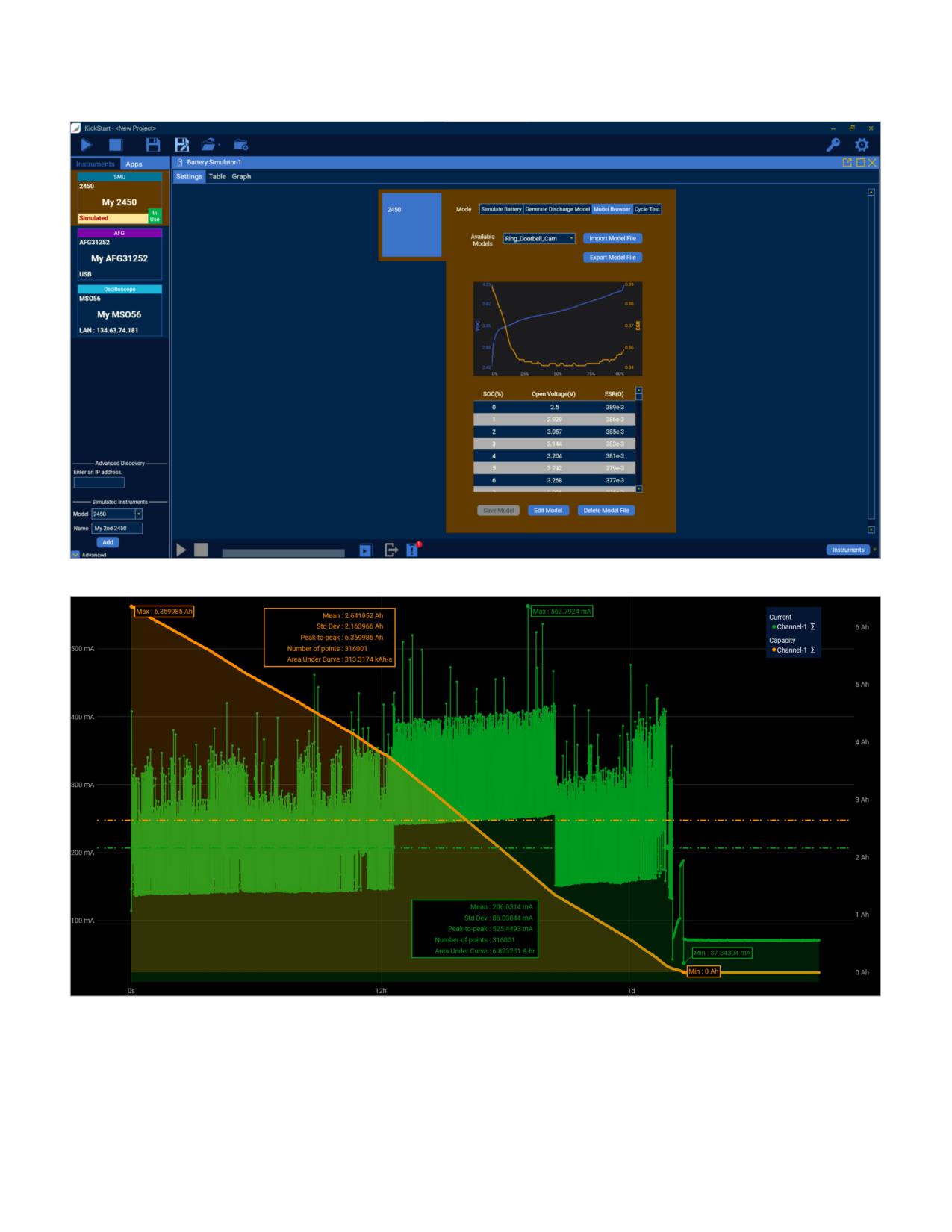
If a battery model is being used and wasn’t generated using KickStart Software, the Model Browser tab allows users to select
a model and import it to their local Kickstart Software repository. The model browser also allows for quick modifications to
the selected battery model. An example of the model browser tab can be seen in Figure 17. After pressing the run button, the
2450 will begin to simulate the Ring security camera’s battery and power on the device. Just as with the generate discharge
model tab, KickStart Software will start to record measurements while simultaneously visualizing this data in the table and
graph tabs. However, the graph for battery simulation also allows the user to plot SoC and capacity. The discharge curve of
the simulated battery is shown in Figure 18.
WWW.TEK.COM | 9
Using Keithley’s All-In-One Battery Test Solution to Characterize, Optimize, and
APPLICATION NOTE
Exercise IoT Home Security Products
Figure 17: Model Browser
Figure 18: Battery Simulation Results
10 | WWW.TEK.COM
Using Keithley’s All-In-One Battery Test Solution to Characterize, Optimize, and
APPLICATION NOTE
Exercise IoT Home Security Products
Figure 18 illustrates that the current draw increases dramatically when accessing the camera from the Ring App. The section
of the graph starting at about 12 hours shows the current draw when manually accessing the camera, while the other spikes
show the automatic motion detection function. Also shown in this graph are statistic windows displaying information about
each plot. Cursors can also be added to limit the range the statistics window focuses on. These tools make it easier to
analyze information such as power usage of DUTs and area under the curve.
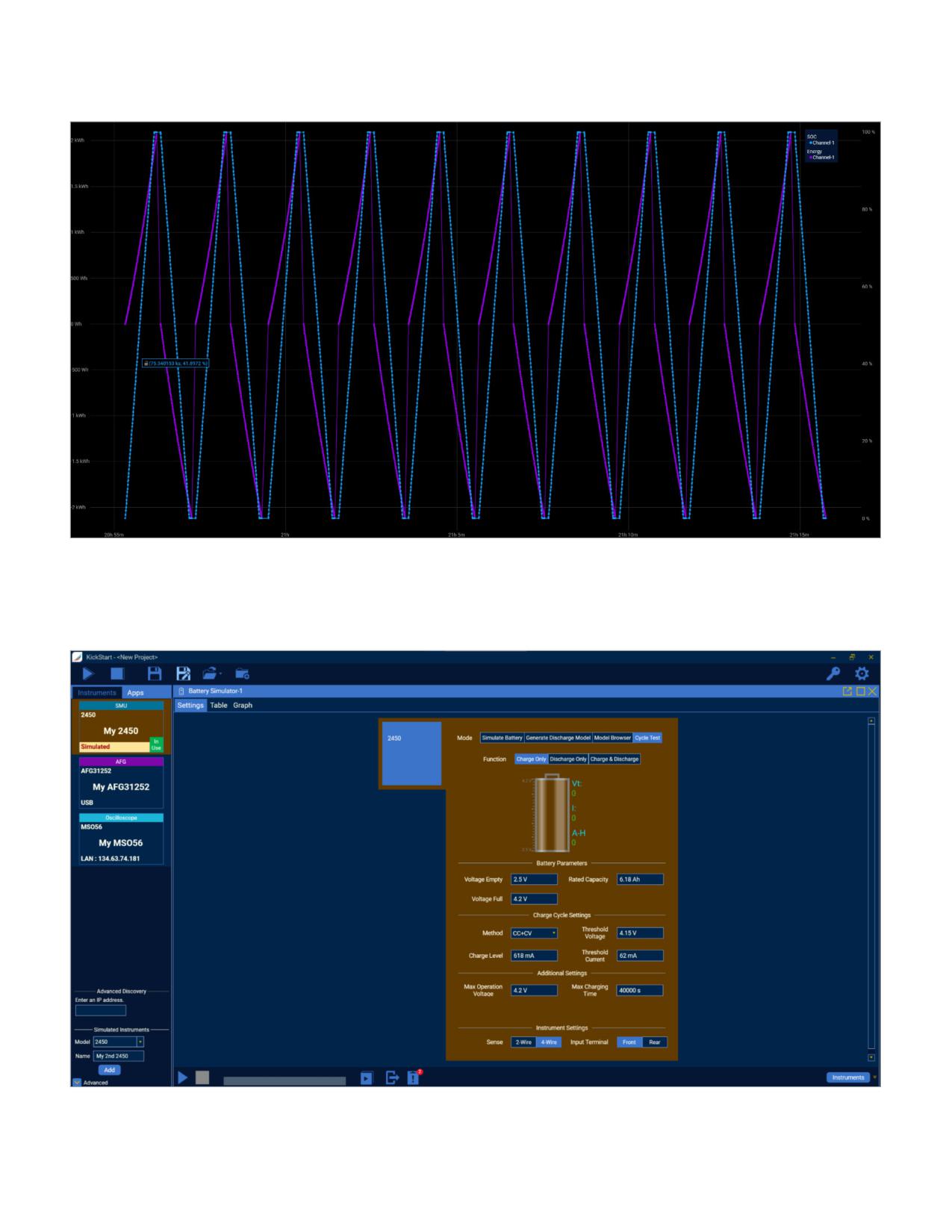
To determine how the Ring Video Doorbell’s battery lifespan degrades across multiple charge and discharge cycles as the
battery is depleted and recharged overtime as it is used, the battery pack can be cycle tested using KickStart Software. In
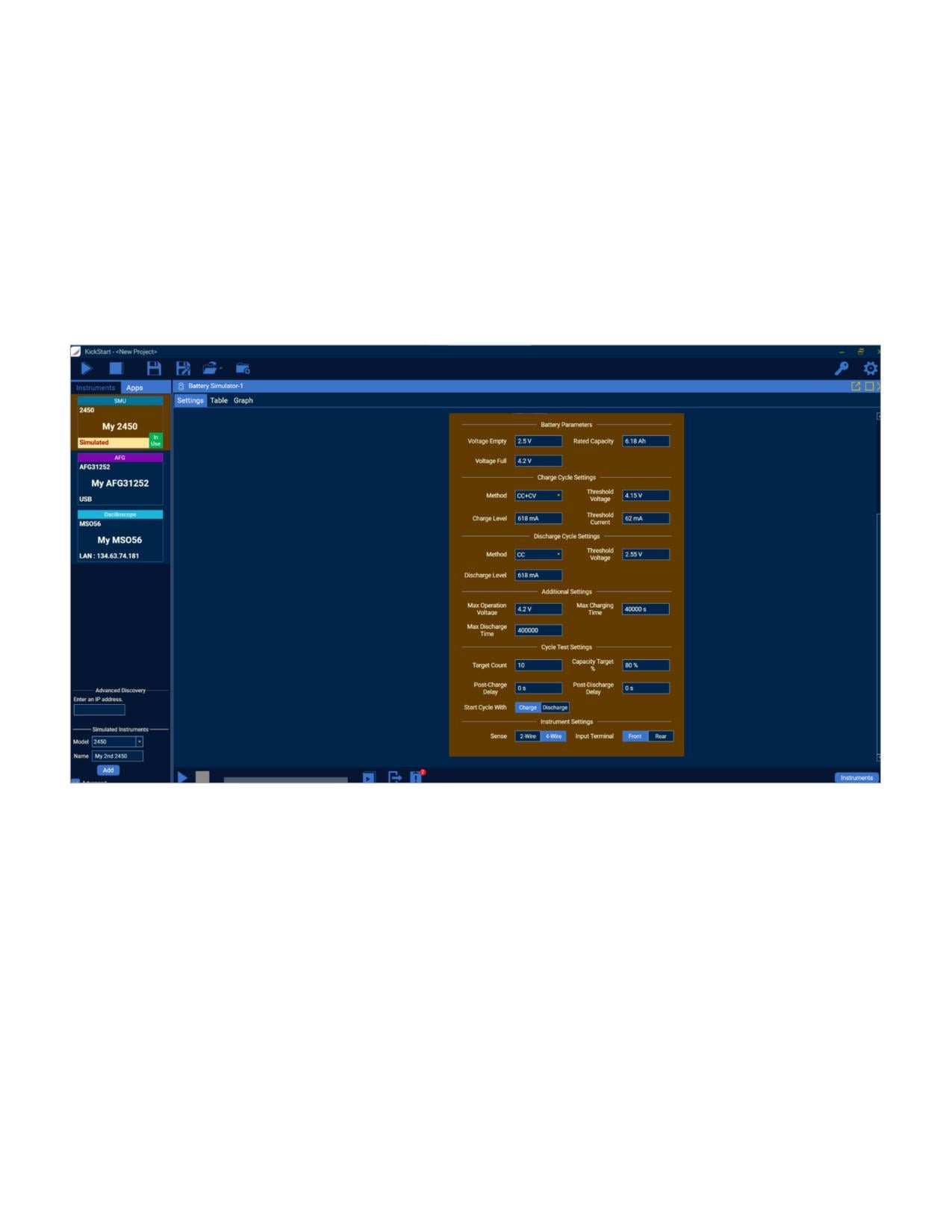
the battery cycle test tab, users will set their charge and discharge settings according to their battery specifications. Users
will also set parameters such as number of cycles, and capacity target. An example of the battery cycle settings for the Ring
battery pack is shown in Figure 19, and the plot of the resulting data is seen in Figure 20.
Figure 19: Battery Cycle Test Settings
WWW.TEK.COM | 11
Using Keithley’s All-In-One Battery Test Solution to Characterize, Optimize, and
APPLICATION NOTE
Exercise IoT Home Security Products
Figure 20: Battery Cycle Test Results
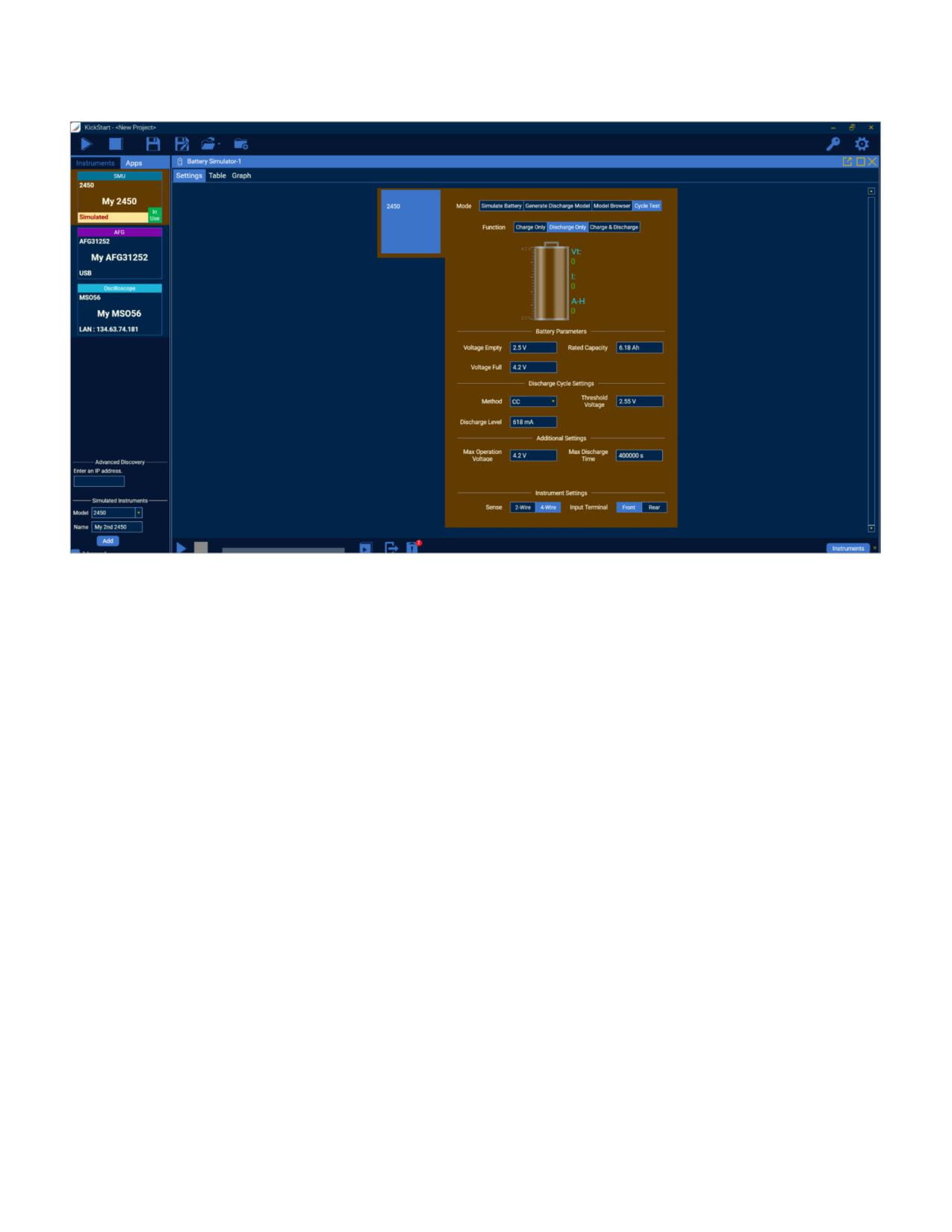
The battery cycle test mode also includes a table and graph tab to visualize data. If the battery being tested is in-between a
full and empty charge, or if the user wants to ensure they are testing from a fully charged or fully depleted battery, a “Charge
Only” or “Discharge Only” battery cycle can be run. An example of these settings can be seen in Figures 21 and 22.
Figure 21: Battery Cycle - Charge Only Settings
12 | WWW.TEK.COM
Using Keithley’s All-In-One Battery Test Solution to Characterize, Optimize, and
APPLICATION NOTE
Exercise IoT Home Security Products
Figure 22: Battery Cycle - Discharge Only Settings
Conclusion
The addition of SMUs to the KickStart Software Battery
discharge and cycle testing extends the functionality of the
Simulator App broadens the scope of batteries which can be
app even further, allowing users to test battery longevity
tested alongside a powerful “one-box” solution. KickStart
alongside device optimization and overall performance. The
Software enables easy repetition of tests under various
simplicity afforded by a total software plus instrumentation
conditions and allows for a simple method to generate
solution means that it is possible for anyone to set up
battery models for simulation. The same SMU can be used
and run tests quickly and efficiently - from students to
to simulate the models and the inclusion of battery charge/
technicians to design engineers.
WWW.TEK.COM | 13

Contact Information:
Australia 1 800 709 465
Austria* 00800 2255 4835
Balkans, Israel, South Africa and other ISE Countries +41 52 675 3777
Belgium* 00800 2255 4835
Brazil +55 (11) 3530-8901
Canada 1 800 833 9200
Central East Europe / Baltics +41 52 675 3777
Central Europe / Greece +41 52 675 3777
Denmark +45 80 88 1401
Finland +41 52 675 3777
France* 00800 2255 4835
Germany* 00800 2255 4835
Hong Kong 400 820 5835
India 000 800 650 1835
Indonesia 007 803 601 5249
Italy 00800 2255 4835
Japan 81 (3) 6714 3086
Luxembourg +41 52 675 3777
Malaysia 1 800 22 55835
Mexico, Central/South America and Caribbean 52 (55) 88 69 35 25
Middle East, Asia, and North Africa +41 52 675 3777
The Netherlands* 00800 2255 4835
New Zealand 0800 800 238
Norway 800 16098
People’s Republic of China 400 820 5835
Philippines 1 800 1601 0077
Poland +41 52 675 3777
Portugal 80 08 12370
Republic of Korea +82 2 565 1455
Russia / CIS +7 (495) 6647564
Singapore 800 6011 473
South Africa +41 52 675 3777
Spain* 00800 2255 4835
Sweden* 00800 2255 4835
Switzerland* 00800 2255 4835
Taiwan 886 (2) 2656 6688
Thailand 1 800 011 931
United Kingdom / Ireland* 00800 2255 4835
USA 1 800 833 9200
Vietnam 12060128
* European toll-free number. If not
accessible, call: +41 52 675 3777
Rev. 02.2022
Find more valuable resources at TEK.COM
Copyright © Tektronix. All rights reserved. Tektronix products are covered by U.S. and foreign patents, issued and pending. Information in this publication supersedes that
in all previously published material. Specification and price change privileges reserved. TEKTRONIX and TEK are registered trademarks of Tektronix, Inc. All other trade names
referenced are the service marks, trademarks or registered trademarks of their respective companies.
050726 1KW-74029-1